Tools for creators — music, video, designData stays with you

16 match your filters — 15 of them answered our check today.

Watching this group for 20 days · how we check

This week6 new arrivals1 stopped answering

A free, browser-based bulk image compressor and format converter that processes files entirely on your device without uploading them to any server.

FreeNothing to installWorks offlineData stays with you
What to know
How it works
compresses and converts images client-side in the browser with no server upload, using lossless optimization
Pricing
completely free
Best for
developers, designers, and creators who need to shrink or convert large batches of images without giving up file privacy

Watched for 7 days · last checked 1d ago

Details →

Turns a single word or image into a full brand identity: palette, name ideas, slogans, fonts, moodboard and brandbook, running free and local in your browser. A branding tool, not a developer API.

FreeNo sign-upWorks offlineData stays with you
What to know
How it works
Enter a word or upload an image and the app generates a full visual identity: color palette, naming ideas, slogans, font pairings, spacing/shadow tokens, animation presets, moodboard, logo prompt and a compact brandbook.
What's different
Runs entirely locally in the browser with no uploads, accounts or API keys required.
Pricing
Free.
Best for
Designers or founders who want a starting brand system from a single word without setting up an account.

Watched for 13 days · last checked 3d ago

Details →

Turns an audio clip into a captioned waveform video for social platforms entirely in-browser, with auto-captions from local Whisper AI, so audio never leaves the device.

FreeNo sign-upData stays with youCan export my data
What to know
How it works
In-browser reactive waveform visualizer plus Whisper-based auto-captions; exports MP4.
Pricing
Free, no signup, no watermark.
Best for
Podcasters making audiogram clips for Instagram/TikTok/YouTube.

Watched for 2 days · last checked 1d ago

Details →

An open-source, template-based design tool for building App Store and Play Store screenshots, feature graphics, and preview videos entirely in your browser or desktop app, with no account or upload required.

Domain registered 14 days ago

FreeNo sign-upData stays with youOpen source
What to know
How it works
pick a template, drop in your app screens, and export every required store size, including MP4 previews
What's different
an optional AI agent can build the whole listing from raw screenshots
Best for
app developers and designers preparing store listings

Watched for 7 days · last checked 6d ago

Details →

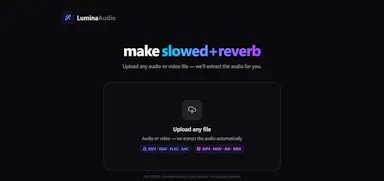
Turns a song into slowed+reverb, nightcore or daycore right in the browser, free, no install, account or upload, with per-section effects and MP4/WAV/AAC export.

Domain registered 1 month ago

FreeNo sign-upNothing to installData stays with you
What to know
How it works
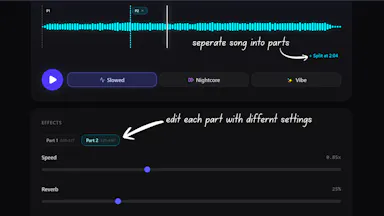
Turns a song into slowed + reverb, nightcore, or daycore versions in the browser, with real-time tempo, pitch, reverb, timbre, and bass-boost controls, and exports to MP4, WAV, or AAC.
What's different
Split Sections lets you apply different effects to different parts of the same track.
Pricing
Free, with no install, account, watermark, or server upload.
Best for
Creators making slowed-and-reverb or nightcore edits of songs.

Watched for 13 days · last checked 7d ago

Details →

Runs speech and visual AI models locally to auto-generate YouTube chapter timestamps — free, no upload, no signup, built for YouTubers who don't want to type timestamps by hand.

FreeNo sign-upWorks offlineData stays with you
What to know
How it works
You upload a video and it uses Whisper for audio and Moment-DETR for visual analysis to detect natural chapter breaks, then outputs timestamps to paste into a YouTube description.
What's different
Cross-validates chapter breaks using both audio (Whisper) and visual detection, rather than relying on one signal; on a 68-minute test video it got 18 of 19 chapters correct.
Pricing
Free, no signup.
Best for
YouTubers who don't want to manually type out chapter timestamps.
Watch out
The 18/19 accuracy figure comes from a single 68-minute test video, not a broad benchmark.

Watched for 13 days · last checked 7d ago

Details →

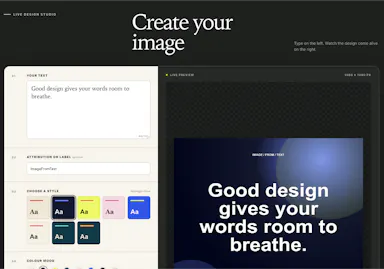
Turns text into styled images for social media, quotes, or announcements entirely in the browser, with no uploads, account, or watermark, and content that never leaves the device.

FreeNo sign-upWorks offlineData stays with you
What to know
How it works
Converts text into images locally in the browser for social media, quotes, testimonials, and announcements, without uploading content anywhere.
Pricing
Free, no account or watermark.

Watched for 18 days · last checked 3d ago

Details →

A free, open-source, local-only app for filmmakers to organize reference frames and moodboards, with on-device AI search — no cloud subscription needed.

FreeWorks offlineData stays with youOpen source
What to know
How it works
A local-only app for filmmakers to organize reference frames, moodboards and production assets, with lightweight on-device AI for natural language search and instant moodboard creation.
What's different
Keeps the entire visual library local instead of requiring a paid cloud subscription.
Pricing
100% free and open-source.
Best for
Filmmakers who want to keep reference and moodboard assets private and local rather than in a cloud subscription tool.

Watched for 15 days · last checked 9d ago

Details →

A local, single-HTML-file tool that analyzes your own past Threads post performance to suggest better posts.

FreeNothing to installWorks offlineData stays with you
What to know
How it works
Reads a local folder via File System Access API and analyzes your actual views/likes/comments
What's different
Your data never uploads; no install or subscription
Pricing
free, bring your own Gemini or OpenRouter API key

Watched for 4 days · last checked 3d ago

Details →

A free, no-install browser-based video editor for short social clips, aimed at people who have never edited video before.

FreeNo sign-upData stays with you
What to know
How it works
Edit video directly in the browser, files stay on your device
Pricing
No account, no payment required
Best for
Reels/Shorts creators and beginners with no editing experience

Watched for 6 days · last checked 4d ago

Details →

A privacy-first bundle of everyday utility tools for creators, developers, marketers, and students that avoids sending data to external servers, unlike most ad-supported online utility sites.

Domain registered 18 days ago

Data stays with you
What to know
How it works
Bundles multiple everyday utilities in one toolbox without ads, signups, or uploading data to external servers.
Best for
creators, developers, marketers, and students who want quick utilities without handing data to third-party servers.

Watched for 13 days · last checked 9d ago

Details →

Vocix

Live

A browser-based media editor (trim/merge/transcribe/convert/denoise) driven by typed natural-language commands, with processing done client-side.

Data stays with you
What to know
How it works
Trim, split, merge, transcribe, convert JPG/PNG/WebP, denoise, and add transitions to audio, video and images by typing natural-language commands, with processing done in the browser.
What's different
Editing is driven by typed commands rather than a traditional timeline/menu interface, and processing happens client-side.
Best for
Creators who want quick media edits (trimming, converting, denoising) without uploading files to a server.

Watched for 13 days · last checked 10d ago

Details →

Previews how your post or thread will actually look on LinkedIn, Instagram, SMS, or a Google meta description before you publish, a formatting check, not a scheduler.

FreeData stays with you
What to know
How it works
A set of client-side web tools that preview how a post, thread, SMS message or meta description will actually render and truncate on LinkedIn, Instagram, SMS and Google search, before you publish.
What's different
Accounts for real-world limits like LinkedIn's 'see more' cutoff, SMS encoding cost changes from emoji, and Google's pixel-width title truncation, rather than a generic character counter.
Pricing
Free.
Best for
Marketers and creators who want to catch formatting cutoffs before publishing instead of guessing.

Watched for 18 days · last checked 11d ago

Details →

Yotsu

Live

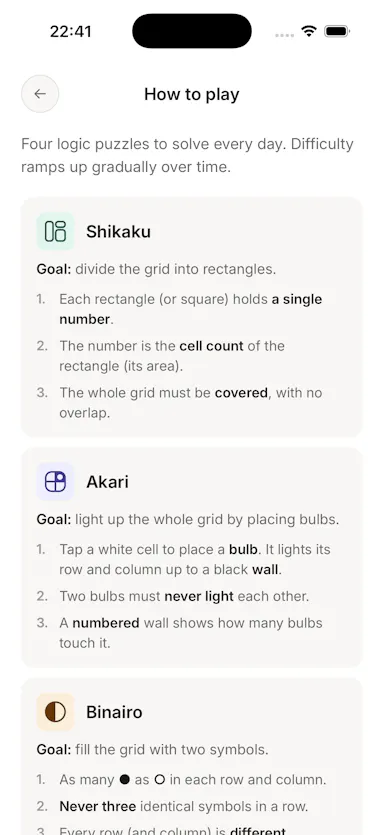
Four daily logic puzzles (Shikaku, Akari, Binairo, Sudoku) with no ads, account or tracking, works offline.

No sign-upWorks offlineData stays with youNo ads
What to know
How it works
Delivers four daily logic puzzles — Shikaku, Akari, Binairo, and Sudoku — and nothing else.
What's different
No ads, no account, no streak manipulation; works fully offline.
Pricing
Free.

Watched for 3 days · last checked 3d ago

Details →

Turns your Android phone into a self-hosted MCP server so AI assistants like Claude, Cursor or Perplexity can pull your personal memory without sending data to the cloud. Aimed at developers already using MCP-compatible tools.

Works offlineData stays with youOpen sourceNo subscription
What to know
How it works
Turns an Android phone into a self-hosted MCP (Model Context Protocol) server by installing a Python MCP server inside Termux, with a secure tunnel giving the phone a stable public HTTPS URL that AI clients like Claude, Cursor or Perplexity can connect to for persistent memory.
What's different
Data is stored locally on the user's own phone instead of a vendor's cloud, with no subscription or vendor lock-in.
Pricing
No subscription.
Best for
Developers already using MCP-compatible AI tools who want to own their memory data instead of storing it in the cloud.
Watch out
Relies on a relay tunnel (relay.memplato.com) and requires Termux running on the phone, with a watchdog to restart the server if the phone reboots or Termux closes.

Watched for 10 days · last checked 4d ago

Details →

Krynn Tools

Not responding

A collection of 100+ free browser tools for PDF editing, image editing, and AI writing, with no signup.

FreeNo sign-upData stays with you
What to know
How it works
Provides over 100 free browser-based tools for PDF editing, image editing, and AI writing, including compress, merge, split, convert, sign, protect, watermark, crop, resize, background removal, and more.
What's different
No signup and no file upload required — everything runs in the browser.
Pricing
Free.

Watched for 12 days · last checked today

Details →