Filter by what founders actually say

We read 638 product pages ourselves and only recorded a claim when the page said it in its own words, with the sentence quoted. This is a small, growing slice of the full catalog, not a replacement for it.

89 contact criteria (public email, LinkedIn, country, registered company) are only available to signed-in members.

Clear all filters

30 products match every selected criterion

Local markdown note-taking app that stores notes as plain .md files on disk for people who want to own their data, instead of a cloud-locked notes app.

Works offline
What to know
How it works
Stores notes as plain text .md files directly on disk; you choose your own sync method or stay fully offline.
Best for
People who want full control of their note files rather than relying on a vendor's cloud storage.

Watched for 27 days · last checked 1d ago

Details →

A desktop coding harness built specifically around open-weight models like DeepSeek, Qwen and Kimi, instead of bolting them onto a Claude or GPT-first interface as an afterthought.

FreeWorks offline
What to know
How it works
A desktop AI coding harness built around open-weight models (DeepSeek, Qwen, Kimi, MiniMax) instead of Claude/GPT, using a structural + lexical code-retrieval engine (Blueprint) that builds a real dependency graph of the codebase rather than embeddings or a vector DB.
What's different
Built specifically for open-weight models' weaker context discipline, instead of treating them as an afterthought behind a Claude/GPT-first interface.
Pricing
Free.
Best for
Developers who want to use open-weight models like DeepSeek, Qwen, or Kimi for coding with retrieval built for their limitations.
Watch out
Depends on local tools like Ollama and MCP — offline/no-cloud setup requires configuring those dependencies yourself.

Watched for 27 days · last checked 11d ago

Details →

Open-source platform for modeling and running BPMN/DMN business workflows with REST APIs and monitoring tools — built for developer and technical ops teams.

Open source
What to know
How it works
An open-source workflow orchestration platform for modeling, running, monitoring, and operating BPMN and DMN business processes, with REST APIs, Tasklist, Cockpit, and Admin tools.
What's different
Open-source with enterprise-ready support options available.
Best for
Developer and technical operations teams building and running BPMN/DMN business process workflows.

Watched for 27 days · last checked 11d ago

Details →

KB2B

Live

A knowledge platform that turns team meetings, documents, and AI-led interviews into a scored, cited knowledge graph instead of a static file index.

What to know
How it works
Pulls facts from meetings, documents, and AI-led interviews, scores each for certainty, flags contradictions, and builds a live knowledge graph; the Scout agent answers questions with cited sources and a confidence score.
Best for
Fast-growing teams whose decisions and context change weekly.

Watched for 27 days · last checked 11d ago

Details →

A free, open-source macOS menu-bar app that gives haptic trackpad feedback whenever your cursor passes over any clickable button, link or menu, system-wide.

FreeOpen source
What to know
How it works
Runs in the Mac menu bar and taps the trackpad's haptic engine whenever the cursor passes over any clickable element — buttons, links, menus, tabs — system-wide across any app.
What's different
Works system-wide in any app rather than requiring per-app integration; open source.
Pricing
Free and open-source.
Best for
Mac users who want physical feedback when navigating the interface, not just visual cues.

Watched for 27 days · last checked 11d ago

Details →

A free macOS app that captures, annotates and merges multiple screenshots into a single PDF, or exports PNG and JPEG, working fully offline with no account required.

FreeNo sign-upWorks offline
What to know
How it works
A free macOS app that captures a screen area, lets you annotate it, and merges multiple screenshots into a single PDF, also exporting as PNG or JPEG.
Pricing
Free.
Best for
Mac users who want to turn screenshots into a shareable PDF without an account or internet connection.
Watch out
Works fully offline with no account, so nothing is uploaded to a server.

Watched for 27 days · last checked 11d ago

Details →

A native macOS tool that auto-generates App Store screenshot mockups with 3D device framing and fast export, for app makers who don't want a full design suite.

Can export my data
What to know
How it works
A native macOS app that frames app screenshots in device bezels (Mac, iPhone, iPad, Apple Watch), rotates them in 3D, and exports them for App Store listings, without opening a full design suite.
What's different
Native macOS app with saved layout projects and memory-optimized export, instead of using a heavy design suite for screenshot mockups.
Best for
App makers who need App Store screenshot assets without learning design software.

Watched for 27 days · last checked 4d ago

Details →

Describe your idea and it generates an animated, narrated slide deck with interactive reveals, playable on web, Mac, Windows, iOS and Android - free, and clearly AI-built.

FreeOpen source
What to know
How it works
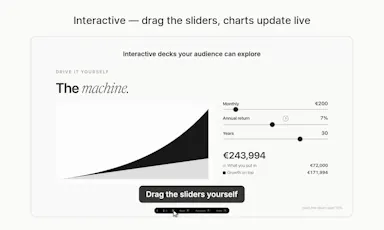
You describe your idea and it builds an animated deck with reveals timed to your talking points; slides are interactive (clickable, draggable sliders, live-updating charts) and each deck can generate a spoken narration to walk through it on its own.
What's different
One file plays across web, Mac, iPhone, iPad, Windows and Android, and decks can narrate themselves.
Pricing
Free and fully open.
Best for
Anyone who wants an interactive, narratable deck instead of a static slide file.

Watched for 27 days · last checked 11d ago

Details →

A menu-bar Mac cleaner that clears junk files, caches and duplicates and frees RAM, in 20 languages; it's a one-time $19 purchase with a free trial, not a free app.

Pay once
What to know
How it works
A lightweight macOS menu-bar app that clears junk files, caches, duplicates and forgotten large files, frees RAM, and tunes performance, available in 20 languages.
Pricing
One-time $19 purchase, free to try.
Best for
Mac users who want to reclaim disk space and improve performance without a subscription cleaner.

Watched for 27 days · last checked 11d ago

Details →

A Mac and Windows desktop app for designing App Store, Google Play and Microsoft Store screenshots -- despite the store names, the tool itself is desktop software, not mobile.

What to know
How it works
A Mac and Windows desktop app for designing App Store, Google Play and Microsoft Store screenshots — despite the store branding, the tool itself runs locally on your computer.
Pricing
$15.99 one-time.
Best for
App developers who need pixel-perfect store screenshots without a subscription design tool.

Watched for 27 days · last checked 12d ago

Details →

A native Mac and iPad app for quickly generating AI app-icon and thumbnail ideas — you supply your own AI key and pay the provider directly, for a one-time $2.99.

Pay onceNo subscription
What to know
How it works
A native Mac and iPad app where you type an idea, pick a style, and get generated app-icon or thumbnail directions back, using your own AI key from Google, OpenAI or Hugging Face.
What's different
You bring your own AI key and pay the provider's real cost directly instead of a subscription, credits, or per-image fee; keys stay in your Keychain.
Pricing
$2.99 one-time purchase, covers both Mac and iPad.
Best for
Designers and developers generating app icons and thumbnails who want to avoid recurring generation fees.

Watched for 27 days · last checked 12d ago

Details →

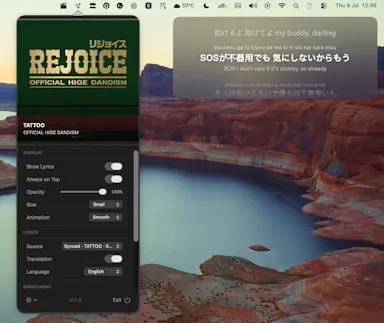
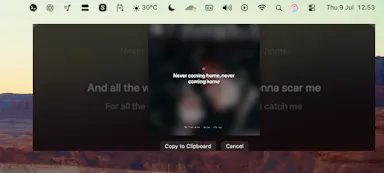
A macOS menu bar overlay that shows synced Spotify lyrics on top of any app, with translations, romanization and shareable lyric cards.

What to know
How it works
A macOS menu bar app that overlays synced Spotify lyrics on top of any app, with live scrolling, word-level fill, translations, romanization, music controls and shareable lyric cards.
Best for
Mac users who want a karaoke-style lyrics overlay while playing music through Spotify.

Watched for 27 days · last checked 12d ago

Details →

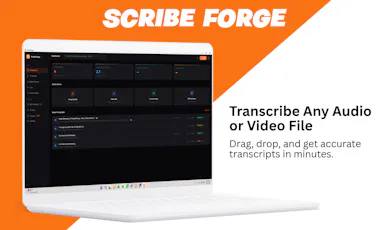
Transcribes audio and video, including YouTube, to text locally using Whisper AI, with no cloud upload, no subscription, and a one-time payment. Good for unlimited, private transcription without ongoing fees.

Works offlinePay onceNo subscription
What to know
How it works
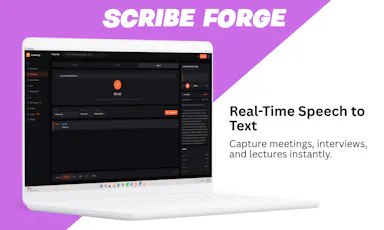
Transcribes audio and video, including YouTube videos, playlists and live microphone input, to text entirely on your computer using Whisper AI, in 100+ languages.
What's different
Runs fully offline with no cloud upload, unlimited usage and no subscription.
Pricing
One-time payment, no subscription.
Best for
People who want unlimited, private transcription without ongoing fees or uploading audio to a cloud service.

Watched for 27 days · last checked 11d ago

Details →

A macOS live-wallpaper app with a Pixabay gallery, positioned as an alternative to Wallpaper Engine.

What to know
How it works
Sets live video and photo wallpapers on macOS Tahoe, with a built-in Pixabay gallery to pick from.
What's different
Positioned as an alternative to Wallpaper Engine on macOS.

Watched for 27 days · last checked 12d ago

Details →

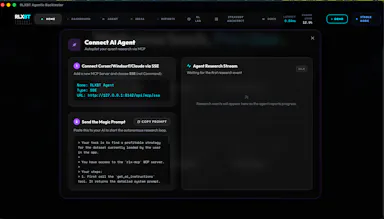
A native macOS app with a Rust backtesting engine for trading strategies, built to be driven by AI coding agents like Claude or Cursor over MCP.

What to know
How it works
A native macOS app with a Rust backtesting engine that connects to Claude, Cursor, or any MCP-compatible agent, letting the agent design, backtest, optimize, and stress-test trading strategies locally.
What's different
Combines a high-performance Rust engine with reinforcement-learning workflows and an AI-native interface built for autonomous agents to iterate on strategies in real time, unlike traditional backtesting tools.
Pricing
Free tier included; Pro unlocks unlimited research.
Best for
Quantitative researchers who want to drive strategy backtesting through an AI coding agent on macOS.

Watched for 27 days · last checked 12d ago

Details →

Scans your Mac for node_modules folders and package caches eating disk space, with one-click cleanup to Trash. Scanning is free; cleanup needs a one-time fee.

FreeOpen sourcePay onceNo subscription
What to know
How it works
Lives in the macOS menu bar and shows what dev projects cost in disk space: every node_modules folder, the pnpm store, and every installed package with versions and security advisories. One-click cleanup always moves files to Trash rather than deleting with rm -rf.
Pricing
Scanning is free forever; one-click cleanup is a one-time 19 euro lifetime license at the founding price.
Best for
Developers whose Mac disk is filling up with node_modules and package caches across projects.

Watched for 27 days · last checked 12d ago

Details →

A fully local voice-to-text keyboard for macOS that types into any app — audio and text never leave your device, free for personal use.

FreeWorks offline
What to know
How it works
Hold a shortcut key and speak to type text into any macOS app via local speech recognition; audio and transcribed text stay on the device and are never sent to an external server.
Pricing
Free for personal use.
Best for
macOS users who want voice typing without their audio leaving their device.

Watched for 27 days · last checked 12d ago

Details →

DataTally is a macOS menu bar app showing real-time Wi-Fi and hotspot data usage per app.

What to know
How it works
A macOS menu bar app showing real-time download and upload data usage per app, with Wi-Fi and Mobile Hotspot traffic tracked separately.

Watched for 27 days · last checked 12d ago

Details →

IAXT

Live

A free macOS menu-bar app that logs everything your AI coding agent (Claude Code, Cursor, Aider, Codex) did in a session, entirely local with no account or cloud.

FreeNo sign-upWorks offline
What to know
How it works
A menu-bar app that passively records what AI coding agents like Claude Code, Cursor, Aider and Codex do on your Mac, every command, file touched, package installed, git operation, and launch agent, then presents it in an Action Log with confidence and severity tiers per agent, with any row copyable as context for another LLM.
Pricing
Free.
Best for
Developers using AI coding agents who want a record of exactly what those agents changed on their machine.

Watched for 27 days · last checked 1d ago

Details →

Parley

Live

A private Mac overlay that gives solo SaaS founders live help during real Zoom sales and discovery calls, not a scripted teleprompter or practice mode.

What to know
How it works
A Mac app that gives solo/indie SaaS founders live, real-time help during their own Zoom discovery and sales calls.
What's different
Assists during the actual live call rather than acting as a scripted teleprompter or a practice mode with a fake buyer.
Best for
Solo or indie SaaS founders who run their own sales calls and freeze on pricing objections.

Watched for 27 days · last checked 12d ago

Details →

Soromi

Live

A workspace manager for AI coding agents like Claude Code and Codex, giving each project its own logins and terminals so agents keep running after you close the window.

What to know
How it works
A workspace manager for AI coding agents like Claude Code and Codex — each project gets its own terminals, login and folders, and you switch between them like Slack workspaces; agents keep running after the window closes and you can answer their prompts from your phone.
What's different
Deliberately small — no boards, personas or dashboards, just workspace isolation and persistence.
Best for
Developers running multiple AI coding agent projects who want separate logins and persistent sessions.

Watched for 27 days · last checked 12d ago

Details →

Hovor

Live

Voice dictation for Mac and iPhone that runs fully on-device so your voice never leaves your hardware, with multilingual support and a lifetime-purchase option instead of a subscription.

Works offlineData stays with youNo subscription
What to know
How it works
Hold a hotkey, speak, and structured text lands where your cursor is in any app on Mac and iPhone, using on-device models that fix punctuation and structure and support multilingual speech, a personal dictionary, snippets and workflows.
What's different
On-device processing means your voice never leaves your hardware.
Pricing
Free tier included, plus lifetime unlocks instead of a forced subscription.
Best for
Mac and iPhone users who want private, offline voice dictation across apps.

Watched for 27 days · last checked 12d ago

Details →

Noeron

Live

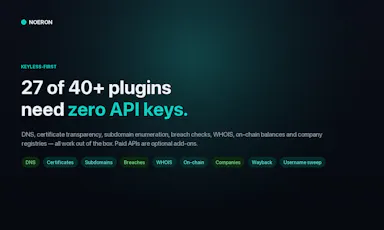
A native Mac/iPad/iPhone OSINT tool that expands a single email, domain, username, phone, IP, wallet or company into a linked intelligence graph using 40+ plugins; open source under MIT.

Open source
What to know
How it works
Turns a single selector — email, domain, username, phone, IP, wallet or company — into a live intelligence graph, running 40+ plugins (most needing no API key) automatically to expand findings.
What's different
Open source under MIT, with a native SwiftUI app for Mac, iPad and iPhone.
Best for
People doing digital/OSINT investigations on Apple devices.

Watched for 27 days · last checked 2d ago

Details →

A simple visual day planner where you drag stickers around a clock face instead of typing a list, synced to your calendar with widgets.

What to know
How it works
Draw your day around a clock face and drag-and-drop stickers to visualize your schedule, synced with your calendar and available as widgets.
Best for
People who prefer a visual, low-effort planner over typing a list.

Watched for 27 days · last checked 12d ago

Details →

A macOS menu bar app showing multiple time zones, meeting times and a mini calendar at a glance, with click-to-set time conversion. One-time purchase, not a subscription.

Data stays with youPay onceNo subscription
What to know
How it works
A macOS menu bar app showing multiple time zones and a mini calendar day view at a glance, with click-to-set time conversion and airport-code zone search.
What's different
DST-proof UTC offset zones and auto-hiding zones when you travel — handles edge cases that usually break simple time-zone widgets.
Pricing
One-time purchase with a free 7-day trial — not a subscription.
Best for
People who regularly schedule meetings across time zones and want a persistent menu bar reference instead of a web converter.

Watched for 27 days · last checked 12d ago

Details →

A design tool that turns a plain-language screen description into a real native iOS app, not a mockup, using Claude Code and the iPhone Simulator; shared prototypes open in a free companion app on the recipient's iPhone.

Free
What to know
How it works
Describe a screen in plain language and it renders as a real native iOS app rather than a webview mockup; Prototo Desktop puts Claude Code and the iPhone Simulator side by side with no terminal or commands needed.
What's different
Publishes prototypes as a link that opens in a free companion app, running natively on the recipient's own iPhone with real gestures and haptics.
Pricing
Free companion app for viewing shared prototypes; pricing for the desktop tool itself isn't stated.
Best for
iOS designers and developers who want to test a native-feeling prototype on a real device instead of a webview mockup.

Watched for 27 days · last checked 12d ago

Details →

A free, no-account, no-cloud plain-text task manager for macOS built around the todo.txt format, for people who already keep their to-dos in a text file.

FreeNo sign-upWorks offline
What to know
How it works
A native macOS app built around the plain-text todo.txt format, with keyboard shortcuts for everything and no cloud sync.
What's different
For people who already keep tasks in a .txt file — it's built to be faster than editing that file by hand, not to replace it with a database.
Pricing
Free.
Best for
macOS users who manage tasks in a plain text file and want a faster native interface for the same format.

Watched for 27 days · last checked 12d ago

Details →

An open-source, Git-native IDE for running and reviewing AI coding agents — shows what changed in the logic, not just the diff. Built for developers working with AI agents.

Open source
What to know
How it works
A Git-native IDE for running AI coding agents: it tracks the agent's changes at the function and class level and compares the resulting code against your original intent, rather than just showing a line diff.
What's different
Where Git shows lines changed, Aura is built to show what changed in the logic — letting you verify a task was actually completed before committing.
Pricing
Open source.
Best for
Developers who run AI coding agents and want to verify logic-level correctness before trusting a commit.

Watched for 27 days · last checked 12d ago

Details →

Lispr

Live

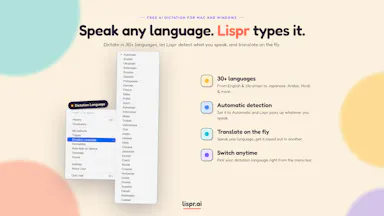
Hold a key, speak, and your words are typed into whatever app is focused — voice dictation and live translation across dozens of languages for Mac and Windows, no audio stored.

FreeNo sign-up
What to know
How it works
Hold a key, speak, release — your words are typed into whatever app your cursor is in. Also supports live translation by holding a separate key.
What's different
Works across roughly 99 languages for dictation and 32 for translation, with the mic only active while the key is held.
Pricing
Free, no account, no model download.
Best for
Mac and Windows users who want fast voice-to-text or live translation without opening a separate app.
Watch out
The 'we never store your audio' claim is the vendor's own statement, not independently verified.

Watched for 27 days · last checked 1d ago

Details →

A local gateway that lets every AI coding client share one set of MCP server connections instead of configuring each tool separately, cutting how many tools your agent has to load.

FreeNo sign-upWorks offlineOpen source
What to know
How it works
A local-first, open-source gateway. You set up and authenticate each MCP server once, and every connected AI client — Claude, Cursor, VS Code, Codex — shares that same connection instead of you configuring it per tool.
What's different
Claims up to 91% less tool-token overhead by giving an agent a handful of meta-tools instead of loading hundreds of individual tool definitions; API keys stay in the OS keychain.
Pricing
Free, open source, no sign-up.
Best for
Developers running multiple AI coding clients against the same set of MCP servers who don't want to re-authenticate each one separately.
Watch out
The '91% overhead cut' figure is the product's own claim; we haven't independently benchmarked it.

Watched for 29 days · last checked 1d ago

Details →