Tools for designersWorks with Chrome

6 match your filters — 6 of them answered our check today.

Watching this group for 18 days · how we check

This week2 new arrivals

A Chrome extension that finds and bulk-downloads images from any webpage in one click.

What to know
How it works
Detects every image on a webpage and lets you preview, filter, and download them individually or in bulk with one click.
Best for
Designers, marketers, developers, students, and anyone saving web images quickly.

Watched for 8 days · last checked 2d ago

Details →

A Chrome extension that takes full-page screenshots entirely in your browser, with no uploads or accounts.

Works offlineData stays with youNo tracking
What to know
How it works
Auto-stitches long pages and hides cookie banners/popups before capture
What's different
Runs 100% locally, no server or account needed
Pricing
Not stated
Best for
Developers and designers who need clean full-page captures privately

Watched for 4 days · last checked 3d ago

Details →

A free Chrome extension adding keyboard shortcuts for copying and pasting classes in the Webflow visual designer, a niche productivity boost for Webflow designers.

Free
What to know
How it works
A Chrome extension for the Webflow designer that adds keyboard shortcuts, currently for copying and pasting classes between elements.
Pricing
Free.
Best for
Webflow designers who want to speed up class management in the visual editor without leaving the mouse-driven workflow behind for a few repetitive actions.
Watch out
Some listed shortcuts (pasting classes as an attribute, adding a hide class) are marked "coming soon," not yet available.

Watched for 17 days · last checked 2d ago

Details →

An OKLCH color system with a Chrome extension for pulling colors off any site and a Figma plugin for handoff - a designer's tool, not just a palette generator.

What to know
How it works
An OKLCH-based color design system with a palette generator, gradient builder, a brand kit for reusing colors, a Figma plugin for handoff, and a Chrome extension that extracts colors from any website.
What's different
Built on OKLCH rather than RGB/HSL, which the product frames as more perceptually accurate, and ships as a full system (generator plus Figma and Chrome integrations) rather than a standalone palette generator.
Best for
Designers building or maintaining a brand color system.

Watched for 18 days · last checked 2d ago

Details →

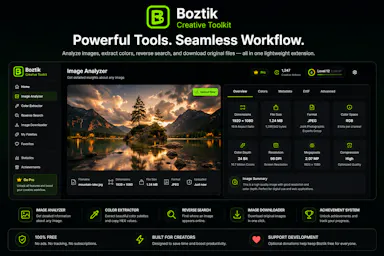
Free Chrome extension for creators to analyze image resolution, extract palettes and reverse-search images.

Free
What to know
How it works
A Chrome extension that analyzes image resolution, extracts color palettes, reverse searches images and downloads original-quality files.
Pricing
Free.
Best for
Photographers, designers and digital creators.

Watched for 3 days · last checked 2d ago

Details →

A Chrome extension that automates batch prompt submission and downloading for Grok's image and video generator, instead of doing each one by hand. Only useful if you already use Grok for bulk generation.

FreeNo tracking
What to know
How it works
A free Chrome extension that turns grok.com into a batch generation engine: you paste a list of prompts, choose settings, and it auto-submits each one, waits through generation and rate limits, optionally upscales, and downloads every output into organized folders. Supports all 5 Grok generation modes and 5 aspect ratios, with 1-6 parallel workers.
What's different
Runs entirely locally inside the browser on grok.com — no servers, uploads, or telemetry, and handles rate limits automatically across parallel workers.
Pricing
Free.
Best for
Content creators, marketers, and designers who already use Grok and need to generate images or video in bulk instead of one prompt at a time.
Watch out
Only useful if you already have access to and use grok.com — it automates that platform specifically, not a standalone generator.

Watched for 18 days · last checked 11d ago

Details →