Tools for designersNo tracking

5 match your filters — 5 of them answered our check today.

Watching this group for 18 days · how we check

This week2 new arrivals

Over two hundred free browser-based utilities for developers, SEO professionals and designers, with no sign-up and no tracking. A broad technical toolkit rather than one purpose-built tool.

Domain registered 2 months ago

FreeNo sign-upNothing to installNo tracking
What to know
How it works
A collection of over two hundred browser-based utility tools for developers, SEO professionals, and designers, accessed directly with no sign-up.
What's different
The entire library is free with no sign-ups, tracking, or upsells.
Pricing
Free, all tools, no sign-up required.
Best for
Developers, SEO professionals, and designers who need quick access to common technical tools without creating accounts.

Watched for 13 days · last checked 2d ago

Details →

A Chrome extension that takes full-page screenshots entirely in your browser, with no uploads or accounts.

Works offlineData stays with youNo tracking
What to know
How it works
Auto-stitches long pages and hides cookie banners/popups before capture
What's different
Runs 100% locally, no server or account needed
Pricing
Not stated
Best for
Developers and designers who need clean full-page captures privately

Watched for 4 days · last checked 3d ago

Details →

Yotsu

Live

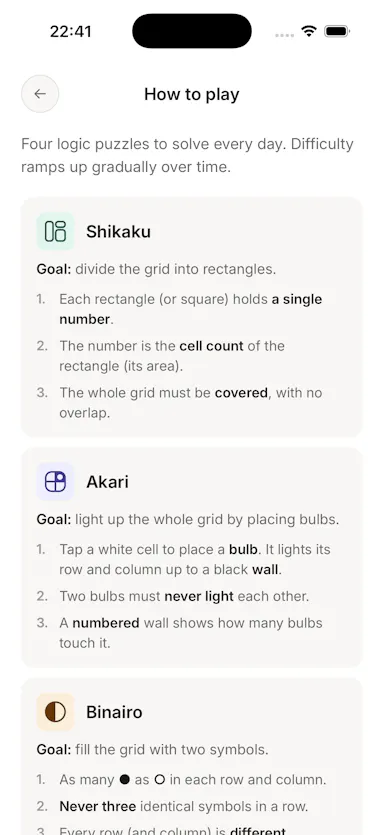
Four daily logic puzzles (Shikaku, Akari, Binairo, Sudoku) with no ads, account or tracking, works offline.

No sign-upWorks offlineData stays with youNo ads
What to know
How it works
Delivers four daily logic puzzles — Shikaku, Akari, Binairo, and Sudoku — and nothing else.
What's different
No ads, no account, no streak manipulation; works fully offline.
Pricing
Free.

Watched for 3 days · last checked 2d ago
Details →

A local-first notebook combining handwriting, rich documents and PDF markup in one workspace, for students and professionals tired of juggling multiple note apps.

Works offlineData stays with youNo adsNo tracking
What to know
How it works
A local-first notebook combining handwriting (ink, pens, highlighters, shapes, lasso selection), rich text boxes, tables, images, audio memos, and PDF import with searchable text, all on a multi-page canvas organized with folders and tags.
What's different
Combines handwriting, structured documents and PDF markup in one workspace instead of forcing a choice between separate apps, without ads or tracking SDKs.
Best for
Students, professionals and creators who currently juggle multiple note apps and want handwriting, documents and PDF annotation in one place.

Watched for 18 days · last checked 2d ago

Details →

A Chrome extension that automates batch prompt submission and downloading for Grok's image and video generator, instead of doing each one by hand. Only useful if you already use Grok for bulk generation.

FreeNo tracking
What to know
How it works
A free Chrome extension that turns grok.com into a batch generation engine: you paste a list of prompts, choose settings, and it auto-submits each one, waits through generation and rate limits, optionally upscales, and downloads every output into organized folders. Supports all 5 Grok generation modes and 5 aspect ratios, with 1-6 parallel workers.
What's different
Runs entirely locally inside the browser on grok.com — no servers, uploads, or telemetry, and handles rate limits automatically across parallel workers.
Pricing
Free.
Best for
Content creators, marketers, and designers who already use Grok and need to generate images or video in bulk instead of one prompt at a time.
Watch out
Only useful if you already have access to and use grok.com — it automates that platform specifically, not a standalone generator.

Watched for 18 days · last checked 11d ago

Details →