Tools for designersScreenshots

5 match your filters — 5 of them answered our check today.

Watching this group for 18 days · how we check

This week3 new arrivals

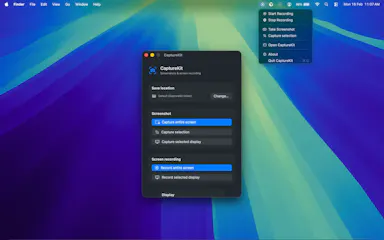
A macOS utility that automatically files every screenshot into a chosen folder instead of letting them pile up on the desktop.

What to know
How it works
Intercepts screenshots and routes them to a folder you set, organized by project.
Best for
Developers, designers, and content creators who take screenshots daily.

Watched for 7 days · last checked 1d ago
Details →

An open-source, template-based design tool for building App Store and Play Store screenshots, feature graphics, and preview videos entirely in your browser or desktop app, with no account or upload required.

Domain registered 13 days ago

FreeNo sign-upData stays with youOpen source
What to know
How it works
pick a template, drop in your app screens, and export every required store size, including MP4 previews
What's different
an optional AI agent can build the whole listing from raw screenshots
Best for
app developers and designers preparing store listings

Watched for 7 days · last checked 6d ago

Details →

A Chrome extension that takes full-page screenshots entirely in your browser, with no uploads or accounts.

Works offlineData stays with youNo tracking
What to know
How it works
Auto-stitches long pages and hides cookie banners/popups before capture
What's different
Runs 100% locally, no server or account needed
Pricing
Not stated
Best for
Developers and designers who need clean full-page captures privately

Watched for 4 days · last checked 3d ago

Details →

A browser tool that swaps any image on a live website so you can preview your own design in a real layout, without building mockups — for designers, marketers, and developers.

What to know
How it works
You click any image on any live website and instantly swap it with your own design to preview it in a real layout, using a floating control panel with fit controls, pixel dimensions on hover, and screenshot capture for sharing.
What's different
No code and no mockup file needed — the preview happens directly on the real website.
Best for
Designers, marketers, and developers who want to preview a design in its real-world context instead of building a mockup.

Watched for 13 days · last checked 10d ago

Details →

Converts SketchUp, Revit or Archicad screenshots into photorealistic renders in seconds. For architects and designers who want to skip slow render setups or paying an outside visualization studio.

What to know
How it works
Converts 3D model screenshots from tools like SketchUp, Revit or Archicad into photorealistic architectural visualizations in seconds, preserving the original geometry, camera perspective and composition while enhancing materials, lighting and environment.
What's different
Purpose-built for architectural workflows rather than general-purpose rendering, letting users test styles like daylight or golden hour without restarting the render.
Best for
Architects and designers who need presentation-ready visuals for early-stage concepts or client meetings without hours of rendering or outsourcing to a visualization studio.

Watched for 18 days · last checked 9d ago

Details →