Tools for freelancers and agenciesWorks with Notion

7 match your filters — 7 of them answered our check today.

Watching this group for 18 days · how we check

This week2 new arrivals

A Notion CRM template for freelancers with lead tracking, a follow-up tracker and ready-to-use outreach scripts — free to duplicate, pitched as a cheaper alternative to HoneyBook or Dubsado.

Free
What to know
How it works
A Notion template for freelancers combining lead tracking with a daily follow-up tracker and a 'Prompt Vault' of ready-to-use outreach, proposal, and objection-handling scripts.
What's different
Lives inside Notion, so it's free to duplicate with no monthly fee, unlike HoneyBook or Dubsado; pairs lead tracking with follow-up prompts unlike generic Notion CRM templates.
Pricing
Free to duplicate, no monthly fee.
Best for
Freelancers already using Notion who want a CRM template that also pushes them to follow up and gives them outreach scripts.

Watched for 15 days · last checked 9d ago

Details →

A pre-built Notion template with CRM, client portals, invoicing and SOPs for freelancers and micro-agencies to run their whole operation.

What to know
How it works
Duplicate a pre-loaded Notion system with sample data, then swap in your own clients
Pricing
Works fully on Notion's free plan
Best for
Freelancers and micro-agencies without a dedicated ops tool

Watched for 6 days · last checked 4d ago

Details →

A Notion template for freelancers that combines a lead pipeline, client CRM, project tracker, and finance ledger for running a freelance business in one workspace.

What to know
How it works
Provides a Lead Pipeline for prospects, a Client CRM, a Project Tracker for deliverables, and a Finance Ledger for invoices and income, all inside Notion.
Pricing
One-time $47 upgrade from the free ClientFlow AI template, no subscription.

Watched for 11 days · last checked 8d ago

Details →

Turns a client project into one Amazon-style tracking link showing what's done, in progress and next, so freelancers and agencies stop fielding WhatsApp, Slack and email update pings.

FreeNo sign-up
What to know
How it works
Turns each client project into a shareable, Amazon-style tracking link showing what's done, in progress, and next, with an expected delivery date. Project stages are set up once and the tracker auto-advances on schedule.
What's different
Clients view progress via a link with no login, app or account required, replacing status-update pings over WhatsApp, Slack or email.
Pricing
Tagged as free, no account or credit card required.
Best for
Freelancers and agencies who want to stop fielding manual client status update messages.

Watched for 18 days · last checked 11d ago

Details →

A Notion template for freelancers to run client work, projects, tasks and invoices in one place — built for freelancing generally, not any single profession despite listing several.

What to know
How it works
A Notion template that lets freelancers manage clients, projects, tasks, invoices and proposals in one workspace instead of juggling multiple apps.
What's different
Built to work across freelance disciplines rather than for one specific profession.
Best for
Freelancers (designers, developers, writers, marketers, consultants) who already use Notion and want one system for running their business.

Watched for 18 days · last checked 2d ago

Details →

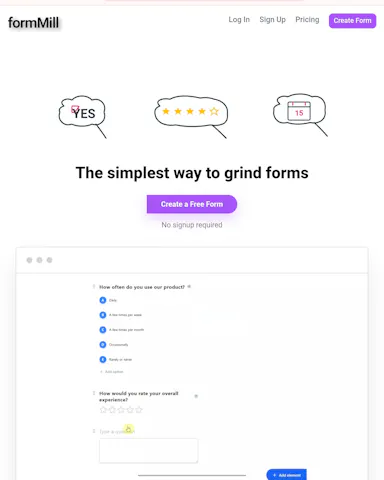
A free-tier online form builder with 23 field types, positioned as a lower-cost alternative to paywalled builders.

Free
What to know
How it works
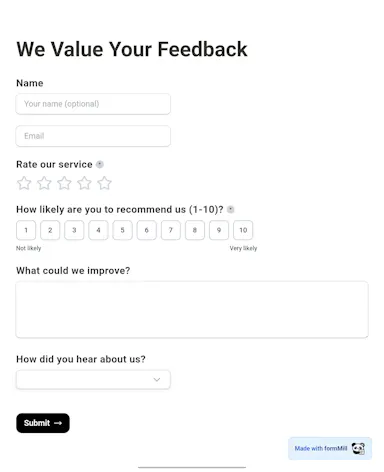
Builds forms with 23 field types (short answers, file uploads, ratings, signatures, audio/video embeds, date/time) for lead generation, onboarding, surveys, job applications, and quizzes, in a Notion-inspired interface.
What's different
Positioned against paywalled builders that lock advanced features behind pricing tiers.
Pricing
Free, unlimited forms.

Watched for 3 days · last checked 3d ago

Details →

Trains an AI support agent on your docs, help center, Notion and Google Drive so it instantly answers repetitive customer questions without a human, a business support tool, not a consumer app.

What to know
How it works
Ingests a company's website, help center, Notion workspace, PDFs or Google Drive content, stays in sync as content changes, and answers customer questions from that content within seconds, without a human in the loop.
What's different
Answers come only from the ingested content rather than generic AI guesses, and it auto-refreshes when source docs change.
Best for
Teams whose support staff repeatedly answer the same questions and want an agent trained only on their own docs.

Watched for 18 days · last checked 11d ago

Details →