We check every product on this page once a day and record whether it still answers.
A free, open-source tool that applies custom visual skins to Codex Desktop without modifying the app's official bundle.
Watch out · macOS and Windows.
FreeOpen source
What to know▼
How it works
Applies immersive backgrounds and visual styling to Codex Desktop through a local CDP session, without modifying the official app bundle or code signature; restores stock appearance with one click.
We check every product on this page once a day and record whether it still answers.
Hold a key, speak, and your words are typed into whatever app is focused — voice dictation and live translation across dozens of languages for Mac and Windows, no audio stored.
Watch out · The 'we never store your audio' claim is the vendor's own statement, not independently verified.
FreeNo sign-up
What to know▼
How it works
Hold a key, speak, release — your words are typed into whatever app your cursor is in. Also supports live translation by holding a separate key.
What's different
Works across roughly 99 languages for dictation and 32 for translation, with the mic only active while the key is held.
Pricing
Free, no account, no model download.
Best for
Mac and Windows users who want fast voice-to-text or live translation without opening a separate app.
Watch out
The 'we never store your audio' claim is the vendor's own statement, not independently verified.
We check every product on this page once a day and record whether it still answers.
A clipboard manager for macOS and Windows that copies text the instant you select it, no Ctrl+C needed, plus a searchable history of your last 200 clips.
Watch out · The Windows version is in beta.
FreeNo sign-upWorks offline
What to know▼
How it works
A clipboard manager for macOS and Windows (beta) that copies text the instant you select it — no Ctrl+C/Cmd+C needed — then long-press to paste, or press Cmd/Ctrl+Shift+V to open a searchable history of your last 200 clips.
What's different
Brings the select-to-copy behavior Linux users know from PRIMARY selection to Mac and Windows; traditional clipboard managers only store history after you explicitly press copy.
Pricing
Free.
Best for
macOS and Windows users who want copy-paste without the extra keystroke.
We check every product on this page once a day and record whether it still answers.
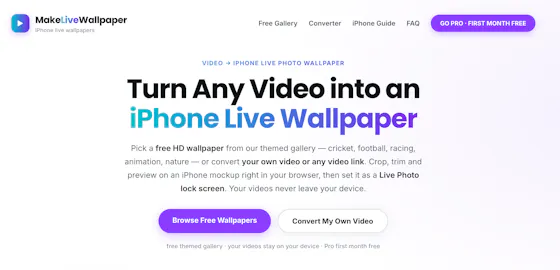
A browser-based tool that turns your own videos into iPhone Live Photo wallpapers entirely on-device with no upload, plus a free gallery of ready-made HD wallpapers.
Watch out · It doesn't create a true Live Photo by itself; it preps the clip and walks you through a manual app step to finish.
FreeWorks offlineData stays with you
What to know▼
How it works
Crop, trim, and preview a video on a phone mockup in the browser, entirely on-device, then follow a one-tap step to set it as your iPhone Live Photo lock screen.
Pricing
Free HD wallpapers from a gallery; you can also convert your own video.
Best for
iPhone users who want a live wallpaper made from their own video without uploading it anywhere.
Watch out
It doesn't create a true Live Photo by itself; it preps the clip and walks you through a manual app step to finish.
We check every product on this page once a day and record whether it still answers.
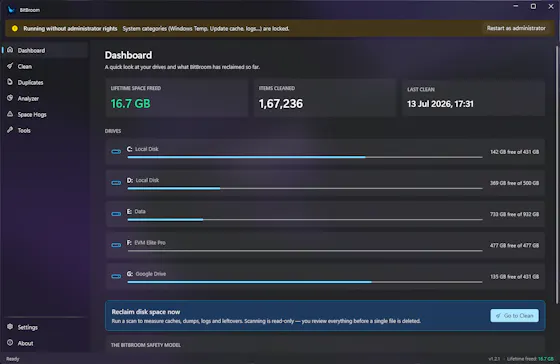
A free, open-source Windows disk cleaner designed to find reclaimable space (old drivers, duplicate files, WSL/Docker disks) without deleting things you need.
FreeOpen sourceNo ads
What to know▼
How it works
Finds reclaimable disk space including WSL/Docker disks, old drivers, and duplicate files, with Recycle Bin safety and a full audit log.
What's different
Engineered so it can't delete what you care about.
We check every product on this page once a day and record whether it still answers.
A fast, local-first Markdown editor that runs in-browser or as an offline desktop app, for writers who want quick note-taking without cloud lock-in.
FreeWorks offline
What to know▼
How it works
A lightweight Markdown editor that starts as a free web editor for writing, previewing, importing and downloading Markdown, and grows into a local-first Tauri desktop app with native file access, offline work and local history snapshots.
Pricing
Free web editor.
Best for
Writers who want fast Markdown editing without cloud lock-in.
We check every product on this page once a day and record whether it still answers.
A lightweight Windows app that streams a video or image file as your webcam feed into Zoom, Teams, Skype, Discord or Telegram, running fully offline with no account or tracking.
FreeNo sign-upWorks offline
What to know▼
How it works
A lightweight virtual webcam app for Windows that streams a video or image file as your camera feed into apps like Zoom, Teams, Skype, Discord and Telegram.
What's different
Runs entirely locally with no account, subscription, ads or tracking — download and run, 25MB portable, works offline.
Pricing
Free for Windows.
Best for
Windows users who want a virtual webcam feed for video call apps without an account or bloatware.
We check every product on this page once a day and record whether it still answers.
A free, open-source Mac app for developers that lists every open port and its process, lets you kill busy ports, and fix 'address already in use' errors.
FreeOpen source
What to know▼
How it works
A free, open-source Mac app that lists every open port and the process behind it, lets you kill processes on busy ports, and can block ports via the built-in macOS firewall.
Pricing
Free and open source.
Best for
Developers on macOS troubleshooting 'address already in use' errors or checking what's listening on their ports.
We check every product on this page once a day and record whether it still answers.
A free, portable Windows utility that edits EDID to unlock custom resolutions and refresh rates your monitor or GPU supports but Windows hides.
FreeNothing to install
What to know▼
How it works
A free, portable Windows utility that edits EDID data to create custom display resolutions and refresh rates, letting you add or remove resolutions and adjust FreeSync and refresh-rate settings without installation.
What's different
Unlocks hidden resolutions that your monitor or GPU supports but that don't appear in standard Windows settings.
Pricing
Free, no installation required.
Best for
Gamers and creative professionals using high-definition or ultrawide displays who want to fine-tune refresh rates and reduce screen tearing.
We check every product on this page once a day and record whether it still answers.
A lightweight Windows utility monitors and manages GPU memory temperature during AI inference or gaming, for owners of high-performance laptops trying to avoid thermal throttling.
FreeNo subscription
What to know▼
How it works
Monitors GPU memory junction temperature via low-level hardware telemetry and applies software-defined duty-cycling (millisecond-level pulse throttling) to prevent thermal-driven performance drops during AI inference or gaming.
What's different
Targets memory junction temperature specifically, which standard tools like MSI Afterburner only tune for the GPU core, not the memory hotspot that triggers emergency throttling.
Pricing
Pulse Throttling is free.
Best for
Owners of high-performance gaming or AI laptops running sustained local inference (Stable Diffusion, llama.cpp, Ollama) who see performance drop from memory overheating.
We check every product on this page once a day and record whether it still answers.
A free browser-based suite for testing microphones, speakers, headphones, and Bluetooth latency without installing software.
FreeNo sign-up
What to know▼
How it works
Provides web-based tools to test microphones, speakers, and headphones, plus a specialized tool to measure Bluetooth latency, with instant in-browser results.
What's different
No software download or account registration required.
We check every product on this page once a day and record whether it still answers.
A free, open-source, portable tool under 150KB for writing bootable USB drives from ISO images, positioned as a lightweight alternative to Rufus, no install needed.
FreeNothing to installOpen source
What to know▼
How it works
A free, portable, open-source tool for writing bootable USB flash drives from ISO images, under 150KB with no installation required.
What's different
Positioned as a lighter alternative to Rufus.
Pricing
Free.
Best for
People who need to create bootable USB drives without installing extra software.
We check every product on this page once a day and record whether it still answers.
Turns your iPhone into a trackpad and remote for your Mac, with gesture input, live stats, and one-tap launch or quit of Mac apps from your phone. Free.
Watch out · The iOS app is currently in TestFlight beta.
Free
What to know▼
How it works
Turns an iPhone into a trackpad and remote for a Mac, syncing after a one-time pairing code, with gesture input, live stats, and a dock that can launch or quit Mac apps with a single tap.
What's different
Goes beyond basic phone-as-trackpad apps with seamless persistent pairing, Mac power-user controls, and one-tap app quitting from the phone.
Pricing
Free.
Best for
Mac users who want phone-based remote control with more than basic trackpad functions.
We check every product on this page once a day and record whether it still answers.
A free, open-source Windows utility that shows real battery health, automatically switches power-saver mode, and adds playful alerts — for any Windows laptop owner, not just developers.
FreeWorks offlineOpen source
What to know▼
How it works
A Windows battery companion that shows real battery health (design capacity vs. current capacity), automatically switches power-saver mode, and adds emoji alerts.
What's different
Open-source, runs 100% locally with no tracking.
Pricing
Free forever.
Best for
Any Windows laptop owner who wants to see actual battery health, not just charge percentage.
We check every product on this page once a day and record whether it still answers.
A desktop multi-agent AI chat workspace with a large tool library covering voice and code tasks; the listing gives little detail beyond a free-to-start pitch.
Free
What to know▼
How it works
A desktop app offering an agentic multi-agent AI chat workspace with over 30 tools, plus voice and code capabilities.
We check every product on this page once a day and record whether it still answers.
A free, open-source macOS menu-bar app that gives haptic trackpad feedback whenever your cursor passes over any clickable button, link or menu, system-wide.
FreeOpen source
What to know▼
How it works
Runs in the Mac menu bar and taps the trackpad's haptic engine whenever the cursor passes over any clickable element — buttons, links, menus, tabs — system-wide across any app.
What's different
Works system-wide in any app rather than requiring per-app integration; open source.
Pricing
Free and open-source.
Best for
Mac users who want physical feedback when navigating the interface, not just visual cues.