We check every product on this page once a day and record whether it still answers.
A free, open-source tool that applies custom visual skins to Codex Desktop without modifying the app's official bundle.
Watch out · macOS and Windows.
FreeOpen source
What to know▼
How it works
Applies immersive backgrounds and visual styling to Codex Desktop through a local CDP session, without modifying the official app bundle or code signature; restores stock appearance with one click.
We check every product on this page once a day and record whether it still answers.
A macOS menu-bar app that turns your own local video files into live wallpapers, fully offline and open-source with no account or cloud step.
No sign-upWorks offlineOpen source
What to know▼
How it works
A macOS menu bar app that turns local video files into live desktop wallpapers, and converts/patches videos for macOS's native lock screen wallpaper support.
What's different
Fully open-source, offline and private — no accounts, cloud or telemetry — unlike commercial live-wallpaper alternatives.
Best for
macOS users who want live wallpapers from their own video files without sending anything to the cloud.
We check every product on this page once a day and record whether it still answers.
A tiny, fast native image viewer for Windows built as a lightweight, open-source alternative to bloated legacy viewers — portable, no install needed.
Nothing to installOpen source
What to know▼
How it works
A portable, sub-10 MB image viewer for Windows built with native C++ and Win32 APIs, supporting modern formats like WebP and JPEG XL, with self-healing registry integration.
What's different
Positioned as a lightweight, hardware-aware alternative to bloated legacy image viewers, with no install required.
Best for
Windows users who want a fast, minimal image viewer instead of a heavier default app.
We check every product on this page once a day and record whether it still answers.
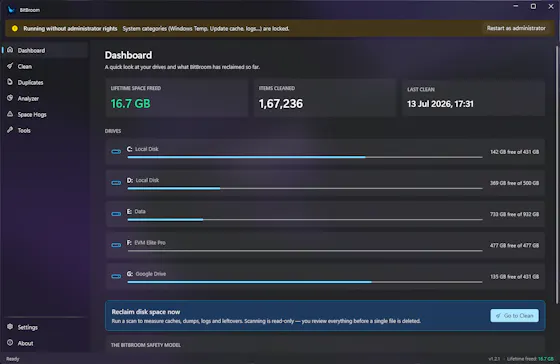
A free, open-source Windows disk cleaner designed to find reclaimable space (old drivers, duplicate files, WSL/Docker disks) without deleting things you need.
FreeOpen sourceNo ads
What to know▼
How it works
Finds reclaimable disk space including WSL/Docker disks, old drivers, and duplicate files, with Recycle Bin safety and a full audit log.
What's different
Engineered so it can't delete what you care about.
We check every product on this page once a day and record whether it still answers.
An open-source desktop calculator that parses phrases like '20% of 150' plus unit conversion and graphing, a general tool despite the developer-flavored tech stack.
Open source
What to know▼
How it works
A cross-platform desktop calculator that parses natural-language phrases like '20% of 150' or '5 kg in pounds', with unit conversion, function graphing and step-by-step evaluation.
What's different
Built with Go + Wails for a roughly 25 MB binary that starts instantly, versus heavier calculator apps.
We check every product on this page once a day and record whether it still answers.
A free, open-source Mac app for developers that lists every open port and its process, lets you kill busy ports, and fix 'address already in use' errors.
FreeOpen source
What to know▼
How it works
A free, open-source Mac app that lists every open port and the process behind it, lets you kill processes on busy ports, and can block ports via the built-in macOS firewall.
Pricing
Free and open source.
Best for
Developers on macOS troubleshooting 'address already in use' errors or checking what's listening on their ports.
We check every product on this page once a day and record whether it still answers.
A free, open-source, portable tool under 150KB for writing bootable USB drives from ISO images, positioned as a lightweight alternative to Rufus, no install needed.
FreeNothing to installOpen source
What to know▼
How it works
A free, portable, open-source tool for writing bootable USB flash drives from ISO images, under 150KB with no installation required.
What's different
Positioned as a lighter alternative to Rufus.
Pricing
Free.
Best for
People who need to create bootable USB drives without installing extra software.
We check every product on this page once a day and record whether it still answers.
A free, open-source Windows utility that shows real battery health, automatically switches power-saver mode, and adds playful alerts — for any Windows laptop owner, not just developers.
FreeWorks offlineOpen source
What to know▼
How it works
A Windows battery companion that shows real battery health (design capacity vs. current capacity), automatically switches power-saver mode, and adds emoji alerts.
What's different
Open-source, runs 100% locally with no tracking.
Pricing
Free forever.
Best for
Any Windows laptop owner who wants to see actual battery health, not just charge percentage.
We check every product on this page once a day and record whether it still answers.
A free, open-source macOS menu-bar app that gives haptic trackpad feedback whenever your cursor passes over any clickable button, link or menu, system-wide.
FreeOpen source
What to know▼
How it works
Runs in the Mac menu bar and taps the trackpad's haptic engine whenever the cursor passes over any clickable element — buttons, links, menus, tabs — system-wide across any app.
What's different
Works system-wide in any app rather than requiring per-app integration; open source.
Pricing
Free and open-source.
Best for
Mac users who want physical feedback when navigating the interface, not just visual cues.