We check every product on this page once a day and record whether it still answers.
A local-first drawing and note-taking canvas for diagrams, wireframes, study sheets and rough ideas, with layers, brushes and PSD import/export — a one-time $9.99 purchase, no account needed.
No sign-upWorks offlinePay once
What to know▼
How it works
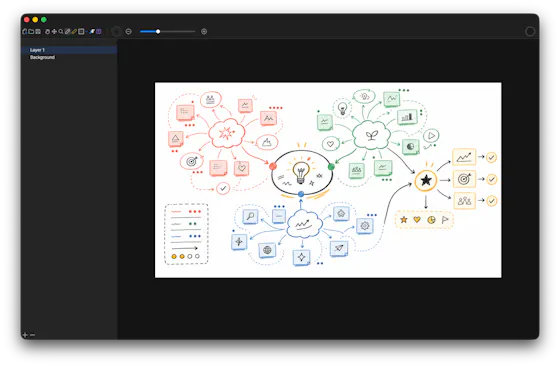
A cross-platform, local-first canvas for notes, diagrams, study sheets, wireframes and rough ideas, with pressure-sensitive brushes, layers, shapes, text, image transforms, PSD import/export, pan/zoom and keyboard shortcuts.
What's different
Files stay entirely on-device with no account, cloud workspace or subscription required.
Pricing
One-time purchase of $9.99.
Best for
People who want a full-featured drawing/note canvas without a subscription or cloud account.
We check every product on this page once a day and record whether it still answers.
Generates architecture diagrams and design documents directly from infrastructure files like docker-compose or Terraform, for teams documenting real systems instead of drawing them by hand.
FreeNo sign-up
What to know▼
How it works
Auto-detects docker-compose, Kubernetes, Terraform, CloudFormation, or a repo URL and builds a diagram
What's different
AI co-editor updates the diagram from plain-English requests
Pricing
free, no signup
Best for
engineering teams documenting existing infrastructure
We check every product on this page once a day and record whether it still answers.
A browsable, bilingual (English/Chinese) online guide listing 50 hiding spots across 5 maps for the Chameleon Art hiding game, with color tips and difficulty ratings — no signup or download needed. A companion reference for game players, not a general-purpose tool.
No sign-upNothing to install
What to know▼
How it works
A bilingual (English/Chinese) browser guide listing 50 hiding spots across 5 maps for the Chameleon Art hiding game, with color/paint recommendations, RGB/hex references, and difficulty ratings.
Best for
Players of the Chameleon Art hiding game looking up hiding spots and seeker counter-tips.
We check every product on this page once a day and record whether it still answers.
A free, no-signup browser-based canvas for sketching diagrams, geometry, and notes with a basic SVG editor, for anyone who wants a quick drawing tool, instead of installing dedicated diagramming software.
FreeNo sign-upCan export my data
What to know▼
How it works
Browser-based canvas with grid snapping, shapes, curves, arrows, and fills; also imports, edits, and exports SVG.
We check every product on this page once a day and record whether it still answers.
A free browser-based sketch tool with an infinite canvas, multiple brushes, and local autosave, for quick doodles and annotations without creating an account.
FreeNo sign-upNothing to install
What to know▼
How it works
Saves drawings to localStorage in the browser and offers export options, with no sign-up required.
We check every product on this page once a day and record whether it still answers.
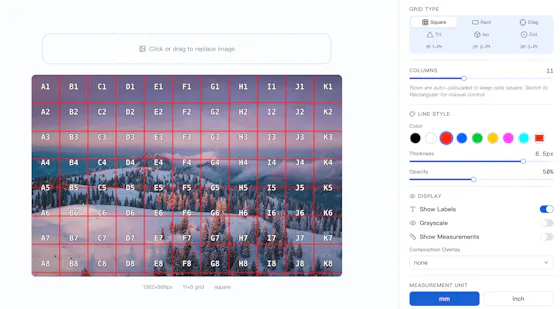
A free, open-source grid tool for artists — perspective grids, composition overlays, an art projector, paint-by-number and an Instagram grid splitter — kept free where other tools paywall them.
FreeNo sign-upOpen source
What to know▼
How it works
A free, open-source grid tool for artists offering 9 grid types, including an Art Projector, Paint by Number, and an Instagram Grid Splitter.
What's different
Keeps perspective grids, composition overlays and diagonal lines free, where competitors paywall them.
Pricing
Free, MIT licensed.
Best for
Artists who want grid tools without paying for features other apps lock behind a paywall.
We check every product on this page once a day and record whether it still answers.
Free online tarot readings with card-by-card interpretations, no account required, offered in multiple languages, an entertainment/interpretation tool, not a productivity one.
FreeNo sign-up
What to know▼
How it works
Draw tarot cards, explore different spreads, and get instant interpretations with an explanation of each card's meaning.
Pricing
Free.
Best for
Anyone curious about tarot, from first-timers to experienced readers, without needing to create an account.
We check every product on this page once a day and record whether it still answers.
Turns a plain-English prompt into an editable flowchart (Excalidraw format) in seconds, no login needed for basic use. A general diagramming tool, not tied to one audience.
No sign-up
What to know▼
How it works
Turns a plain-English prompt into an editable, presentation-ready flowchart using natural language understanding and a layout engine, output in Excalidraw format. No login required for basic use, with a workspace for saving and organizing diagrams.
What's different
Open-source and MIT licensed, with diagrams editable in the Excalidraw format rather than a locked-in proprietary editor.
Best for
Creators, developers, educators, and product teams mapping out user journeys or documenting systems.