We check every product on this page once a day and record whether it still answers.
A no-code AI workspace where teams update workflows and capture data via chat, voice, or image, running on local AI or your own API key.
Works offlineData stays with you
What to know▼
How it works
A no-code workspace where teams update workflows, automate tasks, and capture data via chat, voice, or image, running on local AI or your own API key so data stays in-house.
We check every product on this page once a day and record whether it still answers.
Local-first AI tooling for finance teams' monthly close (bank reconciliation, CSV sorting, PDF parsing, cash forecasting) that keeps sensitive financial data off cloud AI services.
Works offlineData stays with you
What to know▼
How it works
Local-first AI tools for finance teams' monthly close — bank reconciliation, sorting CSV line items, parsing PDFs, and building 90-day cash forecasts — without uploading sensitive financial data to cloud AI services.
We check every product on this page once a day and record whether it still answers.
Records and transcribes Mac meetings entirely on-device, then turns them into searchable AI notes, for people who don't want audio leaving their machine.
FreeWorks offlineData stays with you
What to know▼
How it works
records mic+system audio, transcribes locally with Whisper, generates TL;DR/decisions/action items
What's different
100% on-device transcription, optional bring-your-own ChatGPT/Claude for notes
We check every product on this page once a day and record whether it still answers.
Offline Windows speech studio offering local text-to-speech, speech-to-text and system-wide dictation with a local API.
Watch out · Runs fully offline after models download; works on GPU or CPU.
Works offlineData stays with you
What to know▼
How it works
A Windows speech studio offering multi-engine local TTS with custom voices, speech-to-text with speaker labels, global hotkey dictation into any field, and a localhost HTTP API for scripts and AI agents.
Watch out
Runs fully offline after models download; works on GPU or CPU.
We check every product on this page once a day and record whether it still answers.
A local MCP server that gives AI assistants like Claude, Cursor and ChatGPT tools to act on your Mac — iMessage, Teams, WhatsApp, Mail, files — with nothing sent to the cloud.
FreeWorks offlineData stays with you
What to know▼
How it works
A local Model Context Protocol server running on a Mac that gives AI assistants like Claude, Cursor and ChatGPT 143 tools to act on iMessage, local Microsoft Teams chats, WhatsApp, Apple Mail, Calendar, Contacts, Notes, Reminders, Finder files, OneDrive, Outlook and Office documents.
What's different
Runs 100% locally with no cloud connection, reaching apps like iMessage and local Teams chats that cloud-based connectors can't access.
Pricing
Free.
Best for
Mac users who want their AI assistant to act across native apps like iMessage and Mail without sending data to the cloud.
We check every product on this page once a day and record whether it still answers.
An offline AI companion app for people who want an ongoing personalized chat relationship without their conversations ever leaving their own computer.
Works offlineData stays with you
What to know▼
How it works
A desktop AI companion for Mac and Windows that runs entirely offline, remembering past interactions and learning about the user over time to build a personalized relationship.
What's different
All processing happens locally on the machine rather than in the cloud.
Pricing
No recurring subscription fees.
Best for
People who want an ongoing personalized AI companion without their conversations leaving their computer.
We check every product on this page once a day and record whether it still answers.
A 15-module course that teaches non-coders to build their own private AI operator, running on their own computer, that drafts email and messages on WhatsApp instead of a commercial AI assistant subscription.
Data stays with you
What to know▼
How it works
An AI coding assistant helps you build the operator tier by tier, across 15 modules plus 6 bonuses.
Pricing
Runs for a few dollars a month to operate; course has a 30-day guarantee.
Best for
Non-coders who want to own a private AI assistant instead of subscribing to one.
We check every product on this page once a day and record whether it still answers.
Runs speech and visual AI models locally to auto-generate YouTube chapter timestamps — free, no upload, no signup, built for YouTubers who don't want to type timestamps by hand.
Watch out · The 18/19 accuracy figure comes from a single 68-minute test video, not a broad benchmark.
FreeNo sign-upWorks offline
What to know▼
How it works
You upload a video and it uses Whisper for audio and Moment-DETR for visual analysis to detect natural chapter breaks, then outputs timestamps to paste into a YouTube description.
What's different
Cross-validates chapter breaks using both audio (Whisper) and visual detection, rather than relying on one signal; on a 68-minute test video it got 18 of 19 chapters correct.
Pricing
Free, no signup.
Best for
YouTubers who don't want to manually type out chapter timestamps.
Watch out
The 18/19 accuracy figure comes from a single 68-minute test video, not a broad benchmark.
We check every product on this page once a day and record whether it still answers.
An offline eBook reader for Android — EPUB, PDF, MOBI, comics and more, with AI text-to-speech, synced highlights, and no ads or account. Has optional cloud sync despite the offline-first pitch.
Watch out · Offers optional cloud sync despite the offline-first, no-account pitch.
No sign-upWorks offlineData stays with you
What to know▼
How it works
An offline eBook reader for Android supporting EPUB, PDF, MOBI, FB2, AZW and comics, with offline AI text-to-speech voices synced to text highlighting, bookmarks, notes, a built-in dictionary and OPDS support.
What's different
Fully offline and privacy-first, with no ads, account or subscription required.
Best for
Android readers who want offline reading with AI narration and no account.
Watch out
Offers optional cloud sync despite the offline-first, no-account pitch.
We check every product on this page once a day and record whether it still answers.
A self-hosted WordPress plugin combining a visual workflow automation engine with an open-source AI agent that builds workflows and asks before acting, using your own LLM API keys.
FreeNo sign-upData stays with you
What to know▼
How it works
A low-code workflow builder plus an open-source AI agent and local executor run inside WordPress, with no SaaS component and data staying on your own server.
Pricing
Agent and executor are free; one license covers both paid plugins for the rest of the stack.
Best for
WordPress site owners who want automation without sending data to a third-party SaaS.
We check every product on this page once a day and record whether it still answers.
Caches your GitHub repo traffic stats — views, clones, release downloads — locally in a lightweight desktop app, since GitHub itself deletes that data after 14 days.
Works offlineData stays with you
What to know▼
How it works
A lightweight Tauri desktop app that caches your GitHub repository traffic data — views, clones and release downloads — locally so it persists beyond GitHub's own retention window.
What's different
GitHub deletes repository traffic data after 14 days; this app keeps it forever by storing it locally rather than in the cloud.
Best for
Developers and maintainers who want long-term visibility into their GitHub repo traffic.
We check every product on this page once a day and record whether it still answers.
An open-source, self-hosted AI video surveillance system where footage and detection models stay on your own hardware.
Works offlineData stays with youOpen source
What to know▼
How it works
Runs entirely on hardware you own with footage never leaving your network; AI detectors are pluggable via an open contract (~30 lines of Python) for models like YOLOv8, license plates, or faces; a local LLM can answer spoken questions about live camera frames.
What's different
100% open source and self-hosted, unlike cloud NVRs such as Ring, Nest, or Verkada.
Pricing
No cloud, no subscriptions, no per-camera fees.
Best for
Developers who want full ownership of their video surveillance stack.
We check every product on this page once a day and record whether it still answers.
An open-source, fully local agentic AI platform that runs multi-agent workflows and vector-database ingestion entirely on-device, for organizations and technical users who want AI automation without sending data to the cloud.
Works offlineData stays with youOpen source
What to know▼
How it works
100% local data processing with optimized vector-database ingestion and multi-agent orchestration to run business workflows securely on-device.
Best for
organizations and developers building AI workflows that require full data privacy.
We check every product on this page once a day and record whether it still answers.
A Windows app that auto-sorts, renames and routes your Downloads, Screenshots and Documents using local AI via Ollama — nothing leaves your device.
Watch out · Requires a local Ollama installation to power the AI features.
Data stays with you
What to know▼
How it works
A Windows desktop app that watches selected folders and automatically renames, sorts and routes files using local AI, with duplicate detection and undo-safe operations.
What's different
Runs entirely on-device through Ollama rather than sending files to the cloud.
Best for
Windows users with messy Downloads, Screenshots or Documents folders who want automatic organization without a cloud service.
Watch out
Requires a local Ollama installation to power the AI features.
We check every product on this page once a day and record whether it still answers.
An Android app that quietly records what's on your screen and makes it searchable later, all processed on the phone itself, with no account, server or cloud.
Watch out · Continuous screen capture is a sensitive capability — worth confirming what gets captured and how it's stored before relying on it.
No sign-upWorks offlineData stays with you
What to know▼
How it works
An Android app that captures what crosses your screen and turns it into a searchable memory, with processing done entirely on the device.
What's different
No account, no server, and no analytics — everything stays on the phone.
Best for
Android users who want to search back through what they've seen on their screen without any data leaving the device.
Watch out
Continuous screen capture is a sensitive capability — worth confirming what gets captured and how it's stored before relying on it.
We check every product on this page once a day and record whether it still answers.
Local-first AI meeting note taker for macOS — no bot joins your calls, recordings never leave your Mac; 60 languages, speaker diarization, decisions and action items extracted automatically.
We check every product on this page once a day and record whether it still answers.
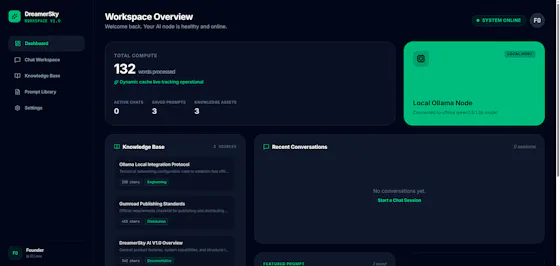
A privacy-first AI workspace combining Gemini and Ollama with local RAG for chatting over your own documents.
Nothing to installData stays with you
What to know▼
How it works
Combines Google Gemini, Ollama, and Local RAG into one application so users can chat with their own documents, switch between cloud and local AI models, and build reusable prompt libraries.
What's different
Keeps data under user control via browser-based storage and backup.