We check every product on this page once a day and record whether it still answers.
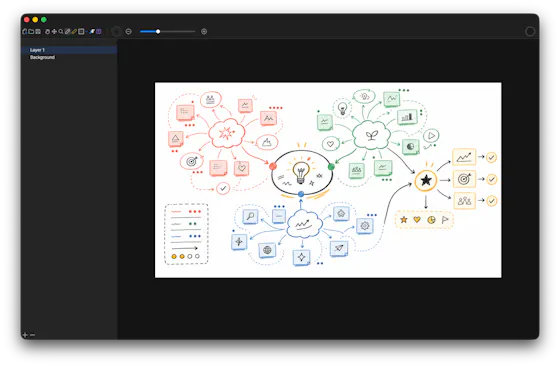
A local-first drawing and note-taking canvas for diagrams, wireframes, study sheets and rough ideas, with layers, brushes and PSD import/export — a one-time $9.99 purchase, no account needed.
No sign-upWorks offlinePay once
What to know▼
How it works
A cross-platform, local-first canvas for notes, diagrams, study sheets, wireframes and rough ideas, with pressure-sensitive brushes, layers, shapes, text, image transforms, PSD import/export, pan/zoom and keyboard shortcuts.
What's different
Files stay entirely on-device with no account, cloud workspace or subscription required.
Pricing
One-time purchase of $9.99.
Best for
People who want a full-featured drawing/note canvas without a subscription or cloud account.
We check every product on this page once a day and record whether it still answers.
A Mac shelf app that pins clipboard items, files, and snippets at your screen's edge so you can drag them back mid-task, sold as a one-time purchase after a 3-day trial (not actually free).
Watch out · Mac only; no account needed.
No sign-upPay once
What to know▼
How it works
Pins copied colors, chat snippets, and files at the edge of the screen so you can drag them back into other apps.
We check every product on this page once a day and record whether it still answers.
A personal wiki for capturing notes and step-by-step instructions with templates instead of Markdown - for individuals who want a simple notebook, not a full wiki platform.
Watch out · No login and no server installation required, so notes stay device-local.
No sign-up
What to know▼
How it works
Captures notes and step-by-step instructions on your device using structured section templates instead of Markdown syntax, with a clean reading mode for looking things up later.
Pricing
No subscriptions.
Best for
Individuals who want a simple personal notebook for instructions and knowledge, not a full team wiki.
Watch out
No login and no server installation required, so notes stay device-local.
We check every product on this page once a day and record whether it still answers.
A lightning-fast offline note capture popup (hotkey-triggered, opens in 20ms) for jotting quick thoughts before moving them into Notion or Obsidian, instead of fighting the friction of a full note app.
FreeNo sign-upWorks offline
What to know▼
How it works
Win+Alt+O opens a popup in under 20ms; stays in system tray, no internet or account needed
Best for
People who need to dump quick thoughts without loading a full note-taking app
We check every product on this page once a day and record whether it still answers.
A native macOS clipboard manager that lets you search your entire copy history by meaning and OCR text out of screenshots, instead of cloud clipboard tools that leave your Mac.
No sign-upWorks offline
What to know▼
How it works
Search by meaning, OCR screenshots, reusable snippets, Stack & Slots organization, built-in dev tools.
We check every product on this page once a day and record whether it still answers.
An offline AI chat companion that runs fully on-device with no account, cloud sync or ads — explicitly not a therapist or productivity tool, just a private space to think out loud.
No sign-upWorks offlineNo ads
What to know▼
How it works
An AI chat companion that runs entirely on-device for calm, private conversations, with no registration, cloud connection, or internet needed; it remembers past conversations and adapts over time.
What's different
Explicitly not positioned as a therapist or productivity tool — it's built to just be a quiet, non-judgmental presence, with no ads or notifications.
Best for
People who want a private space to think out loud without their conversations leaving their device.
We check every product on this page once a day and record whether it still answers.
Browser-based MP3-to-MIDI converter with a piano roll editor for fixing AI transcription mistakes, processed locally.
FreeNo sign-up
What to know▼
How it works
Converts MP3 to MIDI with AI transcription, then lets you fix wrong notes, adjust timing, and tweak velocity in a browser piano-roll editor before downloading a clean MIDI.
We check every product on this page once a day and record whether it still answers.
Saves screenshots and shared content from any app into one categorized, on-device library using Apple Intelligence.
Watch out · Relies on on-device Apple Intelligence.
No sign-upWorks offlineNo subscription
What to know▼
How it works
Lets you share content from any app's share sheet into one place — title and image are grabbed automatically, and on-device Apple Intelligence sorts it into a category; browse by category, add tags, or use 'Daily Review' to resurface saves.
We check every product on this page once a day and record whether it still answers.
A free browser-based notepad for writing and saving notes with auto-save, rich formatting and dark mode — no signup needed, a fairly generic note-taking tool.
FreeNo sign-up
What to know▼
How it works
A browser-based notepad for writing, editing and organizing notes with auto-save, rich text formatting and dark mode.
Pricing
Free, no signup required.
Best for
Anyone who wants a quick, no-account notepad in the browser rather than installing a dedicated app.
We check every product on this page once a day and record whether it still answers.
A native Windows overlay app that combines clipboard history, encrypted clips, and other utilities in one hotkey-accessible tool, aimed at power users who want to stop juggling separate apps.
Watch out · Runs locally with no cloud sync — clips stay on one machine unless the app supports cross-device sync elsewhere.
FreeNo sign-upWorks offline
What to know▼
How it works
A native Windows overlay app that bundles five tools into one hotkey-accessible panel: clipboard history search, text-expansion snippets, screen capture with OCR, and others.
What's different
Combines multiple utilities (clipboard manager, text expander, screen capture) into one unified overlay instead of running them as separate apps.
Pricing
Free.
Best for
Windows power users who currently juggle separate clipboard, snippet, and screenshot tools.
Watch out
Runs locally with no cloud sync — clips stay on one machine unless the app supports cross-device sync elsewhere.
We check every product on this page once a day and record whether it still answers.
Records meetings on Mac and generates transcripts, summaries and live translated subtitles, entirely on-device. Dictation is free forever; the full meeting workflow costs a one-time $49.
Watch out · Requires macOS 26 on Apple Silicon, so it won't run on older Macs or other operating systems.
FreeNo sign-upWorks offline
What to know▼
How it works
Records meetings and produces transcripts and summaries entirely on-device, with nothing sent to the cloud; it also shows live subtitles with translation while recording, and offers push-to-talk dictation usable in any app.
What's different
Continues working with Wi-Fi off and requires no bot joining the call, since everything runs on-device.
Pricing
Dictation is free forever; the full meeting workflow is a one-time $49 purchase. No account or subscription required.
Best for
Mac users who want private, on-device meeting notes without a cloud service.
Watch out
Requires macOS 26 on Apple Silicon, so it won't run on older Macs or other operating systems.
We check every product on this page once a day and record whether it still answers.
Sends end-to-end encrypted notes or images that self-destruct after one view, no account required — a Privnote-style tool with image support and 15 languages.
No sign-up
What to know▼
How it works
Sends end-to-end encrypted notes and images that self-destruct after being viewed once, staying on screen for at most 60 seconds.
What's different
A Privnote-style self-destructing note tool that also supports images, available in 15 languages.
Best for
People who want to share a sensitive note or image once without leaving a permanent record, without creating an account.
We check every product on this page once a day and record whether it still answers.
A local-first iPhone app for logging where you've stored physical items (with photos and notes) so you can search for them later instead of searching your house.
No sign-upWorks offline
What to know▼
How it works
Save an item's location with notes, tags, and a photo, then search later
What's different
No account, ads, analytics, or tracking
Pricing
Free for up to 10 items; subscription unlocks unlimited items and iCloud sync
We check every product on this page once a day and record whether it still answers.
Free, zero-knowledge encrypted notepad that encrypts a note with a user-set password in the browser before it reaches the server, with no account, tracking, or ads.
FreeNo sign-upNo ads
What to know▼
How it works
Encrypts text with AES-256 client-side using a user-set password before sending it to the server.
We check every product on this page once a day and record whether it still answers.
A no-account AI workspace for writing notes, stories and pages, generating images, previewing files and sharing them via private access codes.
No sign-upCan export my data
What to know▼
How it works
A workspace for creating notes, stories, pages and files, with AI for writing and image generation, file previews, slideshow presentation, and PDF export.
Best for
People wanting a private workspace they can access without an account and share via access codes.
We check every product on this page once a day and record whether it still answers.
Turns a private message into a self-destructing QR code that disappears the instant the viewer switches tabs or apps, with no login or app install required.
No sign-up
What to know▼
How it works
Type a message, generate a QR code, and share it; the note is AES-256 encrypted before it reaches the server and self-destructs when the viewer navigates away, not just after a fixed timer.
Best for
sending a one-time secret without leaving a persistent screenshot or message trail.
We check every product on this page once a day and record whether it still answers.
A free, no-signup browser-based canvas for sketching diagrams, geometry, and notes with a basic SVG editor, for anyone who wants a quick drawing tool, instead of installing dedicated diagramming software.
FreeNo sign-upCan export my data
What to know▼
How it works
Browser-based canvas with grid snapping, shapes, curves, arrows, and fills; also imports, edits, and exports SVG.
We check every product on this page once a day and record whether it still answers.
A cross-platform clipboard manager with full history, search and secret masking for anyone who copy-pastes constantly - handy for developers managing API keys, but useful for any heavy copy-paste workflow.
No sign-upWorks offlineOpen source
What to know▼
How it works
Remembers everything you copy - text, images, files - across macOS, Windows and Linux, with full-text search, a paste stack, secret masking with encryption, and smart auto-grouping.
What's different
Runs 100% locally with no account, and is open source.
Pricing
Not stated beyond being open source.
Best for
Developers and anyone who copy-pastes constantly, including people managing API keys via clipboard.
We check every product on this page once a day and record whether it still answers.
12 free single-file HTML tools (notes, invoicing, a CRM, snippets and more) that run in your browser or fully offline, with no account, login or data sent anywhere.
No sign-upWorks offlineNo subscription
What to know▼
How it works
12 single-file HTML tools — including a list app, notes, database, Markdown editor, URL builder, invoice tool, onboarding, outliner, snippets, stickies, deck and CRM — that you open directly as an HTML file; data saves to your browser or you can download and run them offline.
What's different
No subscriptions, logins, or data sent anywhere — each tool is a standalone HTML file you can keep and run forever.
Pricing
Free.
Best for
Small business owners, freelancers and solo operators who want simple tools without accounts or cloud dependence.
We check every product on this page once a day and record whether it still answers.
An offline, no-signup medication reminder for families, storing everything locally with dose confirmations and low-stock refill alerts; free on Android.
Watch out · Android-only.
FreeNo sign-upWorks offline
What to know▼
How it works
An offline medication tracker with no account required, storing data in a local SQLite database, with haptic dose confirmations, family profiles, and automatic low-stock refill alerts.
Pricing
Free on Android.
Best for
Families who want to track medications for multiple people without a cloud account.
We check every product on this page once a day and record whether it still answers.
On-device AI dictation and meeting notetaker for Mac and iOS that works offline without an account.
Watch out · Windows and Android support are coming soon, not yet available.
FreeNo sign-upWorks offline
What to know▼
How it works
Runs 100% on-device using Gemma and Whisper for push-to-talk dictation into any app, live meeting transcripts, AI rewriting, and asking questions across notes.
What's different
No cloud, no account, no subscription.
Pricing
Free for macOS and iOS.
Watch out
Windows and Android support are coming soon, not yet available.