We check every product on this page once a day and record whether it still answers.
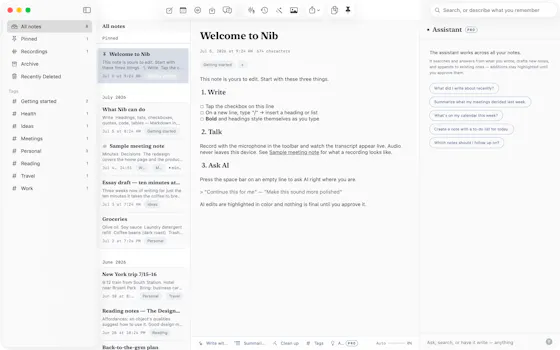
A privacy-first writing workspace for personal note-taking and knowledge management, combining rich text, Markdown, diagrams, and on-demand AI without uploading data.
Data stays with you
What to know▼
How it works
A ~10 MB writing workspace with rich text, Markdown, diagrams, and on-demand AI that keeps data local.
Best for
People doing personal note-taking and knowledge management who don't want to upload their notes.
We check every product on this page once a day and record whether it still answers.
An open-source encrypted note-taking PWA that encrypts notes client-side before sync, for people who want their notes unreadable to the server even in the cloud.
Works offlineData stays with youOpen source
What to know▼
How it works
Notes encrypted in-browser with Argon2id + AES-256-GCM before leaving the device; only ciphertext reaches the server.
What's different
Works offline across devices while staying private.
We check every product on this page once a day and record whether it still answers.
A pair of privacy-focused desktop utilities for text expansion and clipboard management.
Data stays with you
What to know▼
How it works
Two privacy-first desktop utilities: Snipzilla, a privacy-focused text expander, and Stashzilla, a smart clipboard manager that keeps copied items organized and searchable.
Best for
People who want fast, private tools built by one indie developer.
We check every product on this page once a day and record whether it still answers.
A local-first app combining document scanning, PDF tools, notes, expense tracking, and reminders that mostly works offline without an account.
Works offlineData stays with you
What to know▼
How it works
Combines document scanning, PDF tools, multi-format document reading, notes, expense tracking, reminders, weather, QR generation, and photo compression, with most features working offline and no account required.
What's different
Built to replace multiple everyday apps with one experience.
We check every product on this page once a day and record whether it still answers.
A notes app for iPhone, iPad, and Mac that records and transcribes on-device, then turns meeting audio and handwritten notes into structured minutes with decisions and to-dos you approve as diffs.
FreeWorks offlineData stays with you
What to know▼
How it works
On-device transcription keeps audio local; AI restructures transcripts into minutes with editable, diff-based approval.
Pricing
Recording, transcription, and search are free; cloud AI features require Pro.
We check every product on this page once a day and record whether it still answers.
A local-first, self-hostable, open-source notes app with semantic search, autonomous research agents, and voice notes, where data never leaves the user's machine unless they choose to share it.
Watch out · Requires self-hosting, so it needs technical setup compared to a hosted notes app.
Works offlineData stays with youOpen source
What to know▼
How it works
Stores notes locally and adds semantic search, ReAct agents, cited deep research, voice notes, and financial analysis on top, all self-hosted and MIT licensed.
Best for
Technical users who want an AI-augmented notes app without sending their data to the cloud.
Watch out
Requires self-hosting, so it needs technical setup compared to a hosted notes app.
We check every product on this page once a day and record whether it still answers.
Turns your Android phone into a self-hosted MCP server so AI assistants like Claude, Cursor or Perplexity can pull your personal memory without sending data to the cloud. Aimed at developers already using MCP-compatible tools.
Watch out · Relies on a relay tunnel (relay.memplato.com) and requires Termux running on the phone, with a watchdog to restart the server if the phone reboots or Termux closes.
Works offlineData stays with youOpen source
What to know▼
How it works
Turns an Android phone into a self-hosted MCP (Model Context Protocol) server by installing a Python MCP server inside Termux, with a secure tunnel giving the phone a stable public HTTPS URL that AI clients like Claude, Cursor or Perplexity can connect to for persistent memory.
What's different
Data is stored locally on the user's own phone instead of a vendor's cloud, with no subscription or vendor lock-in.
Pricing
No subscription.
Best for
Developers already using MCP-compatible AI tools who want to own their memory data instead of storing it in the cloud.
Watch out
Relies on a relay tunnel (relay.memplato.com) and requires Termux running on the phone, with a watchdog to restart the server if the phone reboots or Termux closes.
We check every product on this page once a day and record whether it still answers.
A local-first notebook combining handwriting, rich documents and PDF markup in one workspace, for students and professionals tired of juggling multiple note apps.
Works offlineData stays with youNo ads
What to know▼
How it works
A local-first notebook combining handwriting (ink, pens, highlighters, shapes, lasso selection), rich text boxes, tables, images, audio memos, and PDF import with searchable text, all on a multi-page canvas organized with folders and tags.
What's different
Combines handwriting, structured documents and PDF markup in one workspace instead of forcing a choice between separate apps, without ads or tracking SDKs.
Best for
Students, professionals and creators who currently juggle multiple note apps and want handwriting, documents and PDF annotation in one place.
We check every product on this page once a day and record whether it still answers.
AI meeting notes and prep built specifically for manager 1:1s, offline-first and privacy-focused for sensitive leadership conversations rather than general note-taking.
Works offlineData stays with you
What to know▼
How it works
Helps managers prepare for and run 1:1s — capture handwritten or text notes, generate structured AI summaries, and track follow-ups.
What's different
Built specifically for manager 1:1s with a privacy-first, offline-first approach for sensitive leadership conversations, unlike generic note-taking apps.
Best for
Managers and team leads who want private prep and notes for direct-report conversations.
We check every product on this page once a day and record whether it still answers.
A password manager built on the open, KeePass-compatible KDBX format, storing logins, passkeys, cards and TOTP codes in one encrypted vault with Face ID autofill.
Data stays with youOpen sourceNo ads
What to know▼
How it works
Stores logins, passkeys, credit cards, secure notes and TOTP codes in an encrypted vault, built on the open KDBX format compatible with KeePass and KeePassXC, with one-tap AutoFill and Face ID across iPhone, iPad, Mac, Windows and Linux.
What's different
Uses the open KDBX format instead of a proprietary vault, so you're not locked into one vendor, with zero-knowledge on-device encryption before sync.
Best for
People wanting a KeePass-compatible password vault across Apple, Windows and Linux devices without vendor lock-in.