We check every product on this page once a day and record whether it still answers.
An offline translation and survival-guide app for foreign travelers in China — menu photo translation, speech/text translation, transit and payment guidance — instead of needing a VPN or a fluent local guide.
Works offlineNo ads
What to know▼
How it works
Translates Chinese menus into actual dish names, ingredients, allergens and spice levels from a photo, translates speech or text into 16+ languages, and provides an offline guide covering WeChat Pay, SIM cards and bullet trains from official government sources, with one-tap links into Amap, Baidu Maps or Google Maps.
What's different
Menu translation gives real dish descriptions instead of literal names, and works offline without a VPN.
Pricing
Free trial, no ads.
Best for
Foreign travelers navigating menus, transit and payments in China without a VPN or local guide.
We check every product on this page once a day and record whether it still answers.
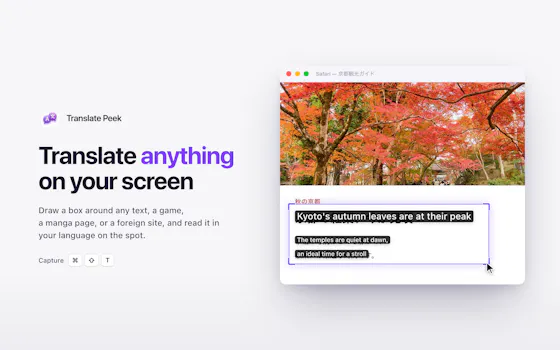
A macOS menu-bar app that translates on-screen text and system audio in real time using on-device OCR and local speech recognition, for videos, meetings, or games.
Works offlineData stays with you
What to know▼
How it works
Lets you drag-select a screen area for an on-device OCR translation overlay, or capture system audio for live, locally-recognized speech translation, supporting 15+ languages.
Best for
Mac users who want instant translation of on-screen content or audio without switching windows.
We check every product on this page once a day and record whether it still answers.
A desktop companion app that generates real-time subtitles for VLC and MPV entirely offline using a local speech engine, with no internet connection or uploads required.
Works offline
What to know▼
How it works
Generates real-time subtitles for VLC and MPV entirely offline, using a local Vosk acoustic engine, with calibration sliders for syncing audio to captions.
What's different
No internet connection or uploads required — subtitle generation runs fully on-device.
Best for
People who want live captions for local video playback without sending audio to a cloud service.
We check every product on this page once a day and record whether it still answers.
Select text in any Windows app, press Alt+Z, and get it translated using local AI models — nothing leaves your device. No subscription; 30-day free trial.
Works offlineData stays with youNo subscription
What to know▼
How it works
Select text in any Windows app and press Alt+Z to have it translated locally and pasted back automatically.
What's different
Runs entirely offline using local AI models, so text never leaves the device.
Pricing
No subscriptions; includes a 30-day free trial.
Best for
Windows users who want in-place translation without switching apps or sending text to the cloud.
We check every product on this page once a day and record whether it still answers.
A free, open-source Windows app that auto-generates styled subtitles for your videos using offline Whisper or the cloud Groq API — aimed at YouTube Shorts, TikTok and Reels creators, not developers.
Watch out · Windows-only desktop app; cloud transcription option (Groq) requires sending video data off-device, unlike the offline Whisper option.
FreeWorks offlineOpen source
What to know▼
How it works
A Windows desktop app that automatically transcribes videos into word-level subtitles using either offline OpenAI Whisper or the cloud-based Groq API, then burns captions into the video or exports as SRT/VTT.
What's different
Free and open-source, with styling presets built for YouTube Shorts, TikTok, and Instagram Reels formats.
Pricing
Free.
Best for
YouTube Shorts, TikTok, and Instagram Reels creators who need styled captions on their videos.
Watch out
Windows-only desktop app; cloud transcription option (Groq) requires sending video data off-device, unlike the offline Whisper option.
We check every product on this page once a day and record whether it still answers.
A native Mac app that translates your voice in real time during Zoom or Meet calls, entirely on-device across six languages, for a one-time purchase with no subscription.
Watch out · Limited to six supported languages and requires Apple Silicon for the on-device processing.
Works offlineData stays with youPay once
What to know▼
How it works
Translates your voice in real time during calls: you speak in your language and the other person hears a natural voice in theirs, with a virtual microphone that plugs into Zoom, Google Meet and Teams.
What's different
Runs 100% on-device on Apple Silicon, so voice never leaves the Mac; supports Spanish, English, German, Italian, French and Portuguese.
Pricing
One-time purchase, no subscription.
Best for
People in international meetings who need real-time spoken translation across the six supported languages.
Watch out
Limited to six supported languages and requires Apple Silicon for the on-device processing.