We check every product on this page once a day and record whether it still answers.
A free bundle of 332 small web utility tools pitched as secure and privacy-first, though the listing gives no detail on what each tool does or how it handles data.
FreeNo sign-upData stays with you
What to know▼
How it works
A bundle of 332 free web utility tools, pitched as privacy-first.
We check every product on this page once a day and record whether it still answers.
A browser-based invoice builder for freelancers and small businesses that keeps client and billing data entirely on your device, no sign-up or cloud sync.
No sign-upWorks offlineData stays with you
What to know▼
How it works
Builds invoices entirely in the browser and exports them as PDF or PNG, with client details, invoice data and branding staying on the user's device.
What's different
No sign-up, no cloud storage and no tracking, unlike most invoicing tools that store data server-side.
Best for
Freelancers, consultants and small businesses who want to create invoices without their client and billing data leaving their device.
We check every product on this page once a day and record whether it still answers.
A privacy-first iOS invoicing app with no login, no analytics and no servers — everything stays on your device. Free for 3 invoices a month; built for freelancers who don't want SaaS bloat.
FreeNo sign-upData stays with you
What to know▼
How it works
An iOS invoicing app that creates professional PDF invoices in under a minute using three templates, with no login and no servers — all data stays on the device.
What's different
No account, no analytics, no servers — invoice data never leaves the device, unlike typical cloud invoicing SaaS.
Pricing
Free tier: 3 invoices/month forever. Plus unlocks unlimited invoices, all templates, logo, reports and CSV export for $5.99/mo or $39.99/yr.
Best for
Freelancers who want simple, private invoicing without SaaS bloat.
We check every product on this page once a day and record whether it still answers.
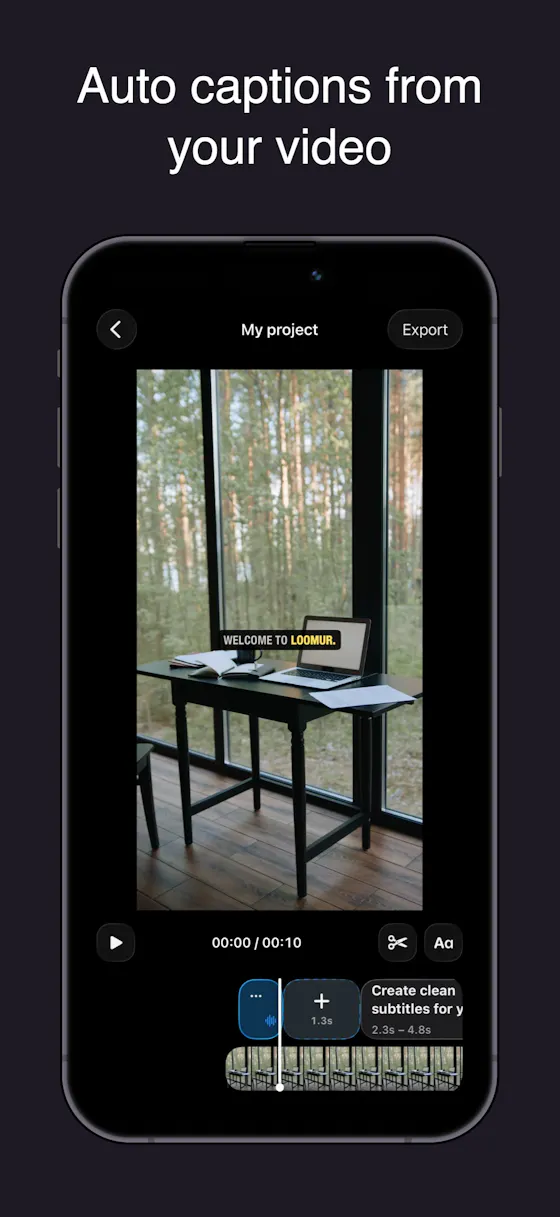
Auto-generates styled subtitles for short vertical videos directly on your iPhone using on-device AI — nothing is uploaded to a server.
Works offlineData stays with you
What to know▼
How it works
Generates stylish subtitles for short-form vertical videos directly on iPhone using on-device AI transcription; lets you edit text, highlight keywords, choose caption styles, and adjust placement before sharing.
What's different
Transcription happens entirely on-device, so no video is uploaded to a server.
Best for
Creators making stories, vlogs, or social content who want captions without uploading footage anywhere.
We check every product on this page once a day and record whether it still answers.
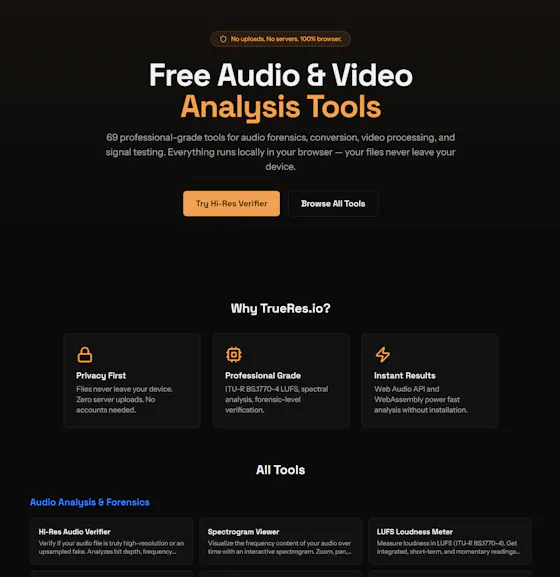
69 free, browser-based audio and video tools — format conversion, loudness metering, spectrogram viewing, trimming — that run entirely client-side so files never leave your device.
FreeNo sign-upNothing to install
What to know▼
How it works
69 audio and video tools -- hi-res audio analysis, LUFS loudness measurement, spectrogram viewing, format conversion, video trimming -- that run entirely client-side in the browser.
What's different
Files never leave your device since processing is 100% client-side, with no signup, watermarks, or limits.
Pricing
Free.
Best for
Anyone needing quick audio/video processing without installing software or uploading files.
We check every product on this page once a day and record whether it still answers.
A browser-based tax estimator for freelancers and independent contractors that runs entirely locally, so your financial data never leaves your device.
Data stays with you
What to know▼
How it works
A browser-based calculator that estimates income tax obligations for independent contractors, running all calculations locally rather than on a server.
What's different
Zero-server design means financial records never leave your browser.
Best for
Freelancers and independent contractors who want a quick tax estimate without submitting financial data to a server.
We check every product on this page once a day and record whether it still answers.
A browser-based PDF editor (merge, split, sign, OCR) marketed as privacy-first, plus beta AI resume and contract-review tools. A general PDF toolkit useful to students and freelancers, not built exclusively for them.
Data stays with you
What to know▼
How it works
A browser-based PDF toolkit for editing, merging, splitting, compressing, converting, signing, protecting and OCR-ing PDFs, plus beta AI Resume Analyzer and Contract Review tools.
What's different
Marketed as privacy-first, working directly in the browser without installing software.
Best for
Students, professionals and freelancers who need common PDF tasks done without installing desktop software.
We check every product on this page once a day and record whether it still answers.
A free browser-based invoice maker with line items, tax, discounts and PDF export that never uploads your data; $19/year removes a small credit line on the invoice.
FreeNo sign-upData stays with you
What to know▼
How it works
Builds a professional invoice with line items, tax, discounts, 24 currencies and a logo entirely in your browser — no account, no upload, drafts stay on your device — then exports as PDF.
Pricing
Free forever; Pro ($19/year) removes the credit line on the invoice.
Best for
Freelancers and small businesses who want to send invoices without an account or uploading their data.
We check every product on this page once a day and record whether it still answers.
A browser-based media editor (trim/merge/transcribe/convert/denoise) driven by typed natural-language commands, with processing done client-side.
Data stays with you
What to know▼
How it works
Trim, split, merge, transcribe, convert JPG/PNG/WebP, denoise, and add transitions to audio, video and images by typing natural-language commands, with processing done in the browser.
What's different
Editing is driven by typed commands rather than a traditional timeline/menu interface, and processing happens client-side.
Best for
Creators who want quick media edits (trimming, converting, denoising) without uploading files to a server.