Tools that are freeDesktop macos

4 match your filters — 4 of them answered our check today.

Watching this group for 22 days · how we check

This weekno new arrivals

A Mac app that turns long videos into short vertical clips with subtitles and AI-generated titles, descriptions, and hashtags, processing everything on-device instead of uploading to the cloud.

FreeWorks offlinePay onceNo subscription
What to know
How it works
Runs entirely locally on Apple Silicon Macs and works offline, so footage is never uploaded to a server.
Pricing
Free to use; a one-time $49 Pro payment removes the watermark, no subscription.

Watched for 14 days · last checked 10d ago

Details →

A free screen recording app for Windows, macOS, Linux, and web that automatically zooms the cursor on clicks, processing everything on-device without upload.

FreeNo sign-upWorks offlineData stays with you
What to know
How it works
Highlights the cursor and auto-zooms on clicks during recording, with no upload or account required to start.
Pricing
Free.
Best for
People who want a directed-looking screen recording without manual editing or cloud upload.

Watched for 14 days · last checked 8d ago

Details →

naden

Live

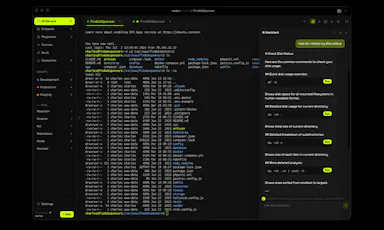
A free, open-source desktop SSH client for macOS with a built-in terminal, SFTP browser, jump host support, and an encrypted credential vault.

Domain registered 1 month ago

FreeOpen source
What to know
How it works
Provides SSH terminal access, SFTP file browsing, jump host chaining, and an encrypted vault for credentials.
Pricing
Free and open source.
Best for
Developers and IT professionals managing remote servers from a Mac.

Watched for 14 days · last checked 11d ago

Details →

Replay

Live

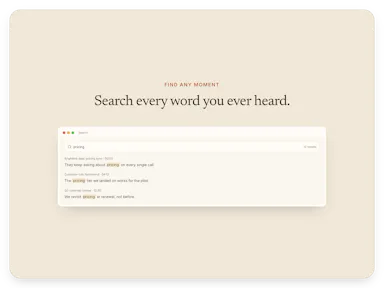
A one-time-purchase Mac app that records and transcribes video calls on-device without bots joining or data leaving the machine, for people who want to own a private, searchable meeting archive.

Domain registered 1 month ago

FreeWorks offlinePay onceNo subscription
What to know
How it works
Records meetings from Zoom, Meet, Teams or Webex on a Mac and transcribes them on-device, learning speaker names across meetings, without bots joining calls or data touching the cloud; saves transcripts as video, JSON and Markdown.
Pricing
One-time purchase, free to try.
Best for
People who want a private, searchable meeting record they own, without a subscription.

Watched for 14 days · last checked 11d ago

Details →