Tools that are freeWindows

5 match your filters — 5 of them answered our check today.

Watching this group for 22 days · how we check

This weekno new arrivals

A free, no-account desktop markdown and text editor with live WYSIWYG formatting and clean markdown export, available now for Windows with macOS and Linux planned. A general writing tool, not developer-specific.

FreeNo sign-upWorks offlineCan export my data
What to know
How it works
A desktop markdown and text editor with WYSIWYG live formatting; edit inline or switch to raw source/preview, then export clean markdown.
Pricing
Free to download and use, including commercial use, no account required.
Best for
General writers who want a simple local markdown editor rather than developers specifically.
Watch out
Windows is available now; macOS and Linux builds are listed as coming soon, not yet available.

Watched for 20 days · last checked 2d ago

Details →

A free, open-source Windows tray app that nudges you to stand up and move every hour -- a general workplace wellness reminder, not developer-specific software.

FreeOpen source
What to know
How it works
A tiny Windows tray app that reminds you to stand up and move every round hour, on your own schedule.
Pricing
Free and open source.
Best for
Windows users who sit at a desk and want a general movement reminder, not a developer-specific tool.

Watched for 19 days · last checked today

Details →

A free, portable Windows utility that edits EDID to unlock custom resolutions and refresh rates your monitor or GPU supports but Windows hides.

FreeNothing to install
What to know
How it works
A free, portable Windows utility that edits EDID data to create custom display resolutions and refresh rates, letting you add or remove resolutions and adjust FreeSync and refresh-rate settings without installation.
What's different
Unlocks hidden resolutions that your monitor or GPU supports but that don't appear in standard Windows settings.
Pricing
Free, no installation required.
Best for
Gamers and creative professionals using high-definition or ultrawide displays who want to fine-tune refresh rates and reduce screen tearing.

Watched for 19 days · last checked 13d ago

Details →

A Windows desktop app for running and managing multiple Claude Code and Codex coding agents in parallel, crash-safe with a conductor agent.

Domain registered 19 days ago

Free
What to know
How it works
A Windows desktop app for running and managing multiple Claude Code and Codex agents in parallel, with a conductor agent coordinating them; it's crash-safe and restores sessions after every reboot.
Pricing
Free for up to 3 agents; Pro is €5/month.
Best for
Developers running several AI coding agents at once who need a UI to manage and recover them.

Watched for 15 days · last checked 4d ago

Details →

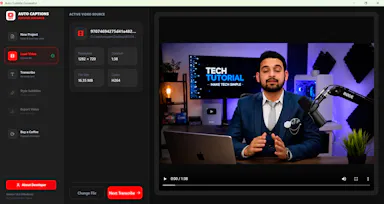
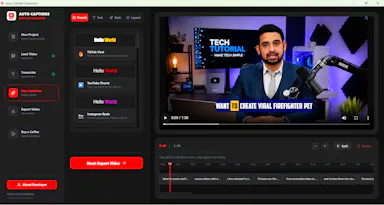
A free, open-source Windows app that auto-generates styled subtitles for your videos using offline Whisper or the cloud Groq API — aimed at YouTube Shorts, TikTok and Reels creators, not developers.

FreeWorks offlineOpen sourceCan export my data
What to know
How it works
A Windows desktop app that automatically transcribes videos into word-level subtitles using either offline OpenAI Whisper or the cloud-based Groq API, then burns captions into the video or exports as SRT/VTT.
What's different
Free and open-source, with styling presets built for YouTube Shorts, TikTok, and Instagram Reels formats.
Pricing
Free.
Best for
YouTube Shorts, TikTok, and Instagram Reels creators who need styled captions on their videos.
Watch out
Windows-only desktop app; cloud transcription option (Groq) requires sending video data off-device, unlike the offline Whisper option.

Watched for 19 days · last checked 4d ago

Details →