Tools that don't mention AIWorks with Microsoft Teams

11 match your filters — 10 of them answered our check today.

Watching this group for 20 days · how we check

This week4 new arrivals

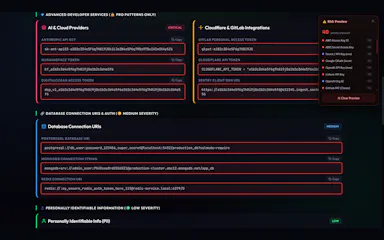
A browser extension that auto-detects and blurs sensitive on-screen info like API keys and passwords during video calls.

What to know
How it works
Detects and blurs sensitive text live during screen shares on Meet/Zoom/Teams
What's different
Custom blur zones, hover-to-reveal, site whitelisting

Watched for 6 days · last checked 5d ago

Details →

A scheduling link tied to your Outlook calendar that also auto-creates the Microsoft Teams meeting when someone books time with you.

Domain registered 1 month ago

What to know
How it works
Connects to Outlook so people book instantly, no guest account or back-and-forth.
What's different
Auto-creates the Teams meeting link on confirmation, which most scheduling tools don't do natively.
Best for
People who live in Microsoft 365/Teams and want booking links that just work.

Watched for 6 days · last checked 5d ago

Details →

Boostr

Live

A peer-recognition tool embedded directly in Microsoft Teams and Slack so coworkers can appreciate each other without leaving chat.

What to know
How it works
Integrates with Teams and Slack to let colleagues send peer-to-peer recognition.
Best for
Teams already living in Slack or Teams who want lightweight recognition.

Watched for 11 days · last checked 8d ago

Details →

A USB desk light plus free app that shows red/green based on your real Teams, Zoom, Slack or Discord status — for people tired of manually toggling do-not-disturb.

Domain registered 4 years ago

Free
What to know
How it works
A USB desk light that mirrors your real presence — green when free, red when on a call — by watching Teams, Zoom, Slack and Discord at once.
What's different
Described as the only commercial busy light that also watches Discord, alongside Teams, Zoom and Slack.
Pricing
Free desktop app; hardware is $39.99.
Best for
People who want automatic do-not-disturb signaling instead of manually toggling status.

Watched for 13 days · last checked today

Details →

A free desktop app that checks your camera, mic, speakers, and network before a video call.

Free
What to know
How it works
Checks camera, microphone, speakers, room noise, and network connection with one click before a video call and gives a simple ready/almost-set/fix-this verdict.
What's different
Audio and video are processed locally and never stored or sent anywhere.
Pricing
Free.

Watched for 3 days · last checked 3d ago

Details →

A private desktop app that gives real-time interview assistance and notes during Zoom, Meet, or Teams calls.

Domain registered 10 months ago

What to know
How it works
A private desktop app giving real-time interview assistance, structured answers, and contextual notes during calls.
What's different
Works with Zoom, Google Meet, and Microsoft Teams.
Best for
Job seekers doing video interviews.

Watched for 8 days · last checked 6d ago

Details →

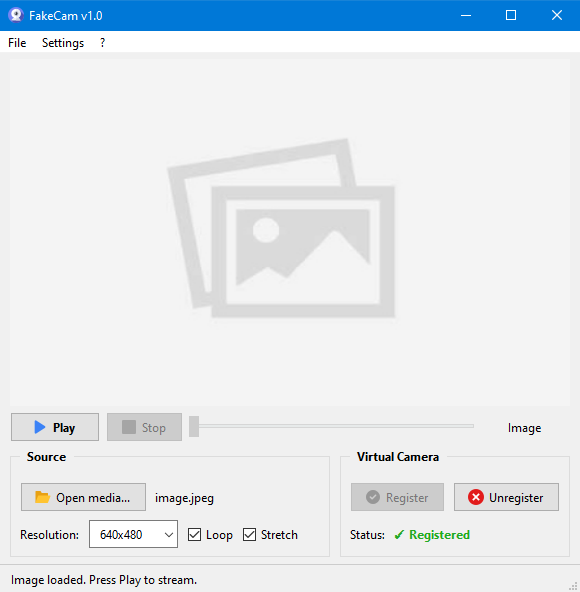
A lightweight Windows app that streams a video or image file as your webcam feed into Zoom, Teams, Skype, Discord or Telegram, running fully offline with no account or tracking.

FreeNo sign-upWorks offlineNo subscription
What to know
How it works
A lightweight virtual webcam app for Windows that streams a video or image file as your camera feed into apps like Zoom, Teams, Skype, Discord and Telegram.
What's different
Runs entirely locally with no account, subscription, ads or tracking — download and run, 25MB portable, works offline.
Pricing
Free for Windows.
Best for
Windows users who want a virtual webcam feed for video call apps without an account or bloatware.

Watched for 18 days · last checked 2d ago

Details →

Records and transcribes calls across Google Meet, Zoom, WhatsApp, Teams, Webex, Telegram and Discord without a bot joining or a recording announcement, then gives you searchable transcripts and summaries.

What to know
How it works
Records and transcribes calls across Google Meet, Zoom, WhatsApp, Microsoft Teams, Webex, Telegram, and Discord, producing automatic transcripts, summaries, searchable notes, key points, and a shareable team link.
What's different
No bot joins the call and no recording announcement is made, unlike most meeting-recorder tools.
Best for
People who need call records across many different platforms in one place.
Watch out
It explicitly records without a bot joining and without a recording announcement, which raises consent considerations for other call participants.

Watched for 12 days · last checked 6d ago

Details →

A virtual microphone that plays sound clips and music into Zoom, Meet, Discord and other web calls alongside your voice. A general-purpose audio routing tool, not tied to one platform.

Works offline
What to know
How it works
Creates a selectable virtual microphone in the browser that mixes your real mic with audio clips — sound effects, music, intros, pre-recorded speech — and feeds that mix into web calls.
What's different
Works inside browser-based call tools like Google Meet, Zoom, Discord, Microsoft Teams and Whereby without installing desktop software or a separate virtual audio cable app.
Best for
Anyone who wants to play sound clips or music into a video call alongside their voice.

Watched for 16 days · last checked 8d ago

Details →

One-click booking for desks, meeting rooms and parking spots via an interactive office map, built for companies managing flexible or hybrid workspaces.

What to know
How it works
Lets employees reserve desks, meeting rooms and parking spots with one click via an interactive office map, with automated parking allocation and real-time occupancy analytics.
What's different
Focuses on extreme simplicity and fast deployment instead of the complexity of larger corporate workplace-management software.
Best for
Organizations managing hybrid or flexible office space who want to cut morning parking/desk chaos and real-estate costs.

Watched for 18 days · last checked 9d ago

Details →

USB office headset with noise-canceling mic for calls and video meetings.

What to know
How it works
A USB headset with an ENC noise-canceling microphone for calls and video meetings.
Best for
Office workers using Zoom, Microsoft Teams or other video meeting tools.

Watched for 3 days · last checked 2d ago

Details →