Tools that don't mention AIWorks with VS Code

11 match your filters — 9 of them answered our check today.

Watching this group for 20 days · how we check

This week4 new arrivals

Narrow it down

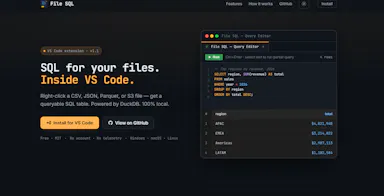
A VS Code extension that lets you query local files or S3 Parquet/CSV data with SQL using DuckDB, directly from the file explorer.

What to know
How it works
Right-click a file or folder in VS Code Explorer to query it as a SQL table via DuckDB, with a multi-tab editor and autocomplete.

Watched for 16 days · last checked today

Details →

Lets developer teams generate dynamic UIs from reusable primitives instead of building custom tooling UIs from scratch.

Watched for 1 day · last checked today

Details →

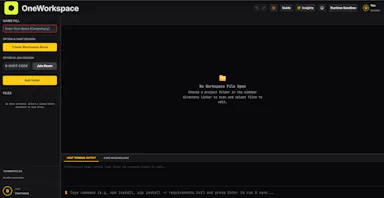
A background sync service that keeps a project's files live-synced across a team's editors in real time without git commits.

Domain registered 9 days ago

What to know
How it works
Background service syncs files automatically as you code, works with VS Code, Cursor, Windsurf
What's different
Shared terminals and live dev server sharing, avoiding merge conflicts entirely
Best for
Teams pair-coding on the same project without constant git pushes

Watched for 6 days · last checked 5d ago

Details →

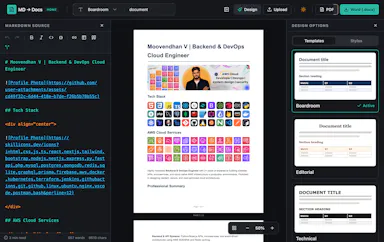
Converts Markdown files into styled Word and PDF documents, usable fully offline or inside VS Code.

Works offline
What to know
How it works
Renders markdown into formatted .docx/.pdf, in a web editor or a VS Code extension
What's different
fully offline compatible
Best for
writers who draft in markdown but need polished Word/PDF output

Watched for 6 days · last checked 5d ago

Details →

A zero-config local development server extension for VS Code that auto-reloads HTML and Markdown previews with hot module replacement, instead of manually setting up a dev server.

What to know
How it works
Uses a dependency graph for smart change detection, plus self-healing HTTPS and QR-code mobile testing.

Watched for 7 days · last checked 6d ago

Details →

A native (non-Electron) Git GUI for Mac and Windows built for speed and low memory use, positioned against GitKraken, SourceTree, Fork and Tower for developers who find those apps sluggish.

Domain registered 2 months ago

No sign-upWorks offline
What to know
How it works
A native Git GUI for macOS and Windows with a color-coded, virtualized commit graph and infinite scroll. Works fully offline and locally, with no account or cloud dependency.
What's different
Roughly 12 MB and launches in a fraction of a second, versus the 300–500 MB idle RAM and multi-second cold starts of Electron-based clients like GitKraken, SourceTree, Fork, and Tower.
Best for
Developers frustrated with the resource overhead of Electron-based Git clients.

Watched for 11 days · last checked 2d ago

Details →

Diploi

Live

A cloud platform that spins up ready-to-code dev, staging and production environments in minutes, aimed at engineering teams onboarding new developers fast.

What to know
How it works
Spins up ready-to-code cloud development environments in minutes, giving each developer an instant environment and each project a consistent path from development through staging to production.
What's different
Lets teams skip local installs entirely and onboard new developers with a single click, while integrating with tools like Cursor, GitHub, and VS Code.
Best for
Engineering teams that want to onboard developers quickly and standardize environments from dev to production.

Watched for 18 days · last checked today

Details →

Shows small sponsored text ads in your IDE sidebar (VS Code, Cursor, Windsurf) and pays you for it — passive income for developers, not an ad-buying tool.

What to know
How it works
Displays small sponsored text cards in the Explorer sidebar of VS Code, Cursor, and Windsurf, and pays developers for showing them.
What's different
Plain text ads matching the editor's look, not banners or popups.
Best for
Developers who spend hours in their IDE and want to earn passive income from sidebar space.

Watched for 18 days · last checked today

Details →

Lets you control and view your Mac's terminal, including shells inside VS Code, Zed or Cursor, from your iPhone or iPad remotely — no SSH, open ports or account needed.

No sign-up
What to know
How it works
Lets you control and observe any terminal on your Mac from an iPhone or iPad, attaching directly to existing shells including those running inside VS Code, Zed and Cursor, over an end-to-end encrypted connection.
What's different
Zero-config networking with no SSH, open ports, port forwarding, or account creation required.
Best for
Developers who want to check on or drive a Mac terminal session remotely from a phone or tablet.

Watched for 18 days · last checked 10d ago

Details →