Tools that work offline, on your own deviceWorks with Microsoft Teams

4 match your filters — 4 of them answered our check today.

Watching this group for 20 days · how we check

This weekno new arrivals

Narrow it down

AI Noise Cancellation for your meetings and calls.

Domain registered 1 month ago

Works offline
What to know
How it works
A real-time, on-device noise and echo cancellation app for Windows and Linux that creates a clean virtual microphone for apps like Zoom, Google Meet, Teams, and Discord.
What's different
Audio is processed entirely on-device and never uploaded.
Pricing
Free to start, no sign-in required.
Best for
People who want background noise removed from calls without sending audio to the cloud.

Watched for 9 days · last checked 3d ago

Details →

A local MCP server that gives AI assistants like Claude, Cursor and ChatGPT tools to act on your Mac — iMessage, Teams, WhatsApp, Mail, files — with nothing sent to the cloud.

FreeWorks offlineData stays with you
What to know
How it works
A local Model Context Protocol server running on a Mac that gives AI assistants like Claude, Cursor and ChatGPT 143 tools to act on iMessage, local Microsoft Teams chats, WhatsApp, Apple Mail, Calendar, Contacts, Notes, Reminders, Finder files, OneDrive, Outlook and Office documents.
What's different
Runs 100% locally with no cloud connection, reaching apps like iMessage and local Teams chats that cloud-based connectors can't access.
Pricing
Free.
Best for
Mac users who want their AI assistant to act across native apps like iMessage and Mail without sending data to the cloud.

Watched for 18 days · last checked 2d ago

Details →

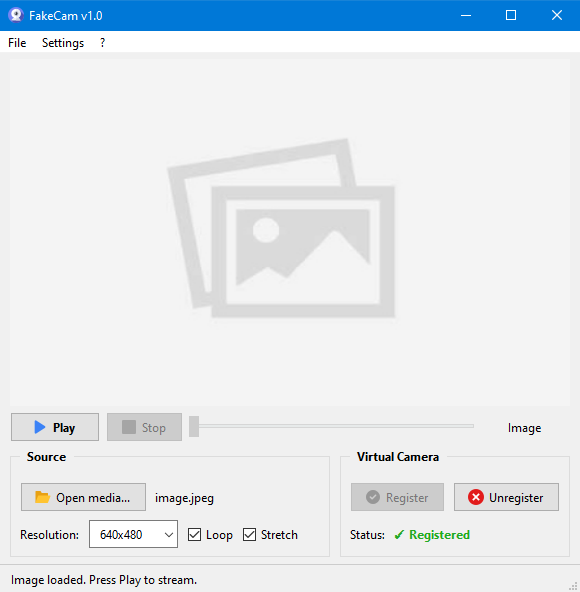
A lightweight Windows app that streams a video or image file as your webcam feed into Zoom, Teams, Skype, Discord or Telegram, running fully offline with no account or tracking.

FreeNo sign-upWorks offlineNo subscription
What to know
How it works
A lightweight virtual webcam app for Windows that streams a video or image file as your camera feed into apps like Zoom, Teams, Skype, Discord and Telegram.
What's different
Runs entirely locally with no account, subscription, ads or tracking — download and run, 25MB portable, works offline.
Pricing
Free for Windows.
Best for
Windows users who want a virtual webcam feed for video call apps without an account or bloatware.

Watched for 18 days · last checked 2d ago

Details →

A virtual microphone that plays sound clips and music into Zoom, Meet, Discord and other web calls alongside your voice. A general-purpose audio routing tool, not tied to one platform.

Works offline
What to know
How it works
Creates a selectable virtual microphone in the browser that mixes your real mic with audio clips — sound effects, music, intros, pre-recorded speech — and feeds that mix into web calls.
What's different
Works inside browser-based call tools like Google Meet, Zoom, Discord, Microsoft Teams and Whereby without installing desktop software or a separate virtual audio cable app.
Best for
Anyone who wants to play sound clips or music into a video call alongside their voice.

Watched for 16 days · last checked 8d ago

Details →