Tools that work offline, on your own deviceWorks with Zoom

9 match your filters — 9 of them answered our check today.

Watching this group for 20 days · how we check

This week1 new arrival

Narrow it down

Desktop teleprompter for presenters that overlays a click-through script on any app while staying invisible in screen recordings.

Domain registered 10 months ago

Works offline
What to know
How it works
Floating click-through script overlay with voice-activated auto-scroll
What's different
Invisible in screen recordings and to viewers, unlike normal teleprompters
Best for
People presenting demos, webinars, or interviews on camera

Watched for 5 days · last checked today

Details →

AI Noise Cancellation for your meetings and calls.

Domain registered 1 month ago

Works offline
What to know
How it works
A real-time, on-device noise and echo cancellation app for Windows and Linux that creates a clean virtual microphone for apps like Zoom, Google Meet, Teams, and Discord.
What's different
Audio is processed entirely on-device and never uploaded.
Pricing
Free to start, no sign-in required.
Best for
People who want background noise removed from calls without sending audio to the cloud.

Watched for 9 days · last checked 3d ago

Details →

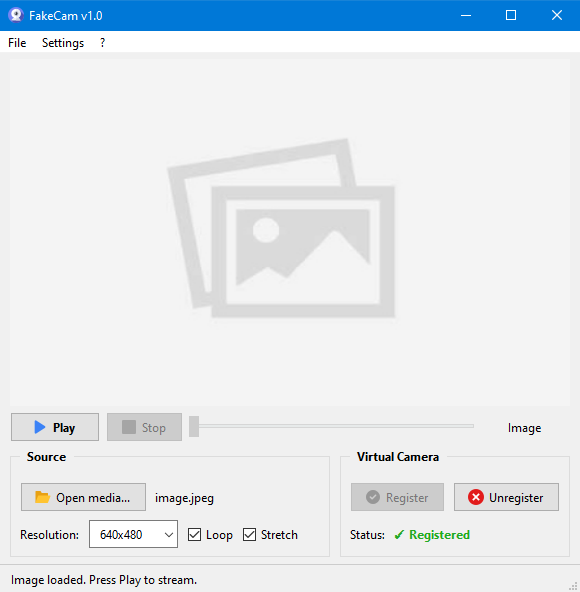
A lightweight Windows app that streams a video or image file as your webcam feed into Zoom, Teams, Skype, Discord or Telegram, running fully offline with no account or tracking.

FreeNo sign-upWorks offlineNo subscription
What to know
How it works
A lightweight virtual webcam app for Windows that streams a video or image file as your camera feed into apps like Zoom, Teams, Skype, Discord and Telegram.
What's different
Runs entirely locally with no account, subscription, ads or tracking — download and run, 25MB portable, works offline.
Pricing
Free for Windows.
Best for
Windows users who want a virtual webcam feed for video call apps without an account or bloatware.

Watched for 18 days · last checked 2d ago

Details →

Corder

Live

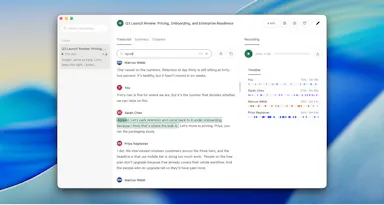
Records your Mac's mic and system audio directly with no bot joining the call, and transcribes on-device so recordings never leave your machine. Free to start, no account needed.

Domain registered 2 months ago

FreeNo sign-upWorks offline
What to know
How it works
Records your Mac's microphone and system audio as two separate tracks at the OS level, so nothing joins the call as a bot — works in Zoom, Meet, Teams, Discord or any browser tab. Transcription runs on-device.
What's different
No bot tile appears in the meeting, so it works even where bot-based recorders are blocked, and transcripts never leave your Mac.
Pricing
Free, no account needed to start.
Best for
People in companies that block meeting-recorder bots who still want private, local transcripts.

Watched for 13 days · last checked 7d ago

Details →

Records what you say and turns it into an organized project log automatically on your own device. Aimed at solo builders and founders who have no one else tracking their progress.

FreeWorks offlinePay onceNo subscription
What to know
How it works
Records spoken audio and turns it into an organized project history and devlog automatically, processed on your own device.
What's different
Runs fully on-device rather than relying on manual note-taking or a cloud service.
Pricing
Free to use with full functionality, no subscription; a paid Pro tier unlocks Labs and unlimited weekly processing.
Best for
Solo builders and founders who track their own progress by talking rather than writing, with no one else keeping a project record for them.

Watched for 18 days · last checked 2d ago

Details →

Opsler

Live

Offline-first scheduling, dispatch and invoicing software for field service contractors and trades, with no per-transaction payment processing fees taken by the platform.

Domain registered 6 months ago

Works offline
What to know
How it works
An offline-first Progressive Web App for field service management: technicians manage jobs, check inventory, and build estimates without a connection, syncing once they hit cellular service. Includes Good/Better/Best tiered quoting for estimates.
What's different
0% payment processing fees — businesses can use their own processor or peer-to-peer QR codes instead of standard card fees.
Pricing
Flat pricing model with zero feature-gating.
Best for
Field service contractors and trades who often work without reliable connectivity.

Watched for 11 days · last checked 11d ago

Details →

Replay

Live

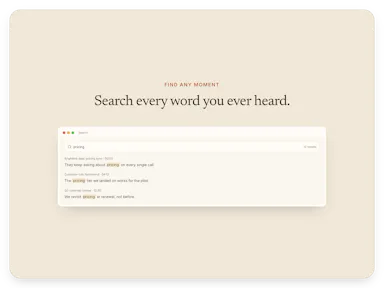
A one-time-purchase Mac app that records and transcribes video calls on-device without bots joining or data leaving the machine, for people who want to own a private, searchable meeting archive.

Domain registered 1 month ago

FreeWorks offlinePay onceNo subscription
What to know
How it works
Records meetings from Zoom, Meet, Teams or Webex on a Mac and transcribes them on-device, learning speaker names across meetings, without bots joining calls or data touching the cloud; saves transcripts as video, JSON and Markdown.
Pricing
One-time purchase, free to try.
Best for
People who want a private, searchable meeting record they own, without a subscription.

Watched for 12 days · last checked 8d ago

Details →

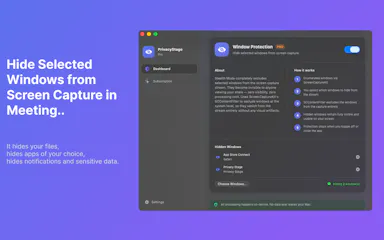
A Mac app that lets you hide specific windows from screen shares while still using them.

Works offline
What to know
How it works
A Mac app that lets you hide specific windows from screen shares while still using them, with a clean presentation desktop and notification guard, working via virtual camera with any meeting app.
Watch out
Everything runs locally on the Mac.

Watched for 10 days · last checked 4d ago

Details →

A virtual microphone that plays sound clips and music into Zoom, Meet, Discord and other web calls alongside your voice. A general-purpose audio routing tool, not tied to one platform.

Works offline
What to know
How it works
Creates a selectable virtual microphone in the browser that mixes your real mic with audio clips — sound effects, music, intros, pre-recorded speech — and feeds that mix into web calls.
What's different
Works inside browser-based call tools like Google Meet, Zoom, Discord, Microsoft Teams and Whereby without installing desktop software or a separate virtual audio cable app.
Best for
Anyone who wants to play sound clips or music into a video call alongside their voice.

Watched for 16 days · last checked 8d ago

Details →