Tools that work offline, on your own deviceRuns on Linux

28 match your filters — 25 of them answered our check today.

Watching this group for 20 days · how we check

This week8 new arrivals

Pandia

Live

Native desktop app for opening and editing multi-gigabyte JSON files instantly, for developers who hit size limits in browser-based JSON viewers.

FreeWorks offlineData stays with youOpen source
What to know
How it works
Opens huge files with no upload, shows JSON as Tree, Code, Grid, Graph, or Compare views, generates types for 9 languages.
What's different
Handles multi-gigabyte files offline where most JSON tools choke or require upload.
Pricing
Free
Watch out
Desktop-only (macOS, Windows, Linux).

Watched for 5 days · last checked today

Details →

Lets people encrypt files with PGP without a GnuPG install instead of using command-line-only tools.

Works offlineOpen sourceNo tracking
What to know
What's different
compatible with GPG, Kleopatra, and Thunderbird
Pricing
free, MIT license

Watched for 1 day · last checked 1d ago

Details →

A local-first trading journal with an offline AI coach that reviews your trades and notes to flag costly habits, for traders who don't want their data on someone else's server.

No sign-upWorks offlineNo tracking
What to know
How it works
stores trades and notes in a single local file; AI coach runs against a local model (Ollama, LM Studio)
What's different
open source so the no-cloud claim is verifiable, plus a 'Leak Finder' that prices out bad habits
Best for
prop-firm traders needing drawdown and payout tracking

Watched for 5 days · last checked today

Details →

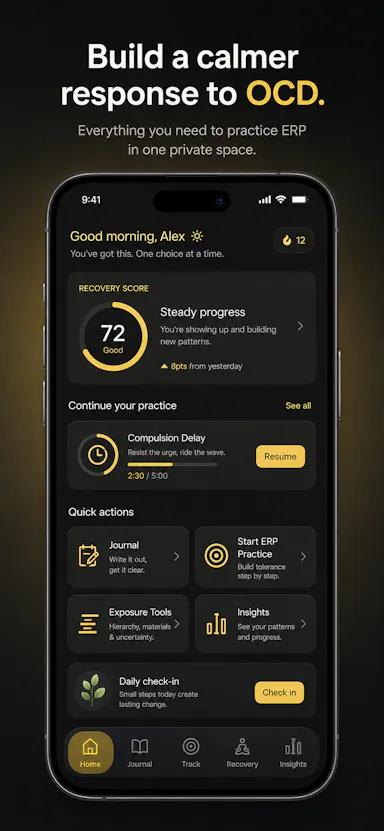
Private OCD/ERP tracker across desktop and mobile that logs obsessions, compulsions, triggers and exposure practice with no cloud sync.

Domain registered 20 days ago

No sign-upWorks offlineData stays with youNo ads
What to know
How it works
Tracks obsessions, compulsions, mood and exposure exercises across iOS/Android/desktop
What's different
No accounts, no cloud sync — data stays on-device
Best for
People doing ERP therapy who want a private tracking journal

Watched for 6 days · last checked today

Details →

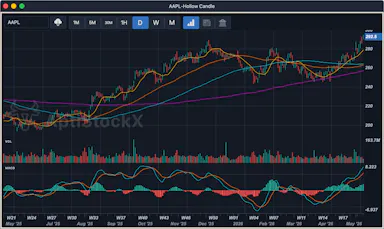
A local-first desktop stock charting app for Windows, macOS, and Linux that keeps your data, watchlists, and credentials on your machine.

Domain registered 21 years ago

Works offline
What to know
How it works
Native charting app storing charts, watchlists, and provider credentials locally
Best for
Traders who want charting data kept off the cloud

Watched for 5 days · last checked today

Details →

AI Noise Cancellation for your meetings and calls.

Domain registered 1 month ago

Works offline
What to know
How it works
A real-time, on-device noise and echo cancellation app for Windows and Linux that creates a clean virtual microphone for apps like Zoom, Google Meet, Teams, and Discord.
What's different
Audio is processed entirely on-device and never uploaded.
Pricing
Free to start, no sign-in required.
Best for
People who want background noise removed from calls without sending audio to the cloud.

Watched for 9 days · last checked 3d ago

Details →

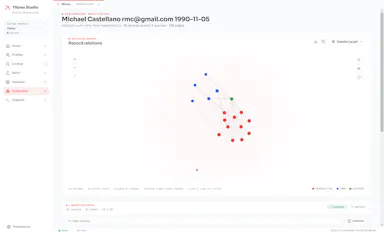
A desktop entity-resolution tool that matches and deduplicates records in a CSV locally on your machine, free up to 100k records, with an MCP server for AI coding assistants.

FreeNo sign-upWorks offline
What to know
How it works
Loads a CSV and resolves duplicate records live using the same real-time matching engine as Tilores' cloud product, running entirely on your machine; a local MCP server also lets Claude Code, Codex and other AI assistants search, import and steer it against your data.
What's different
Skips the usual enterprise entity-resolution sales process (demo, contract) — nothing leaves your laptop, and it's free up to 100k records.
Pricing
Free up to 100,000 records.
Best for
Teams who want to deduplicate and match records locally, including via AI coding assistants, without a cloud enterprise contract.

Watched for 10 days · last checked 4d ago

Details →

Melia

Live

A native Linux desktop email client that connects straight to your IMAP/SMTP mail servers with no cloud relay, middleman account or telemetry, as an alternative to Thunderbird or Evolution.

FreeWorks offlineData stays with youPay once
What to know
How it works
A native Linux desktop email client that connects directly to your mail servers over IMAP and SMTP, storing everything locally in a SQLite database and syncing credentials through the OS keyring so it works fully offline.
What's different
No cloud relay, middleman account, or telemetry — mail stays on your own machine, unlike hosted alternatives.
Pricing
Free for one account with full functionality; a one-time $10 unlock removes the account cap.
Best for
Linux desktop users looking for a native alternative to Thunderbird, Evolution, Geary or Mailspring.

Watched for 18 days · last checked today

Details →

Compresses images and video (JPG, PNG, TIFF, MP4, GIF) entirely on your device with no upload to a server — for Mac, Windows and Linux, privacy-focused.

Works offlineData stays with you
What to know
How it works
Compresses JPG, PNG, TIFF, MP4 and GIF files, processing them locally on-device rather than uploading them to a server, via web tools or a dedicated offline desktop app for Mac, Windows and Linux.
What's different
Local, privacy-focused processing rather than server-side upload-based compression.
Best for
Anyone who wants to compress images or video without sending files to a third-party server.

Watched for 18 days · last checked 11d ago

Details →

A free screen recording app for Windows, macOS, Linux, and web that automatically zooms the cursor on clicks, processing everything on-device without upload.

FreeNo sign-upWorks offlineData stays with you
What to know
How it works
Highlights the cursor and auto-zooms on clicks during recording, with no upload or account required to start.
Pricing
Free.
Best for
People who want a directed-looking screen recording without manual editing or cloud upload.

Watched for 12 days · last checked 6d ago

Details →

Ortu

Live

A cross-platform clipboard manager with full history, search and secret masking for anyone who copy-pastes constantly - handy for developers managing API keys, but useful for any heavy copy-paste workflow.

No sign-upWorks offlineOpen source
What to know
How it works
Remembers everything you copy - text, images, files - across macOS, Windows and Linux, with full-text search, a paste stack, secret masking with encryption, and smart auto-grouping.
What's different
Runs 100% locally with no account, and is open source.
Pricing
Not stated beyond being open source.
Best for
Developers and anyone who copy-pastes constantly, including people managing API keys via clipboard.

Watched for 16 days · last checked 10d ago

Details →

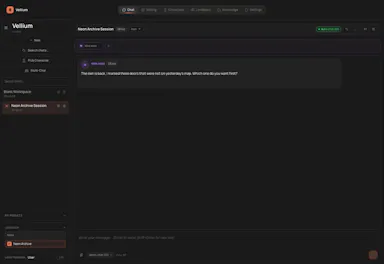
A local-first AI platform bundling chat, a coding agent, a terminal and uncensored open models, with no cloud or accounts. For technical users, not really a mobile app despite the Android companion.

No sign-upWorks offlineOpen sourceNo subscription
What to know
How it works
A local-first AI platform bundling end-to-end encrypted P2P chat, a bare-metal terminal with real PTY shell access, autonomous coding agents, hybrid RAG, and bundled uncensored Qwen/Gemma models, with a native Android companion app for LAN discovery.
What's different
Runs fully offline with no cloud, accounts, or subscriptions, and ships uncensored model variants with no filters.
Pricing
Open-source (AGPL-3.0).
Best for
Technical users on Linux or Windows who want a self-hosted AI toolkit with no cloud dependency.
Watch out
Ships uncensored models with zero filters — outputs are not moderated.

Watched for 18 days · last checked 2d ago

Details →

Records what you say and turns it into an organized project log automatically on your own device. Aimed at solo builders and founders who have no one else tracking their progress.

FreeWorks offlinePay onceNo subscription
What to know
How it works
Records spoken audio and turns it into an organized project history and devlog automatically, processed on your own device.
What's different
Runs fully on-device rather than relying on manual note-taking or a cloud service.
Pricing
Free to use with full functionality, no subscription; a paid Pro tier unlocks Labs and unlimited weekly processing.
Best for
Solo builders and founders who track their own progress by talking rather than writing, with no one else keeping a project record for them.

Watched for 18 days · last checked 2d ago

Details →

A French rental-property management app storing all tenant, lease, and receipt data locally on-device with no cloud or subscription.

Domain registered 1 month ago

Works offlinePay onceNo subscriptionNo tracking
What to know
How it works
Encrypted local storage on your device, works offline, no server or account
What's different
One-click ALUR-compliant receipts, signed leases with timestamped photos
Pricing
19.99 EUR one-time; free on Linux
Best for
French landlords wanting rental management without sending data to a cloud

Watched for 6 days · last checked 5d ago

Details →

A local-first notebook combining handwriting, rich documents and PDF markup in one workspace, for students and professionals tired of juggling multiple note apps.

Works offlineData stays with youNo adsNo tracking
What to know
How it works
A local-first notebook combining handwriting (ink, pens, highlighters, shapes, lasso selection), rich text boxes, tables, images, audio memos, and PDF import with searchable text, all on a multi-page canvas organized with folders and tags.
What's different
Combines handwriting, structured documents and PDF markup in one workspace instead of forcing a choice between separate apps, without ads or tracking SDKs.
Best for
Students, professionals and creators who currently juggle multiple note apps and want handwriting, documents and PDF annotation in one place.

Watched for 18 days · last checked 2d ago

Details →

Cross-platform hardware monitoring with real-time stats, history and benchmarking for Windows, Linux, macOS and Android, with all data processed locally and no telemetry upload.

Works offlineOpen source
What to know
How it works
Monitors CPU, GPU, memory, disk and network in real time, with historical analytics, process management, local benchmarking, and gaming session detection, across Windows, Linux, macOS (Apple Silicon), and Android.
What's different
All monitoring data is processed on-device with local SQLite storage; no telemetry or benchmark results are uploaded.
Best for
Users who want cross-platform hardware monitoring without sending data to the cloud.

Watched for 12 days · last checked 2d ago

Details →

Gleam

Live

Wraps app screenshots in device frames and backgrounds, exporting every size needed for iPhone, iPad, Android and Mac stores in one click. A one-time-purchase desktop app (not mobile), runs fully offline.

Domain registered 19 days ago

Works offlinePay onceNo subscription
What to know
How it works
Takes a plain app screenshot and wraps it in device frames, backgrounds, and text layers, exporting every size required for iPhone, iPad, Android, and Mac app stores from one project in one click.
What's different
Runs completely offline on macOS, Windows, or Linux, keeping data private, unlike browser-based mockup tools.
Pricing
$19 one-time payment, no subscription.
Best for
App developers preparing store screenshots who want to skip manually recreating frames in Figma or Photoshop.

Watched for 13 days · last checked 11d ago

Details →

Muster

Live

Desktop app that runs each AI coding-agent task in its own isolated git worktree with DB tooling and PR review, offline-first.

Domain registered 16 days ago

Works offline
What to know
How it works
Runs each AI coding-agent task in its own isolated git worktree, with database access through MCP, hunk review, PR creation, SSH, a five-engine DB studio, and Linear/Jira/GitHub imports.
Pricing
$39 one-time per device.
Watch out
Offline-first: code and credentials never leave your machine. Available on macOS, Linux, Windows.

Watched for 3 days · last checked 2d ago

Details →

Prizmi

Live

An AI assistant that drafts messages, organizes files, and fills out forms and flight check-ins on its own, installed on your computer for everyday tasks.

Works offlineData stays with you
What to know
How it works
You message Prizmi in plain language and it acts on your phone or computer — drafting texts and emails, organizing files, filling out web forms and flight check-ins, and running scheduled tasks — while proactively reaching out when it notices something matters.
What's different
Takes action directly on your connected devices rather than just answering questions, but never clicks Submit or Pay itself, keeping the user in control of final actions.
Best for
Anyone wanting a proactive assistant that runs tasks on their own Mac, Windows or Linux machine, described as built for grandparents through developers.

Watched for 18 days · last checked today

Details →

A free, no-account desktop markdown and text editor with live WYSIWYG formatting and clean markdown export, available now for Windows with macOS and Linux planned. A general writing tool, not developer-specific.

FreeNo sign-upWorks offlineCan export my data
What to know
How it works
A desktop markdown and text editor with WYSIWYG live formatting; edit inline or switch to raw source/preview, then export clean markdown.
Pricing
Free to download and use, including commercial use, no account required.
Best for
General writers who want a simple local markdown editor rather than developers specifically.
Watch out
Windows is available now; macOS and Linux builds are listed as coming soon, not yet available.

Watched for 18 days · last checked today

Details →

Pluks

Live

A clipboard manager for macOS and Windows that copies text the instant you select it, no Ctrl+C needed, plus a searchable history of your last 200 clips.

FreeNo sign-upWorks offline
What to know
How it works
A clipboard manager for macOS and Windows (beta) that copies text the instant you select it — no Ctrl+C/Cmd+C needed — then long-press to paste, or press Cmd/Ctrl+Shift+V to open a searchable history of your last 200 clips.
What's different
Brings the select-to-copy behavior Linux users know from PRIMARY selection to Mac and Windows; traditional clipboard managers only store history after you explicitly press copy.
Pricing
Free.
Best for
macOS and Windows users who want copy-paste without the extra keystroke.
Watch out
The Windows version is in beta.

Watched for 18 days · last checked 2d ago

Details →

A desktop PDF toolkit with 27 tools — merge, compress, sign, encrypt, OCR, redact — that all run locally without uploading files.

FreeNo sign-upWorks offline
What to know
How it works
Runs 27 PDF tools — merge, compress, convert, sign, encrypt, OCR, redact — 100% locally on your machine with no file uploads.
What's different
Aimed at confidential work like legal contracts, medical records, financial statements, and ID documents; available on macOS, Windows, and Linux.
Pricing
The Merge tool is free forever with no account; Pro unlocks the other 26 tools.

Watched for 10 days · last checked 4d ago

Details →

An open-source desktop AI app that works inside document editing, mail merge, and receipt reading, running fully locally on Mac and Linux.

Domain registered 1 month ago

Works offlineOpen source
What to know
How it works
Brings AI into everyday tools like document editing, mail merge, and receipt reading, running fully locally so files never leave your machine.
What's different
Open source (AGPL-3.0), fully forkable, built with Tauri, Rust, React, and SQLite.
Watch out
Runs on Mac and Linux only.

Watched for 10 days · last checked 4d ago

Details →

A free, open-source desktop app for AI character chat, roleplay and long-form writing, where your data stays in a local database even with a cloud AI backend.

FreeWorks offlineOpen source
What to know
How it works
A desktop AI workspace for character chat, multi-character roleplay, and long-form writing with RAG, LoreBooks, and MCP tools and plugins; you bring your own backend, such as OpenAI-compatible APIs, OpenRouter, LM Studio, Ollama, or KoboldCpp, while chats, characters, projects, and knowledge are stored in a local SQLite database.
What's different
Keeps your data in a local database even when you connect a cloud AI backend, and is free and open source.
Pricing
Free and open source.
Best for
Writers and roleplayers who want to choose their own AI backend while keeping their data local. Native builds are available for macOS, Windows, and Linux.

Watched for 14 days · last checked 2d ago

Details →

An open-source, self-hostable desktop workbench for scientific research that logs experiment data, agent sessions, and provenance locally.

Works offlineOpen sourceSelf-hosted
What to know
How it works
Local-first desktop app for macOS/Windows/Linux storing experiment runs and provenance
What's different
Self-hosted alternative to Claude Science, extensible via Skills and MCP
Pricing
Open source
Best for
Researchers wanting to keep experiment data and computation local

Watched for 6 days · last checked 5d ago

Details →

Fast, modern notes for people who prefer the keyboard

Works offline

First seen today

Details →

Your AI agent team, living on your own computer LOCAL

Works offline

First seen today

Details →

Open, organize, and explore almost any file

Works offline

First seen today

Details →