Open-source toolsBrowser extension

15 match your filters — 13 of them answered our check today.

Watching this group for 20 days · how we check

This week4 new arrivals

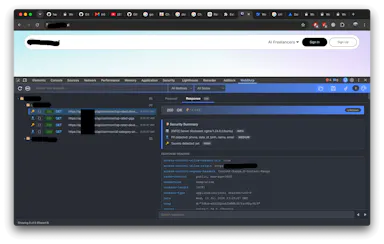
A free, open-source Chrome DevTools extension for testing APIs — capture, inspect, edit, and replay HTTP requests without an external proxy, plus a quick header and secrets audit.

FreeOpen source
What to know
How it works
A Chrome DevTools extension that captures, inspects, edits, and replays HTTP/HTTPS requests without an external proxy, plus a Quick Security Check that audits headers and flags secrets or PII.
What's different
Works without needing to route traffic through an external proxy, unlike typical API testing setups.
Pricing
Free and open-source.
Best for
Developers testing API security directly inside Chrome DevTools.

Watched for 10 days · last checked today

Details →

A free, open-source Chrome extension that cleans up copied web text into compact prompts, processing everything on-device rather than a server. For anyone who pastes a lot of text into AI chat tools.

Domain registered 24 days ago

FreeWorks offlineOpen source
What to know
How it works
A Chrome extension that compacts messy web copy into clean AI prompts, processing everything on-device.
What's different
Free, open source, and 100% on-device rather than sending text to a server; optional Gemini Nano support.
Pricing
Free.
Best for
People who frequently paste web text into AI chat tools and want it cleaned up first.

Watched for 12 days · last checked today

Details →

Lets people using multiple AI chatbots reuse the same project context instead of rewriting it each time they switch platforms.

FreeData stays with youOpen source
What to know
Pricing
free, open-source

Watched for 1 day · last checked 1d ago

Details →

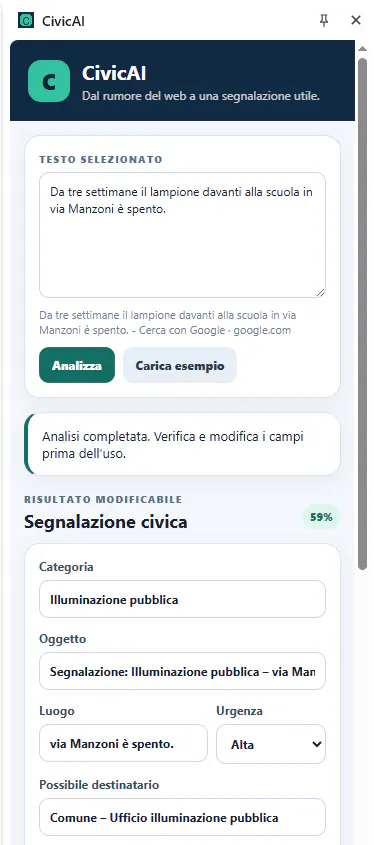
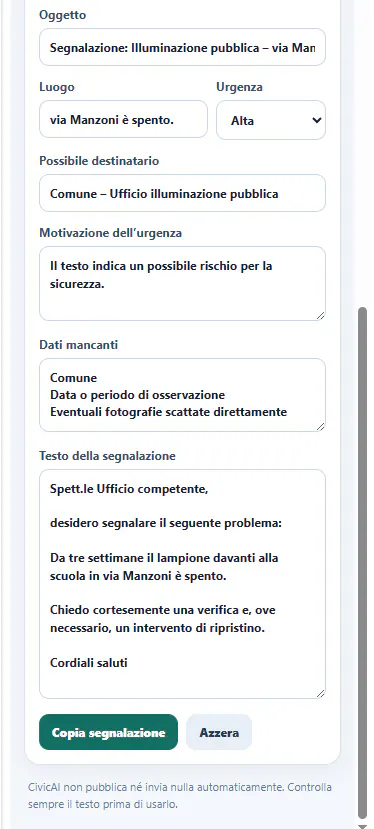
An open-source browser extension that turns selected webpage text into a structured civic report entirely on-device, with no cloud calls.

Domain registered 3 months ago

Works offlineOpen source
What to know
How it works
An open-source Chrome/Edge extension that turns selected webpage text into a structured civic report, classifying the issue, estimating urgency, and drafting a report.
What's different
All AI inference runs locally on-device, with no backend, API key, account, or telemetry.

Watched for 4 days · last checked today
Details →

A free, open-source Chrome extension that scrapes Google Maps to extract verified B2B leads with emails and social profiles by deep-crawling business websites, including automated CAPTCHA bypass.

FreeOpen source
What to know
How it works
Deep-crawls B2B business websites found via Google Maps to find verified emails and social profiles, with automated 2Captcha bypass.
Pricing
Free.

Watched for 7 days · last checked 1d ago

Details →

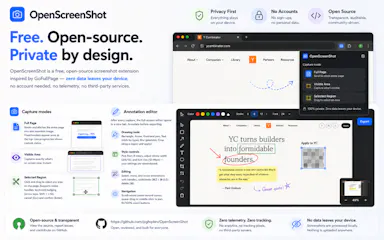
Free Chrome extension for taking full-page or region screenshots with an annotation editor, processed entirely on your device.

FreeData stays with youOpen sourceCan export my data
What to know
How it works
capture full-page, region, or visible-area screenshots, then annotate with undo/redo and export to PDF
Pricing
free, open source
Watch out
Chrome extension only

Watched for 6 days · last checked today
Details →

Checks grammar and rewrites text right inside Gmail, LinkedIn, X and Reddit, using a Gemini API key you provide yourself, free and open source, no subscription.

FreeNo sign-upOpen sourceNo subscription
What to know
How it works
Checks grammar and rewrites text inline on any website — Gmail, LinkedIn, X, Reddit — using your own free Google Gemini API key.
What's different
Free and open source, and runs on a Gemini key you supply yourself instead of a paid subscription.
Pricing
Free, no account or subscription.
Best for
People who want a Grammarly-style writing checker without paying for a subscription or handing over data to a third-party service.

Watched for 13 days · last checked 7d ago

Details →

Pseudo

Live

A Chrome extension for LeetCode practice that turns your described approach into code with your own LLM key, without the AI quietly fixing your mistakes. For developers training for interviews.

Open source
What to know
How it works
A Chrome extension for LeetCode practice: describe your algorithm approach in natural language and it generates code with your chosen LLM exactly as described, right or wrong, plus an experimental 'Resource Units' metric for AI usage.
What's different
Does not silently improve or fix your described approach the way other AI coding tools do — the generated code reflects your reasoning as-is, mistakes included.
Best for
Developers training for coding interviews who want to practice their own problem-solving rather than let AI solve it for them.
Watch out
Requires bringing your own LLM API key (BYOK); there is no backend.

Watched for 14 days · last checked 8d ago

Details →

Habeas

Live

A browser extension that exports your own data — receipts, invoices, bank statements — straight from your logged-in sessions on sites with no official export, unlike Plaid or Tink.

Open sourceCan export my data
What to know
How it works
An open-source browser extension that exports your own data — receipts, invoices, bank and card transactions — directly from your logged-in session on sites that have no API or export option, without storing any credentials.
What's different
Runs inside your real session instead of connecting via credentials or fighting bot detection like Plaid or Tink; data only leaves the browser to a destination you choose (folder, Drive, Dropbox, WebDAV, S3), and sources are declarative, auditable entries in an open registry rather than code.
Best for
Developers and users who need to pull their own financial data out of services with no official export.

Watched for 12 days · last checked 6d ago

Details →

Folio

Live

A free open-source Chrome extension that remembers your profile once and auto-fills job application forms - for anyone job hunting, not just developers.

FreeOpen source
What to know
How it works
A Chrome extension where you set up your profile once, then click a button to have it auto-fill job application forms instead of retyping your resume information each time.
What's different
Open source and free, aimed specifically at ending the repetitive 'upload resume, retype everything' cycle of online job applications.
Pricing
Free and open-source.
Best for
Job seekers submitting many applications who are tired of manually retyping the same information into different forms.

Watched for 16 days · last checked 10d ago

Details →

An open-source Chrome extension that lets an AI agent read and act on the page you're viewing, using whatever model you plug in, with API keys kept local and no telemetry.

No sign-upOpen sourceNo tracking
What to know
How it works
An open-source Chrome extension where an AI agent reads and acts on the page you're viewing, using any model you plug in — OpenRouter, OpenAI, Claude, Gemini, Groq, or a local model.
What's different
Model-agnostic and keeps API keys local in the browser rather than sending them through a vendor's servers.
Pricing
MIT license, no account required.
Best for
Developers who want a browser agent they can point at any LLM provider, including local models, without vendor lock-in.

Watched for 18 days · last checked 2d ago

Details →

A browser extension that hides X (Twitter) posts from countries you pick, detecting location locally with no external servers or sign-up. A niche personal timeline filter, not a developer tool.

No sign-upWorks offlineOpen sourceNo tracking
What to know
How it works
A browser extension where you check countries in a popup and posts from those countries disappear from your X For You feed, Following feed, search, and reply threads; detection runs locally using known accounts, country/city keywords, post language, and public profile location.
What's different
No sign-up, no tracking, and no external servers — settings and detection stay in your browser; open source (MIT).
Best for
X users who want to filter their timeline by country without sending data to a third-party server.

Watched for 18 days · last checked 2d ago

Details →

A Raycast-style launchbar that groups your tabs, apps, links and notes into project workspaces instead of one generic list, for people juggling several projects through their full lifecycle.

Domain registered 11 months ago

No sign-upOpen source
What to know
How it works
A launchbar for browser and desktop that organizes tabs, apps, links and notes into project workspaces, with AI Spotlight Search to jump to anything instantly.
What's different
Organizes around project lifecycle rather than being a generic launcher like Raycast, and pulls native desktop apps into the same workspaces via a companion app.
Best for
People juggling several projects who want their tabs, apps and notes grouped by project instead of scattered.

Watched for 13 days · last checked 7d ago

Details →

https://ample-transformation-production-27f3.up.railway.app/

FreeOpen source

First seen today

Details →