Open-source toolsPDFs

8 match your filters — 8 of them answered our check today.

Watching this group for 20 days · how we check

This week3 new arrivals

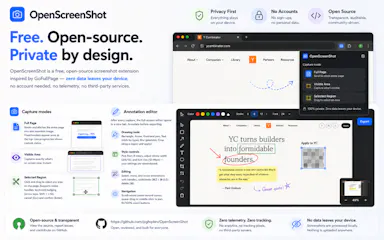
Free Chrome extension for taking full-page or region screenshots with an annotation editor, processed entirely on your device.

FreeData stays with youOpen sourceCan export my data
What to know
How it works
capture full-page, region, or visible-area screenshots, then annotate with undo/redo and export to PDF
Pricing
free, open source
Watch out
Chrome extension only

Watched for 6 days · last checked today

Details →

Folium

Live

A free, open-source resume builder with 15 templates, a live preview, and an ATS-ready PDF export, plus AI job-tailoring that scores your resume against a pasted job posting and matches keywords.

Domain registered 18 days ago

FreeNo sign-upOpen source
What to know
How it works
Build a resume from 15 templates with a live preview and ATS-ready PDF export; paste a job posting to get a match score, missing keywords, a tailored copy, and a cover letter.
What's different
Open source under AGPL, with no resume database storing your data.
Pricing
Free, no account, no paywall.
Best for
Job seekers who want a private resume builder without an account or paywall.

Watched for 11 days · last checked 5d ago

Details →

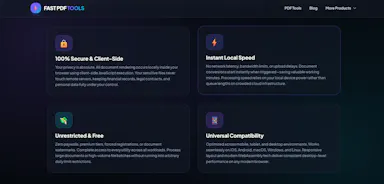
Merges, splits, compresses, and converts PDFs entirely in your browser, so files never get uploaded to a server.

Domain registered 8 months ago

FreeNo sign-upNothing to installData stays with you
What to know
How it works
Runs PDF/image tools client-side in JavaScript
What's different
Nothing leaves your device, unlike most free PDF tools
Pricing
Free, open source

Watched for 6 days · last checked 4d ago

Details →

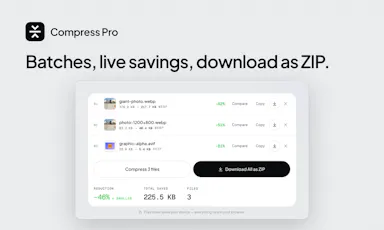
A free, open-source browser tool that compresses and converts images, video, audio and PDFs entirely on your device with no uploads or ads — a general utility, not developer-specific.

Domain registered 17 days ago

FreeWorks offlineData stays with youOpen source
What to know
How it works
An open-source app with 47 tools for compressing and converting images, video, audio and PDFs, with all processing happening on-device so files never leave your computer, including offline use.
What's different
No upload step at all — compression runs entirely locally, works offline, with no ads, accounts or size limits.
Pricing
Free forever.
Best for
Anyone who wants to compress or convert media files without uploading them to a server.

Watched for 14 days · last checked 2d ago

Details →

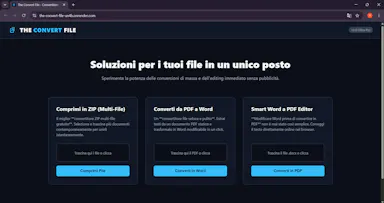
A free, open-source browser tool for converting and compressing files into ZIP format, and editing Word documents into PDF online — a general file utility, not developer-specific.

FreeOpen sourceNo ads
What to know
How it works
Converts and compresses multiple files into ZIP format directly in the browser, and can edit Word documents online before converting them to PDF.
What's different
Open-source and runs entirely in the browser, ad-free.
Pricing
100% free.
Best for
Anyone needing a private, ad-free way to convert or compress files without uploading them elsewhere.

Watched for 13 days · last checked 2d ago

Details →

An open-source Mac app that runs local AI mini-apps, including a private finance analyzer that redacts data before AI sees it.

FreeOpen source
What to know
How it works
Runs AI mini-apps locally on Mac; the lead app is a private CFO that turns bank/card CSV or PDF exports into spend reports (trends, subscriptions, duplicate charges) with account numbers redacted before any AI sees them. Also includes a music DJ with karaoke, a Mac health scanner, and cross-agent memory shared with Claude Code and Codex.
Pricing
Open source; free hosted tier, or bring your own OpenAI-compatible/Ollama model.
Watch out
macOS only.

Watched for 8 days · last checked 6d ago

Details →

40 free in-browser tools (PDF compress, convert, OCR, SEO checks) that never upload files, open-source, in 6 languages.

FreeNo sign-upData stays with youOpen source
What to know
How it works
40 tools for compressing PDFs and images, converting files, OCR, and SEO checks, all running in the browser with no upload, handling files up to 1GB.
What's different
Open-source (AGPL) and available in 6 languages.
Pricing
Free, ad-supported.
Best for
People wanting private, no-signup file utilities.

Watched for 3 days · last checked 2d ago

Details →

A self-hosted client, project and invoice tracker you deploy yourself for a one-time $49 instead of paying HoneyBook or Bonsai monthly. Built for developer-comfortable freelancers, not a no-code SaaS pick.

Open sourcePay onceNo subscriptionCan export my data
What to know
How it works
Manage clients, projects, and invoices in one place: track billable hours, generate invoice PDFs, and monitor monthly revenue with a built-in chart. Self-hosted on your own Railway + Supabase stack, built with React 19, Express 5, PostgreSQL, and Drizzle ORM, deployable in under 15 minutes.
What's different
Sold as a one-time $49 purchase with full source code (MIT licensed) instead of paying HoneyBook ($19/month) or Bonsai ($25/month) recurring fees.
Pricing
One-time $49 purchase, no recurring fees.
Best for
Freelance developers, designers, and consultants at $0-$5k/month who want a real CRM before paying for Bonsai.

Watched for 18 days · last checked 11d ago

Details →