Desktop(macos)

We're tracking 8 of these, and 8 are still live today.

Watching this group for 20 days · how we check

This weekno new arrivals

A macOS menu-bar app that watches your AI coding usage on Codex or Claude Code and forecasts whether you'll hit your limit before it resets, all processed locally.

What to know
How it works
A macOS menu-bar app that forecasts your remaining usage for AI coding tools like Codex and Claude Code and flags whether your current pace will last until the next limit reset.
What's different
Processes usage data locally on-device rather than sending it to a server.
Best for
Developers on usage-limited AI coding plans who want to avoid unexpectedly hitting their limit.

Watched for 16 days · last checked today

Details →

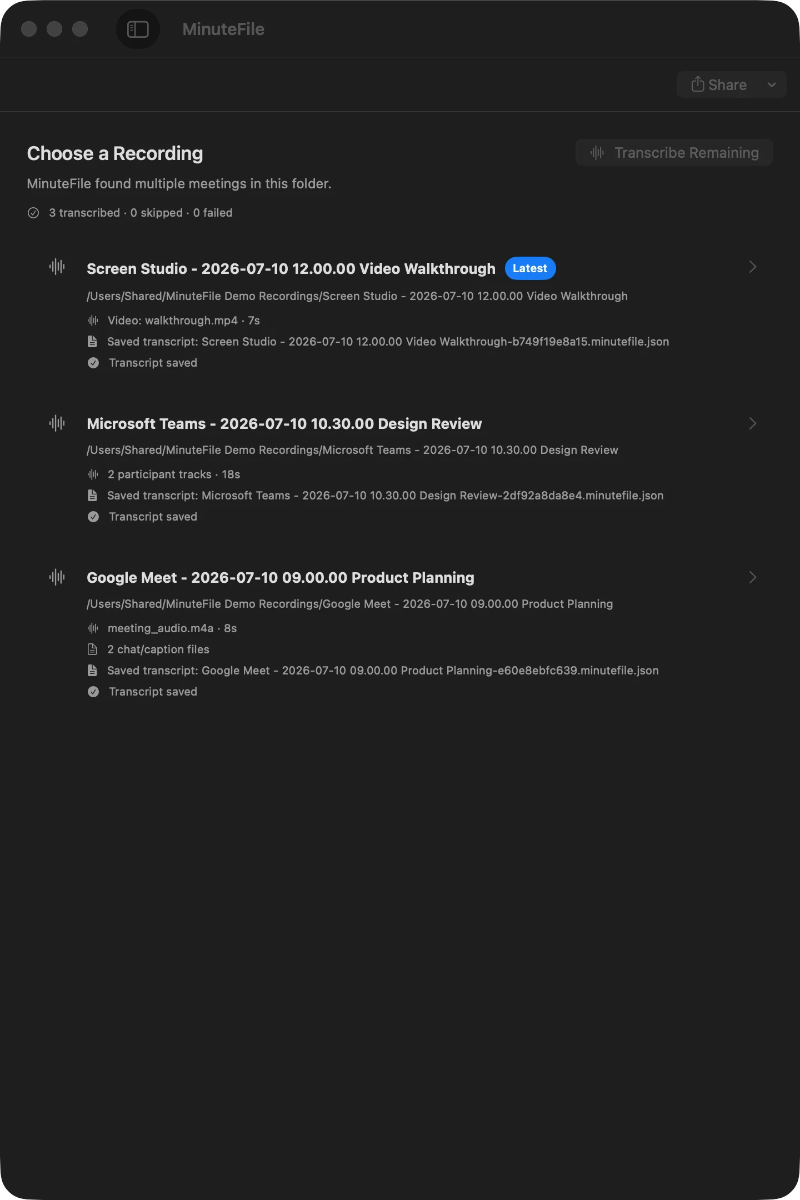
Turns local meeting recording folders into private, searchable transcripts on your Mac — everything stays on your machine, with no account, no upload, no meeting bot, and no subscription.

No sign-upData stays with youNo subscription
What to know
How it works
Turns local meeting recording folders on your Mac into private, searchable transcripts.
What's different
Everything stays on your machine — no account, upload, meeting bot, or subscription required.
Pricing
No account or subscription required.
Best for
Mac users who record meetings locally and want searchable transcripts without sending recordings to the cloud.

Watched for 16 days · last checked today

Details →

A native Mac app for opening and reviewing 3D engineering JT files, with exploded and cross-section views, model export to STL, glTF, or USDZ, and annotated screenshot or video capture, for engineers reviewing CAD data.

Can export my data
What to know
How it works
Opens JT files locally in a native 3D viewport; supports exploded view, cross-section inspection, export to STL/glTF/USDZ, and screenshot or narrated video capture with annotations.
Best for
Engineers reviewing tessellated CAD/assembly models on a Mac.

Watched for 16 days · last checked 4d ago

Details →

A free, open-source desktop app for AI character chat, roleplay and long-form writing, where your data stays in a local database even with a cloud AI backend.

FreeWorks offlineOpen source
What to know
How it works
A desktop AI workspace for character chat, multi-character roleplay, and long-form writing with RAG, LoreBooks, and MCP tools and plugins; you bring your own backend, such as OpenAI-compatible APIs, OpenRouter, LM Studio, Ollama, or KoboldCpp, while chats, characters, projects, and knowledge are stored in a local SQLite database.
What's different
Keeps your data in a local database even when you connect a cloud AI backend, and is free and open source.
Pricing
Free and open source.
Best for
Writers and roleplayers who want to choose their own AI backend while keeping their data local. Native builds are available for macOS, Windows, and Linux.

Watched for 16 days · last checked 4d ago

Details →

Maintenance, ISM compliance, crew and voyage tracking for yacht captains and fleet managers, in a native Mac app for superyachts and commercial vessels.

Domain registered 2 months ago

What to know
How it works
A native Mac app for tracking yacht maintenance, ISM compliance, crew management, voyage planning, and the ship's log in one place.
Best for
Captains, owners, and fleet managers of superyachts and commercial vessels.

Watched for 16 days · last checked 4d ago

Details →

A GPU-accelerated real-time fire, smoke, and explosion simulator for Apple Silicon Macs that lets VFX artists design volumetric effects and export them as MP4, PNG sequences, sprite sheets, or VDB volumes.

Can export my data
What to know
How it works
Real-time volumetric fire/smoke/explosion simulation on Apple Silicon, exportable as MP4, PNG sequences, sprite sheets, and VDB volumes.
Best for
Film and game VFX artists needing simulated pyro effects.

Watched for 16 days · last checked 4d ago

Details →

A macOS utility that instantly fixes text typed with the wrong keyboard input source, so you don't have to delete and retype it.

Domain registered 1 month ago

What to know
How it works
A macOS utility that, on a keyboard shortcut, converts text typed with the wrong keyboard language or input source into what you meant to type, preserving your original keystrokes without requiring you to retype.
Best for
macOS users who regularly switch between keyboard languages and end up typing garbled text in the wrong input source.

Watched for 16 days · last checked 4d ago

Details →

A free, open-source macOS menu-bar app that gives haptic trackpad feedback whenever your cursor passes over any clickable button, link or menu, system-wide.

FreeOpen source
What to know
How it works
Runs in the Mac menu bar and taps the trackpad's haptic engine whenever the cursor passes over any clickable element — buttons, links, menus, tabs — system-wide across any app.
What's different
Works system-wide in any app rather than requiring per-app integration; open source.
Pricing
Free and open-source.
Best for
Mac users who want physical feedback when navigating the interface, not just visual cues.

Watched for 20 days · last checked 4d ago

Details →

Desktop(macos) — the short answers

Every number here comes from our own daily check — not from a vendor list.

Desktop(macos) — how many are there?
Tablif is tracking 8 of them. 8 answered our check today.
Which ones are still maintained?
Tablif knocks on every door once a day and records the answer. 8 of these 8 responded on the latest run, so that number is what "still here" means on this page — not a review score.
Are any of them free?
2 of the live ones say so in their own words, and 1 let you start without making an account. Tablif records the claim the product makes; we don't verify pricing.
Any open-source options?
2 of the live ones on Tablif mention being open source.
What's the newest one?
MinuteFile — Tablif first saw it 16 days ago.
Did a person actually look at these?
8 of them Tablif opened and read, then wrote a one-line summary in our own words instead of reusing the founder's tagline. The rest carry keyword labels we haven't confirmed by reading yet — and we say so rather than hiding it.