Windows

We're tracking 10 of these, and 10 are still live today.

Watching this group for 20 days · how we check

This weekno new arrivals

A free, no-account desktop markdown and text editor with live WYSIWYG formatting and clean markdown export, available now for Windows with macOS and Linux planned. A general writing tool, not developer-specific.

FreeNo sign-upWorks offlineCan export my data
What to know
How it works
A desktop markdown and text editor with WYSIWYG live formatting; edit inline or switch to raw source/preview, then export clean markdown.
Pricing
Free to download and use, including commercial use, no account required.
Best for
General writers who want a simple local markdown editor rather than developers specifically.
Watch out
Windows is available now; macOS and Linux builds are listed as coming soon, not yet available.

Watched for 20 days · last checked 2d ago

Details →

A free, open-source Windows tray app that nudges you to stand up and move every hour -- a general workplace wellness reminder, not developer-specific software.

FreeOpen source
What to know
How it works
A tiny Windows tray app that reminds you to stand up and move every round hour, on your own schedule.
Pricing
Free and open source.
Best for
Windows users who sit at a desk and want a general movement reminder, not a developer-specific tool.

Watched for 19 days · last checked today

Details →

A Windows desktop app that automatically sorts messy folders into categories like Images, Documents and Archives with one click.

What to know
How it works
Choose a folder and SmartSort Auto automatically organizes its contents into categories like Images, Videos, Documents, Audio, Archives and Installers.
Best for
Windows users with messy, unsorted folders who want a one-click cleanup.

Watched for 15 days · last checked 9d ago

Details →

A free, portable Windows utility that edits EDID to unlock custom resolutions and refresh rates your monitor or GPU supports but Windows hides.

FreeNothing to install
What to know
How it works
A free, portable Windows utility that edits EDID data to create custom display resolutions and refresh rates, letting you add or remove resolutions and adjust FreeSync and refresh-rate settings without installation.
What's different
Unlocks hidden resolutions that your monitor or GPU supports but that don't appear in standard Windows settings.
Pricing
Free, no installation required.
Best for
Gamers and creative professionals using high-definition or ultrawide displays who want to fine-tune refresh rates and reduce screen tearing.

Watched for 19 days · last checked 13d ago

Details →

Cross-platform hardware monitoring with real-time stats, history and benchmarking for Windows, Linux, macOS and Android, with all data processed locally and no telemetry upload.

Works offlineOpen source
What to know
How it works
Monitors CPU, GPU, memory, disk and network in real time, with historical analytics, process management, local benchmarking, and gaming session detection, across Windows, Linux, macOS (Apple Silicon), and Android.
What's different
All monitoring data is processed on-device with local SQLite storage; no telemetry or benchmark results are uploaded.
Best for
Users who want cross-platform hardware monitoring without sending data to the cloud.

Watched for 14 days · last checked 4d ago

Details →

A Windows desktop app that puts Claude, ChatGPT and Gemini side by side using your own existing subscriptions, so no API key or separate windows needed.

What to know
How it works
A Windows desktop app that puts Claude, ChatGPT, and Gemini side by side, using your own existing subscriptions to each service rather than an API key.
What's different
No API needed and no separate browser tabs to juggle — uses your existing subscriptions in one window.
Best for
People who already pay for multiple AI chat subscriptions and want them side by side on Windows.

Watched for 15 days · last checked 13d ago

Details →

A native Windows PDF editor that lets you edit pages while previewing the file, positioned as a simpler, more stable alternative to browser-based PDF editors for business use — it requires installing, not a no-install tool.

What to know
How it works
A native Windows application for editing PDF pages while viewing a live preview of the file, installed directly rather than run in a browser.
What's different
Positioned as more stable than browser-based PDF editors because it's a native Windows app, with a simple UI usable without a manual.
Best for
Business users on Windows who want a lightweight, install-based PDF editor instead of a browser tool.

Watched for 15 days · last checked 12d ago

Details →

A Windows desktop app for running and managing multiple Claude Code and Codex coding agents in parallel, crash-safe with a conductor agent.

Domain registered 19 days ago

Free
What to know
How it works
A Windows desktop app for running and managing multiple Claude Code and Codex agents in parallel, with a conductor agent coordinating them; it's crash-safe and restores sessions after every reboot.
Pricing
Free for up to 3 agents; Pro is €5/month.
Best for
Developers running several AI coding agents at once who need a UI to manage and recover them.

Watched for 15 days · last checked 4d ago

Details →

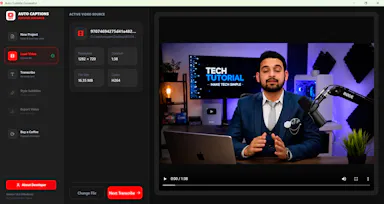
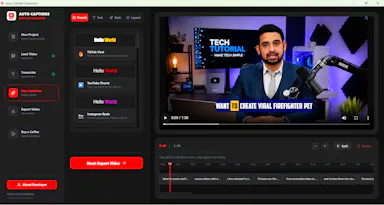
A free, open-source Windows app that auto-generates styled subtitles for your videos using offline Whisper or the cloud Groq API — aimed at YouTube Shorts, TikTok and Reels creators, not developers.

FreeWorks offlineOpen sourceCan export my data
What to know
How it works
A Windows desktop app that automatically transcribes videos into word-level subtitles using either offline OpenAI Whisper or the cloud-based Groq API, then burns captions into the video or exports as SRT/VTT.
What's different
Free and open-source, with styling presets built for YouTube Shorts, TikTok, and Instagram Reels formats.
Pricing
Free.
Best for
YouTube Shorts, TikTok, and Instagram Reels creators who need styled captions on their videos.
Watch out
Windows-only desktop app; cloud transcription option (Groq) requires sending video data off-device, unlike the offline Whisper option.

Watched for 19 days · last checked 4d ago

Details →

Pins any website as a floating, resizable widget on your Windows desktop so you skip tab-switching for dashboards, prices or calendars — a general tool, not developer-specific.

What to know
How it works
Turns any website into a floating, resizable Windows desktop widget — you can pin dashboards, notes, prices or calendars, adjust opacity, snap layouts, and enable click-through mode.
What's different
Keeps live pages visible on the desktop instead of switching between browser tabs.
Best for
Windows users who want dashboards, prices or calendars visible at all times without tab-switching.

Watched for 19 days · last checked 11d ago

Details →

Windows — the short answers

Every number here comes from our own daily check — not from a vendor list.

Windows — how many are there?
Tablif is tracking 10 of them. 10 answered our check today.
Which ones are still maintained?
Tablif knocks on every door once a day and records the answer. 10 of these 10 responded on the latest run, so that number is what "still here" means on this page — not a review score.
Are any of them free?
5 of the live ones say so in their own words, and 1 let you start without making an account. Tablif records the claim the product makes; we don't verify pricing.
Any open-source options?
3 of the live ones on Tablif mention being open source.
What's the newest one?
HardwareMon — Tablif first saw it 14 days ago.
Did a person actually look at these?
10 of them Tablif opened and read, then wrote a one-line summary in our own words instead of reusing the founder's tagline. The rest carry keyword labels we haven't confirmed by reading yet — and we say so rather than hiding it.