We check every product on this page once a day and record whether it still answers.
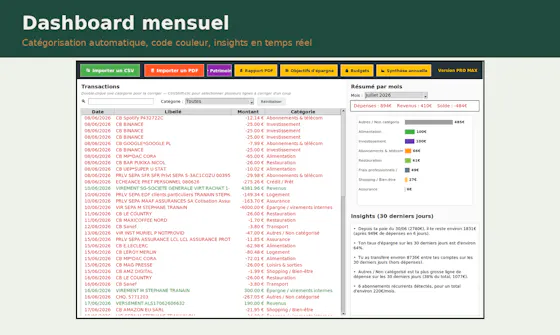
Local-first AI tooling for finance teams' monthly close (bank reconciliation, CSV sorting, PDF parsing, cash forecasting) that keeps sensitive financial data off cloud AI services.
Works offlineData stays with you
What to know▼
How it works
Local-first AI tools for finance teams' monthly close — bank reconciliation, sorting CSV line items, parsing PDFs, and building 90-day cash forecasts — without uploading sensitive financial data to cloud AI services.
We check every product on this page once a day and record whether it still answers.
Privacy-first app to organize life with your people
FreeWorks offlineData stays with you
What to know▼
How it works
AI fiş taramasıyla gider paylaşır, alışveriş listesi ve görev oyunlaştırması sunar, ortak fotoğraf zaman çizelgesi tutar; veri sıfır bilgi ilkesiyle şifreli, biz bile göremeyiz.
What's different
Beş ayrı uygulamayı tek gizlilik öncelikli uygulamayla değiştirir.
We check every product on this page once a day and record whether it still answers.
A local-first app combining document scanning, PDF tools, notes, expense tracking, and reminders that mostly works offline without an account.
Works offlineData stays with you
What to know▼
How it works
Combines document scanning, PDF tools, multi-format document reading, notes, expense tracking, reminders, weather, QR generation, and photo compression, with most features working offline and no account required.
What's different
Built to replace multiple everyday apps with one experience.
We check every product on this page once a day and record whether it still answers.
A private, offline journal for solo and divorced parents to track custody schedules and log expenses with receipt scanning, kept as their own record for legal, tax or personal clarity.
Works offline
What to know▼
How it works
Paints who has the kids on a time grid, applies custody templates, imports calendar events, and logs expenses with receipt scanning; has no shared accounts, chat or cloud sync.
Best for
solo or divorced parents who want a private custody and expense record.
We check every product on this page once a day and record whether it still answers.
A private, offline expense tracker with encrypted storage, no accounts and no telemetry — its optional AI assistant uses your own API key instead of sending data to the company's servers.
No sign-upWorks offlineData stays with you
What to know▼
How it works
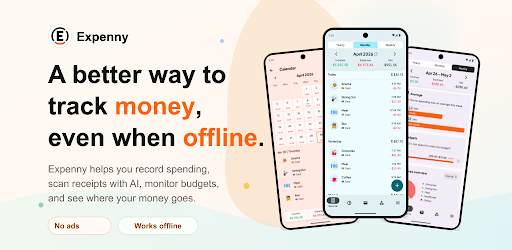
An offline-by-default expense tracker with encrypted backup and an optional AI assistant.
What's different
No accounts, no analytics, no telemetry — the optional AI assistant uses your own provider key instead of routing your data through the company's servers.
Best for
People who want to track expenses without creating an account or having their financial data leave their device.
We check every product on this page once a day and record whether it still answers.
Scans paper receipts with on-device AI and turns them into categorized expenses automatically — offline-first with optional cloud sync, supports 12 languages and multiple currencies.
Works offline
What to know▼
How it works
Snaps a photo of a paper receipt and reads it with on-device AI, turning it into a categorized expense without manual typing.
What's different
Processes receipts on-device and works offline-first, syncing to the cloud only when you choose.
Pricing
Free trial on iOS.
Best for
People tracking expenses who want to avoid manually typing receipt data, with multi-currency and multilingual support.
We check every product on this page once a day and record whether it still answers.
Splits shared expenses across recurring friend groups and trips, with AI receipt scanning, WhatsApp logging and offline mode that syncs when reconnected.
No sign-upWorks offlineNo ads
What to know▼
How it works
You create one group per friend circle, and every dinner, trip, or outing becomes an event inside it, with AI receipt scanning and settlement suggestions, expense logging via WhatsApp, multi-currency support, offline mode that syncs when reconnected, guest members with no account needed, and one-tap payment via Venmo or PayPal.
What's different
Organized around an ongoing friend group rather than a single trip, so history carries across every dinner and trip together.
Pricing
Free to start, no ads, no data selling.
Best for
Recurring friend groups splitting expenses across many dinners and trips over time.
We check every product on this page once a day and record whether it still answers.
An offline Android budget tracker that auto-reads GCash/Maya/bank notifications, for people who want their spending data to stay on-device rather than in a cloud app.
Works offline
What to know▼
How it works
An offline Android app that automatically captures transaction data from GCash, Maya, and bank notifications, tracks multi-currency budgets, debts, and recurring subscriptions, and includes a built-in AI assistant to answer questions about spending.
What's different
Works entirely offline, so financial data stays on the device rather than in a cloud service.
Best for
People who want automated expense tracking from their existing payment apps without their spending data leaving their phone.
We check every product on this page once a day and record whether it still answers.
An offline expense tracker with on-device receipt OCR and voice input, requiring no bank connection or account.
Watch out · No account or bank connection required; data stays on device.
FreeNo sign-upWorks offline
What to know▼
How it works
Track expenses with manual entry, voice input, or on-device OCR receipt scanning, with budgets, insights, anomaly detection, optional Google Drive backup, and PDF/CSV export.
Pricing
Free; premium unlocks voice AI categorization, receipt scanning, PDF export, and advanced insights.
Watch out
No account or bank connection required; data stays on device.
We check every product on this page once a day and record whether it still answers.
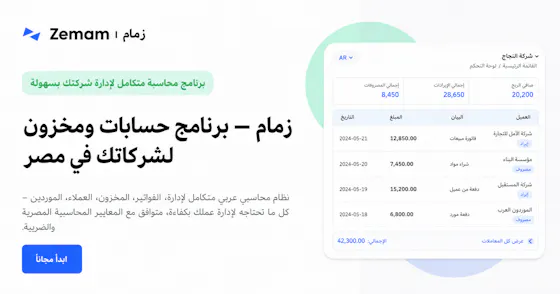
An Arabic-first cloud ERP for small and mid-sized MENA businesses covering accounting, inventory, offline-capable POS, payroll and Egyptian e-invoicing on one double-entry ledger.
Works offline
What to know▼
How it works
A cloud ERP unifying accounting (IFRS + Egyptian VAT), inventory with batch/expiry tracking, offline-capable POS, cheques, installments, multi-currency, HR/payroll, and Egyptian e-invoicing on a real double-entry ledger.
Pricing
Free trial, no credit card.
Best for
Small and mid-sized businesses in Egypt and MENA needing an Arabic-language ERP.
We check every product on this page once a day and record whether it still answers.
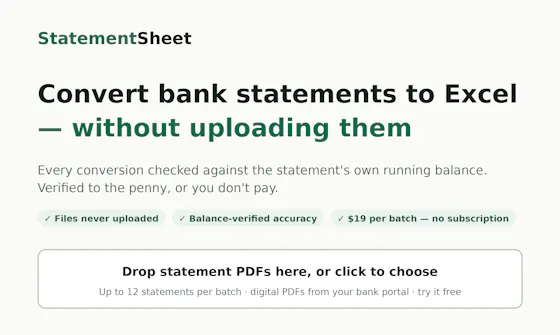
Converts PDF bank statements to Excel/CSV entirely in your browser without uploading them, and checks each one balances to the penny. $19 per batch, not a subscription.
No sign-upWorks offlineData stays with you
What to know▼
How it works
Converts PDF bank and card statements to Excel/CSV entirely in the browser, without uploading files to a server, and re-verifies each statement against its own running balance to the penny.
What's different
Files never leave the browser (works in airplane mode), and mismatched statements are flagged and made free.
Pricing
$19 per batch, no subscription, no account.
Best for
Anyone converting bank statements to spreadsheets who wants to keep the files off a server.
We check every product on this page once a day and record whether it still answers.
Scans receipts and bank screenshots on your iPhone using on-device ML to auto-categorize spending, with nothing sent to a server. A personal budgeting tool, not a business expense system.
No sign-upWorks offline
What to know▼
How it works
Scans receipts, order confirmations and banking-app screenshots on an iPhone using Apple's on-device ML, and turns them into categorized, charted spending with one tap to confirm.
What's different
Runs entirely on-device with no account, aggregator, or cloud — financial data never touches a server. It also learns merchant-to-category mappings and retags past transactions.
Best for
iPhone users tracking personal spending who don't want their financial data leaving their device.
We check every product on this page once a day and record whether it still answers.
Offline ledgers, inventory, billing and POS management in one app for small retail businesses, a general small-business tool rather than one built for a single trade.
Works offline
What to know▼
How it works
An offline business management app that handles customer ledgers (khata), inventory, sales, billing and reports from a single platform.
Best for
Retailers, sellers and small businesses that want ledger, inventory and POS management in one offline app.