We check every product on this page once a day and record whether it still answers.
Turns local meeting recording folders into private, searchable transcripts on your Mac — everything stays on your machine, with no account, no upload, no meeting bot, and no subscription.
No sign-upData stays with youNo subscription
What to know▼
How it works
Turns local meeting recording folders on your Mac into private, searchable transcripts.
What's different
Everything stays on your machine — no account, upload, meeting bot, or subscription required.
Pricing
No account or subscription required.
Best for
Mac users who record meetings locally and want searchable transcripts without sending recordings to the cloud.
We check every product on this page once a day and record whether it still answers.
A one-time-purchase task app for solo workers that applies agile concepts like backlog, priority, and kanban to personal work, syncing via CloudKit with no account or server.
FreeNo sign-upData stays with you
What to know▼
How it works
Syncs across iOS, macOS, and web through CloudKit only, with no signup and no backend server.
We check every product on this page once a day and record whether it still answers.
An offline encrypted vault for passwords, documents and voice/video messages stored only on your phone, meant to be accessible to family if something happens to you.
Works offlinePay onceNo subscription
What to know▼
How it works
encrypted on-device vault with an owner-held recovery backup, no cloud or account
We check every product on this page once a day and record whether it still answers.
An open-source, zero-knowledge Android password manager that encrypts on-device before anything leaves it, for users who don't trust cloud password managers with plaintext access.
Works offlineOpen sourceNo subscription
What to know▼
How it works
On-device encryption, offline by default, optional opt-in cloud sync/backup that servers can't read
Pricing
Free tier unlimited entries; Premium €2.99/month or €29.99 lifetime for sync, backup, security report, no ads
We check every product on this page once a day and record whether it still answers.
A local, privacy-first JSON viewer and formatter for developers, with JWT decoding and CSV/YAML/TypeScript export; free for everyday use, $29 one-time for Pro features.
FreeWorks offlinePay once
What to know▼
How it works
A JSON viewer and formatter that runs 100% locally with zero network requests, handling 100MB+ files, inline JWT decoding, and export to CSV, TSV, YAML, or TypeScript (Pro features).
What's different
Positioned as a trustworthy local replacement after a popular JSON formatter with 2M+ users was sold and turned into adware.
Pricing
Free forever for everyday use; Pro is $29 one-time, lifetime.
Best for
Developers who want a JSON viewer that never sends data over the network.
We check every product on this page once a day and record whether it still answers.
A native Linux desktop email client that connects straight to your IMAP/SMTP mail servers with no cloud relay, middleman account or telemetry, as an alternative to Thunderbird or Evolution.
FreeWorks offlineData stays with you
What to know▼
How it works
A native Linux desktop email client that connects directly to your mail servers over IMAP and SMTP, storing everything locally in a SQLite database and syncing credentials through the OS keyring so it works fully offline.
What's different
No cloud relay, middleman account, or telemetry — mail stays on your own machine, unlike hosted alternatives.
Pricing
Free for one account with full functionality; a one-time $10 unlock removes the account cap.
Best for
Linux desktop users looking for a native alternative to Thunderbird, Evolution, Geary or Mailspring.
We check every product on this page once a day and record whether it still answers.
Mac dictation app that turns speech into text system-wide via a hotkey, runs locally for privacy, and is sold as a one-time purchase instead of a subscription.
Watch out · macOS only.
No subscription
What to know▼
How it works
System-wide dictation on macOS activated by a customizable push-to-talk key, converting speech to text in any app.
We check every product on this page once a day and record whether it still answers.
A mobile app that converts video to GIF entirely on-device, with no upload, watermark, or account required, and can share the result to WhatsApp, Telegram, Instagram, Reddit, or X.
No sign-upWorks offlineData stays with you
What to know▼
How it works
Encodes video to GIF on-device with a trim/scrubber editor and FPS/resolution/speed controls.
Pricing
One-time $2.99 premium removes ads and unlocks longer clips and higher quality; no subscription.
Best for
People converting short video clips to GIFs privately without uploading footage.
We check every product on this page once a day and record whether it still answers.
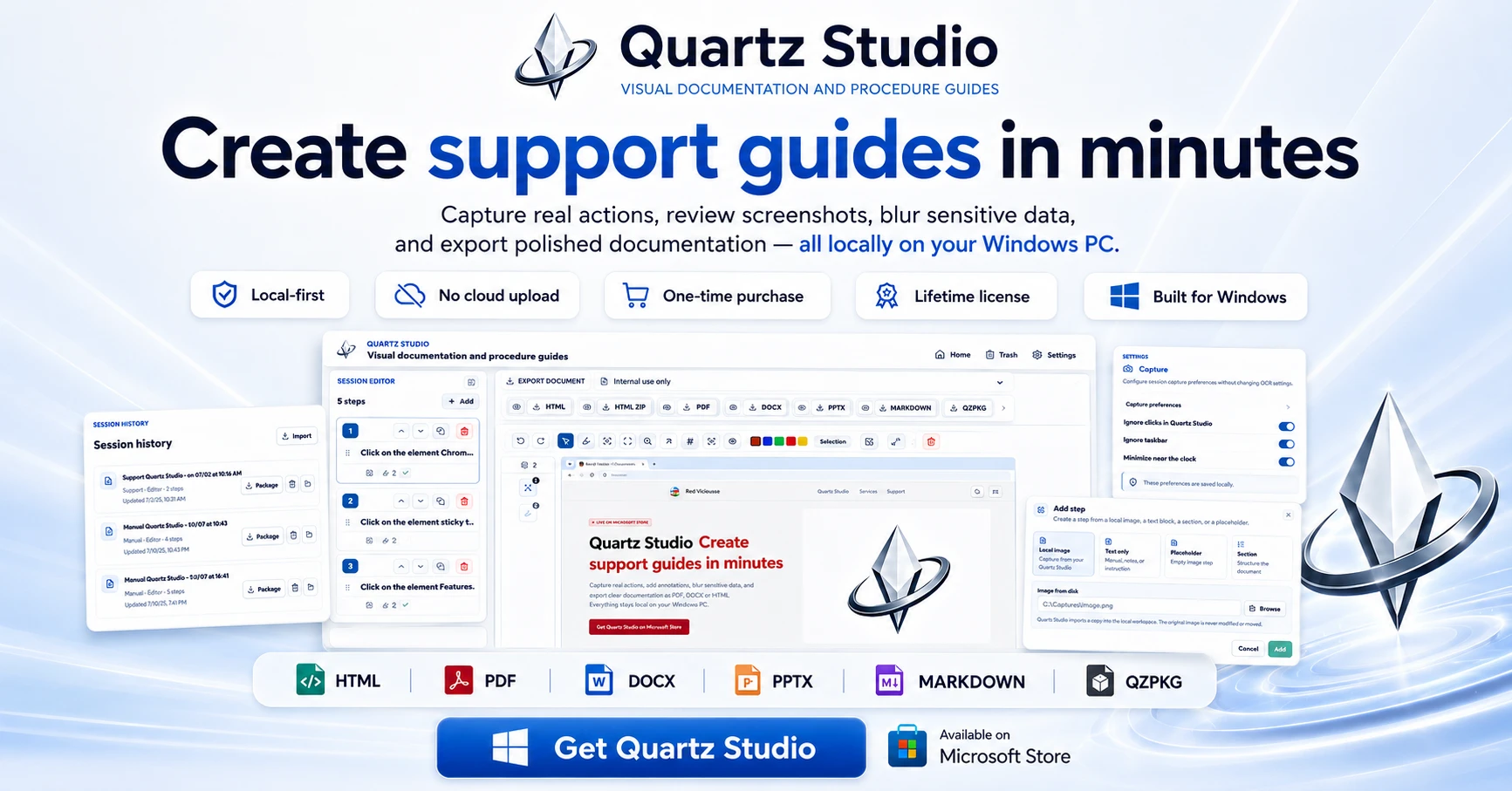
A Windows app that turns real screen actions into annotated step-by-step guides with local OCR and no cloud upload, aimed at IT support, helpdesk and training teams.
Works offlineNo subscriptionCan export my data
What to know▼
How it works
A local-first Windows app for turning real desktop actions into professional visual guides: it captures clicks and active windows with consent, offers a structured editor, annotations, blur, and local OCR, and exports to PDF, DOCX, HTML, PowerPoint, or Markdown.
What's different
Keeps screenshots, OCR, and documents entirely local on the user's PC, with no SaaS account and no keystroke logging, unlike cloud-based alternatives.
Pricing
Available on Microsoft Store with a one-time lifetime license.
Best for
IT support, helpdesk, QA, operations, and training teams that need step-by-step documentation from real desktop actions.
We check every product on this page once a day and record whether it still answers.
A Mac app that turns long videos into short vertical clips with subtitles and AI-generated titles, descriptions, and hashtags, processing everything on-device instead of uploading to the cloud.
FreeWorks offlinePay once
What to know▼
How it works
Runs entirely locally on Apple Silicon Macs and works offline, so footage is never uploaded to a server.
Pricing
Free to use; a one-time $49 Pro payment removes the watermark, no subscription.
We check every product on this page once a day and record whether it still answers.
A local Windows security suite with antivirus, AI ransomware detection, a DNS shield, VPN, identity monitoring, and a telemetry blocker that stops manufacturers from phoning home.
Watch out · blocks telemetry from Microsoft, AMD, HP, NVIDIA, and Intel.
No sign-upWorks offlineData stays with you
What to know▼
How it works
100% local, one-time payment, no cloud, no subscription, no account required; data never leaves the machine.
Watch out
blocks telemetry from Microsoft, AMD, HP, NVIDIA, and Intel.
We check every product on this page once a day and record whether it still answers.
Automatically sorts a Mac's Desktop and Downloads into folders and renames cryptic filenames, processed entirely on-device with no cloud upload or subscription.
Works offlineData stays with youNo subscription
What to know▼
How it works
Automatically organizes a Mac's Desktop and Downloads folders into custom categories and renames cryptic filenames like IMG_1234 or scan_002 into readable names, using on-device AI.
What's different
Processes files entirely on-device with no cloud upload, so file organization doesn't leave the machine.
Pricing
Free 30-day trial; no subscription.
Best for
Mac users with cluttered Desktop/Downloads folders who don't want their file names or contents sent to the cloud.
We check every product on this page once a day and record whether it still answers.
Turns your Android phone into a self-hosted MCP server so AI assistants like Claude, Cursor or Perplexity can pull your personal memory without sending data to the cloud. Aimed at developers already using MCP-compatible tools.
Watch out · Relies on a relay tunnel (relay.memplato.com) and requires Termux running on the phone, with a watchdog to restart the server if the phone reboots or Termux closes.
Works offlineData stays with youOpen source
What to know▼
How it works
Turns an Android phone into a self-hosted MCP (Model Context Protocol) server by installing a Python MCP server inside Termux, with a secure tunnel giving the phone a stable public HTTPS URL that AI clients like Claude, Cursor or Perplexity can connect to for persistent memory.
What's different
Data is stored locally on the user's own phone instead of a vendor's cloud, with no subscription or vendor lock-in.
Pricing
No subscription.
Best for
Developers already using MCP-compatible AI tools who want to own their memory data instead of storing it in the cloud.
Watch out
Relies on a relay tunnel (relay.memplato.com) and requires Termux running on the phone, with a watchdog to restart the server if the phone reboots or Termux closes.
We check every product on this page once a day and record whether it still answers.
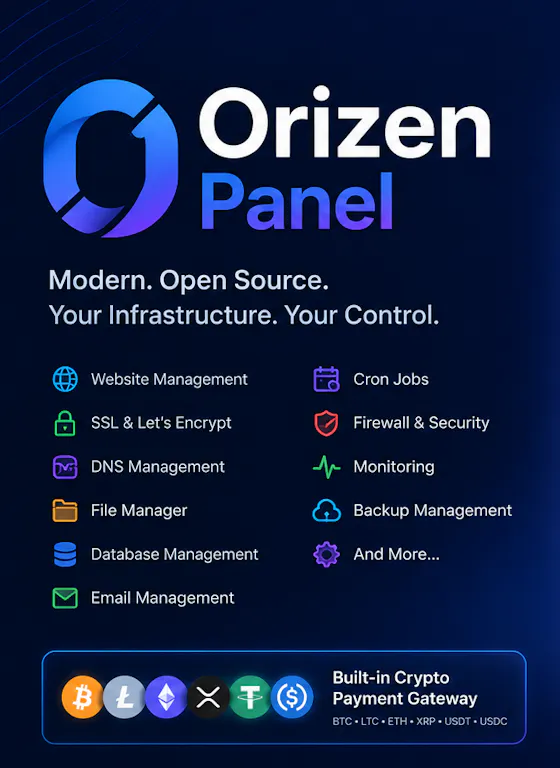
An open-source, self-hosted hosting control panel positioned as a free alternative to cPanel/WHM, with built-in multi-chain crypto payments.
FreeOpen sourceNo subscription
What to know▼
How it works
A self-hosted hosting control panel with one-command cross-distro install: unlimited sites, automatic Cloudflare DNS and HTTPS, email, databases, file manager, staging, and a built-in multi-chain crypto payment gateway.
What's different
Positioned as a free, open-source alternative to cPanel/WHM with crypto payments to wallets you control, no KYC.
We check every product on this page once a day and record whether it still answers.
An on-device AI writing assistant for Mac that fixes grammar and expands text snippets across every app without sending your text to the cloud, sold as a one-time $39 purchase with no account required.
No sign-upWorks offlineNo subscription
What to know▼
How it works
Runs entirely on-device using local AI to fix grammar, expand snippets, and finish sentences inside any Mac app.
Pricing
One-time $39 payment, no subscription.
Best for
Mac users who want AI writing help without cloud data transmission or recurring fees.
We check every product on this page once a day and record whether it still answers.
Locks, hides and encrypts apps and folders on your Mac with Touch ID or a password, entirely offline, for a one-time purchase instead of a subscription.
No sign-upWorks offlinePay once
What to know▼
How it works
Locks, hides and encrypts apps and folders on macOS using Touch ID or a password.
What's different
Runs 100% locally with no account and no cloud, and is sold as a one-time purchase rather than a subscription.
Pricing
One-time purchase.
Best for
Mac users who want specific apps and folders locked away from other people using the same machine.
We check every product on this page once a day and record whether it still answers.
76 separate browser-based, offline, pay-once workspaces built for specific roles like real estate agents, fitness coaches and developers, pitched as an escape from stacked SaaS subscriptions.
Nothing to installWorks offlineData stays with you
What to know▼
How it works
76 self-contained, browser-based workspaces, each with 8-10 purpose-built modules for a specific role or niche (real estate, fitness coaching, cybersecurity, development, etc.), running 100% offline and locally.
What's different
Data never touches a server (local-first architecture) and it's a one-time purchase instead of a stack of monthly SaaS subscriptions.
Pricing
Pay once, own forever (one-time payment, no subscription).
Best for
Professionals in specific niches who want purpose-built tools without recurring SaaS fees or sending business data to the cloud.
We check every product on this page once a day and record whether it still answers.
A local-first AI platform bundling chat, a coding agent, a terminal and uncensored open models, with no cloud or accounts. For technical users, not really a mobile app despite the Android companion.
Watch out · Ships uncensored models with zero filters — outputs are not moderated.
No sign-upWorks offlineOpen source
What to know▼
How it works
A local-first AI platform bundling end-to-end encrypted P2P chat, a bare-metal terminal with real PTY shell access, autonomous coding agents, hybrid RAG, and bundled uncensored Qwen/Gemma models, with a native Android companion app for LAN discovery.
What's different
Runs fully offline with no cloud, accounts, or subscriptions, and ships uncensored model variants with no filters.
Pricing
Open-source (AGPL-3.0).
Best for
Technical users on Linux or Windows who want a self-hosted AI toolkit with no cloud dependency.
Watch out
Ships uncensored models with zero filters — outputs are not moderated.
We check every product on this page once a day and record whether it still answers.
Generates and burns video captions entirely on your Mac using local AI, no cloud upload, no subscription, one-time purchase after a 30-day free trial.
No sign-upWorks offlinePay once
What to know▼
How it works
Generates, edits and burns video captions locally on a Mac using on-device AI, with Quick Mode for batch-processing multiple videos of mixed codecs/resolutions and Project mode for adjusting timing word by word. Supports karaoke, word-build and custom caption styles, exporting SRT, VTT, ASS, MKV or burned-in video.
What's different
Runs fully offline with no cloud upload, account or subscription, on any Apple Silicon Mac including 8GB models.
Pricing
Free 30-day trial, then a one-time purchase, no subscription.
Best for
Mac-based video creators who want captions generated and burned in without uploading footage to the cloud.
We check every product on this page once a day and record whether it still answers.
On-device AI dictation and meeting notetaker for Mac and iOS that works offline without an account.
Watch out · Windows and Android support are coming soon, not yet available.
FreeNo sign-upWorks offline
What to know▼
How it works
Runs 100% on-device using Gemma and Whisper for push-to-talk dictation into any app, live meeting transcripts, AI rewriting, and asking questions across notes.
What's different
No cloud, no account, no subscription.
Pricing
Free for macOS and iOS.
Watch out
Windows and Android support are coming soon, not yet available.
We check every product on this page once a day and record whether it still answers.
A Chrome screenshot and annotation tool that runs entirely locally with five capture modes and eight annotation tools, instead of uploading screenshots to a cloud service.
Watch out · About 50KB, built with vanilla JS.
FreeNo sign-upWorks offline
What to know▼
How it works
Captures screenshots (visible, full page, region, element, timed) and adds annotations such as arrows, shapes, text, and blur, locally in the browser.
Pricing
Free tier with all modes and tools, no watermark; Pro is a $39 one-time purchase for extra formats and history.
We check every product on this page once a day and record whether it still answers.
An Android app that turns your daily workouts, steps, sleep, hydration, habits, and screen time into a single private health score, instead of separate tracking apps or a cloud dashboard.
No sign-upWorks offlinePay once
What to know▼
How it works
Combines health metrics via Health Connect into one daily score, with no account and no cloud, data staying on-device.
Pricing
7-day free trial, then a one-time purchase of 5.99 euro (normally 7.99 euro).
We check every product on this page once a day and record whether it still answers.
A native Mac file converter that compresses images, video, audio and PDFs entirely on-device with Shortcuts and Finder integration, for people who don't want files touching the cloud.
Works offlineData stays with youPay once
What to know▼
How it works
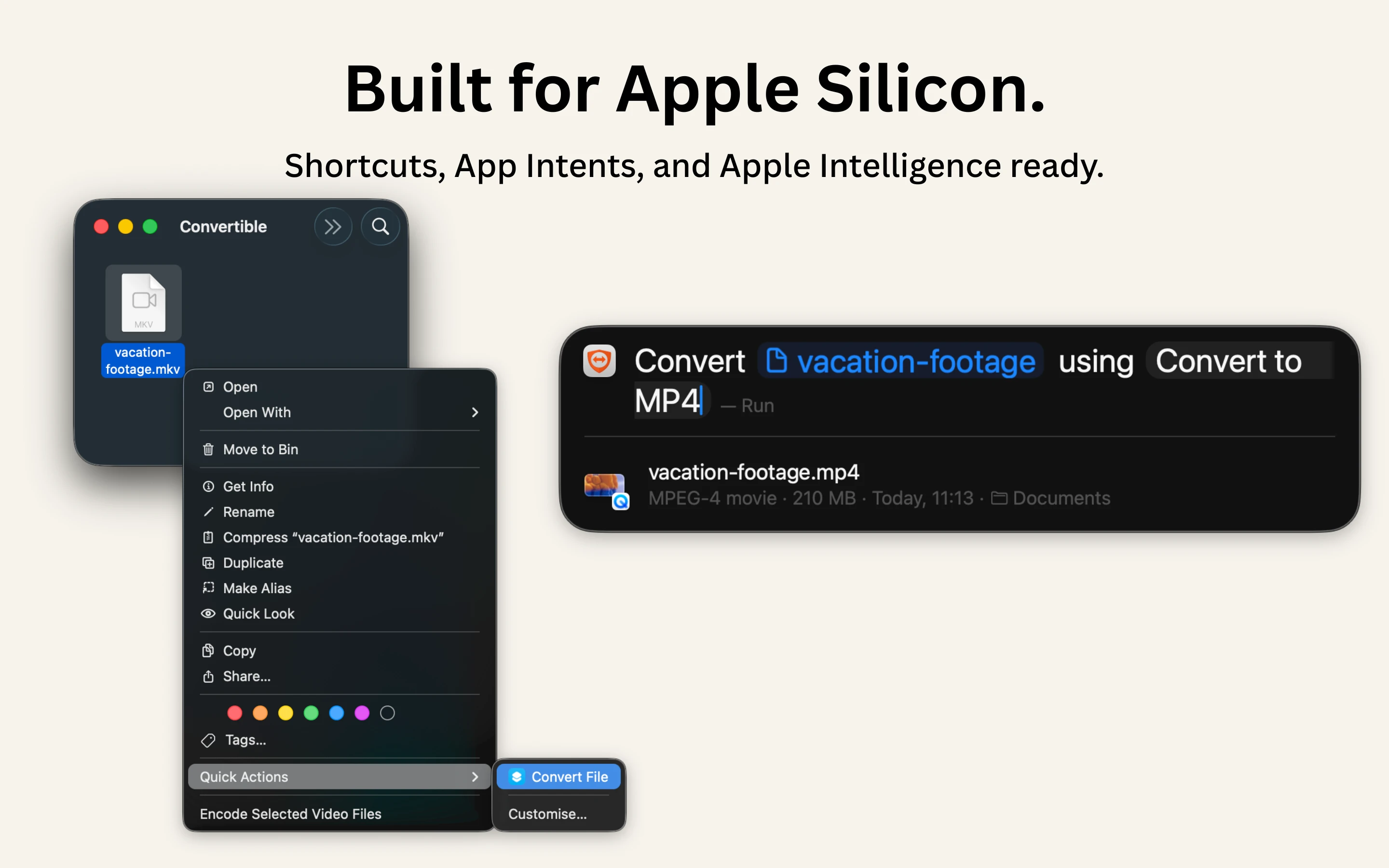
Converts and compresses images, video, audio and PDFs entirely on-device on Mac, including hard-to-open formats like MKV, WebM and HEIC, and can shrink files to a target size limit in one click.
What's different
Runs 100% locally with no cloud upload or telemetry, and integrates with Shortcuts, Finder's right-click menu, Spotlight and scheduled automations.
Pricing
One-time purchase, no subscription.
Best for
Mac users who want to convert or compress files without sending them to the cloud.
We check every product on this page once a day and record whether it still answers.
A drag-and-drop website builder that runs as a desktop app and exports real React code, with no cloud account or subscription. For people who want visual building without losing code ownership.
Works offlineNo subscriptionCan export my data
What to know▼
How it works
A drag-and-drop website builder that runs as a desktop app, letting you build pages visually from pre-built React components and export clean code to your framework of choice.
What's different
Local-first with no cloud account or subscription, and it exports real, ownable React code instead of locking you into a hosted builder.
Pricing
No subscription mentioned — described as no-cloud, no-lock-in.
Best for
Developers who want to build UI visually without giving up code ownership or a self-hosted workflow.
We check every product on this page once a day and record whether it still answers.
Scans WooCommerce product CSVs locally to find the exact row breaking your import, applies safe formatting repairs, and exports a clean UTF-8 copy — no uploads, no subscription.