We check every product on this page once a day and record whether it still answers.
A local, privacy-first app that uses one on-device Gemma model to capture, transcribe, search, and automate your screen and audio history.
Watch out · Requires a 4GB GPU to run.
Works offlineOpen sourceNo tracking
What to know▼
How it works
Uses one local Gemma model on-device for screen vision, audio transcription, chat, and reasoning; captures only when content changes and lets you search or chat with your screen history in plain English.
What's different
Compared against Microsoft Recall (needs $1000+ hardware) and Screenpipe (needs separate OCR + Whisper + external LLM) — this runs one local model for everything.
We check every product on this page once a day and record whether it still answers.
An open-source, self-hosted memory layer that links related facts across Claude, ChatGPT, Cursor and Codex via MCP. Built for developers comfortable self-hosting on Cloudflare, not a plug-and-play tool.
Open sourceSelf-hosted
What to know▼
How it works
A memory layer that remembers projects, people, decisions and preferences across Claude, ChatGPT, Cursor, Codex and any MCP client, automatically linking related memories and following those connections during recall.
What's different
Open source and self-hosted in your own Cloudflare account, and distinguishes settled decisions from drafts/stale context.
Best for
Developers comfortable self-hosting on Cloudflare who want a shared memory layer across multiple AI tools.
We check every product on this page once a day and record whether it still answers.
An open-source encrypted note-taking PWA that encrypts notes client-side before sync, for people who want their notes unreadable to the server even in the cloud.
Works offlineData stays with youOpen source
What to know▼
How it works
Notes encrypted in-browser with Argon2id + AES-256-GCM before leaving the device; only ciphertext reaches the server.
What's different
Works offline across devices while staying private.
We check every product on this page once a day and record whether it still answers.
A free, open-source clipboard history manager for Windows with image previews and a double-tap-Ctrl shortcut - a general utility despite being open source.
FreeOpen source
What to know▼
How it works
An open-source clipboard history manager for Windows 10/11 built with Rust and Tauri 2, showing text and image previews and letting you paste history with a double-tap of Ctrl.
What's different
Positioned against Windows' built-in Win+V (text-only, no image preview) and Ditto (not modernized), filling the gap for a free, actively developed Windows clipboard manager.
Pricing
Free.
Best for
Windows users who want a fast, private clipboard history tool with image support.
We check every product on this page once a day and record whether it still answers.
Managed hosting for the open-source Kanboard project-management tool, so small businesses get task tracking without installing or maintaining it — a cheaper alternative to Asana.
Open source
What to know▼
How it works
Managed hosting for the open-source Kanboard project-management tool, so you get task and team tracking without installing or maintaining the software yourself.
What's different
Built on open-source Kanboard rather than a proprietary tool, positioned as a cheaper alternative to Asana.
Best for
Small businesses that find tools like Asana too expensive.
We check every product on this page once a day and record whether it still answers.
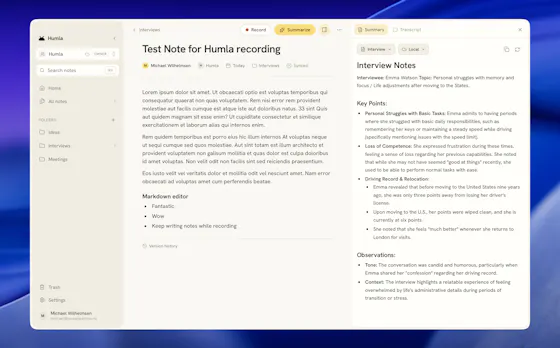
A Mac app that records and transcribes meetings entirely on-device, no bot joins the call. Free and open source, with optional cloud or self-hosted sync for teams.
FreeWorks offlineOpen source
What to know▼
How it works
Records mic and call audio directly through macOS with no bot joining the meeting, then transcribes, labels speakers, and writes a summary that fuses your notes with the transcript. Runs fully on-device using Whisper on Apple Silicon, or with your own AI key.
What's different
No bot joins the call, and it can run entirely on-device with local SQLite storage and no telemetry.
Pricing
Free and MIT-licensed, with optional paid team sync via Humla Cloud or self-hosting.
Best for
Mac users who want private, on-device meeting transcription without a bot joining their calls.
We check every product on this page once a day and record whether it still answers.
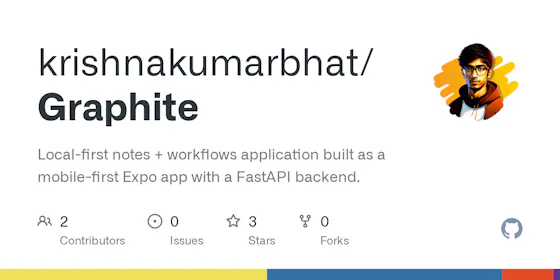
A local-first, self-hostable, open-source notes app with semantic search, autonomous research agents, and voice notes, where data never leaves the user's machine unless they choose to share it.
Watch out · Requires self-hosting, so it needs technical setup compared to a hosted notes app.
Works offlineData stays with youOpen source
What to know▼
How it works
Stores notes locally and adds semantic search, ReAct agents, cited deep research, voice notes, and financial analysis on top, all self-hosted and MIT licensed.
Best for
Technical users who want an AI-augmented notes app without sending their data to the cloud.
Watch out
Requires self-hosting, so it needs technical setup compared to a hosted notes app.
We check every product on this page once a day and record whether it still answers.
Open-source notes and to-do app with end-to-end encrypted sync and offline access, aimed at privacy-conscious users generally rather than developers specifically.
Works offlineOpen source
What to know▼
How it works
An open-source note-taking and task management app with rich notes, to-dos, notebooks, and multimedia documents.
What's different
End-to-end encryption, offline-first access, Markdown support, OCR search, and cross-platform sync while keeping full control of your data.
Best for
Privacy-conscious users who want productivity features without giving up control of their data.
We check every product on this page once a day and record whether it still answers.
A free, open-source local diff viewer for reviewing AI-agent-written code across git, jj, Perforce and GitHub/GitLab PRs, with optional AI-assisted review - for developers.
FreeOpen sourceSelf-hosted
What to know▼
How it works
A local diff viewer for reviewing AI-agent-written code, supporting git, jj, Perforce, and GitHub/GitLab pull requests. You annotate lines and files, and those notes feed back into your agent session. An optional AI layer adds inline Q&A, guided reviews and launchable review agents.
What's different
Notes feed directly back into the coding agent's session rather than staying siloed in the review tool.
Pricing
Free, MIT / Apache-2.0 licensed, runs on your machine.
Best for
Developers reviewing large volumes of AI-agent-generated code across multiple version control systems.
We check every product on this page once a day and record whether it still answers.
Turns your Android phone into a self-hosted MCP server so AI assistants like Claude, Cursor or Perplexity can pull your personal memory without sending data to the cloud. Aimed at developers already using MCP-compatible tools.
Watch out · Relies on a relay tunnel (relay.memplato.com) and requires Termux running on the phone, with a watchdog to restart the server if the phone reboots or Termux closes.
Works offlineData stays with youOpen source
What to know▼
How it works
Turns an Android phone into a self-hosted MCP (Model Context Protocol) server by installing a Python MCP server inside Termux, with a secure tunnel giving the phone a stable public HTTPS URL that AI clients like Claude, Cursor or Perplexity can connect to for persistent memory.
What's different
Data is stored locally on the user's own phone instead of a vendor's cloud, with no subscription or vendor lock-in.
Pricing
No subscription.
Best for
Developers already using MCP-compatible AI tools who want to own their memory data instead of storing it in the cloud.
Watch out
Relies on a relay tunnel (relay.memplato.com) and requires Termux running on the phone, with a watchdog to restart the server if the phone reboots or Termux closes.
We check every product on this page once a day and record whether it still answers.
A companion tool that adds a personal practice log on top of LeetCode — attempt history, notes, solutions, and review tracking — backed by your own GitHub repo.
Open source
What to know▼
How it works
Logs attempts, saves notes and solutions, and tracks review status built directly into LeetCode, backed by your own GitHub repository.
We check every product on this page once a day and record whether it still answers.
A hosted, open-source knowledge base that auto-tags and semantically links your notes, writes cited wikis, and runs scheduled research reports using AI; Markdown export anytime, 14-day trial (not free).
Open sourceCan export my data
What to know▼
How it works
An open-source, hosted knowledge base that auto-tags your notes, links them semantically, writes cited wikis, and runs research reports on a schedule.
What's different
Auto-tagging and semantic linking happen automatically rather than requiring manual organization.
Pricing
14-day trial, no card required; not stated as free after the trial.
Best for
People who want a self-organizing notes system and can export to Markdown at any time if they leave.
We check every product on this page once a day and record whether it still answers.
A free, open-source, self-hostable link where a class shares notes, slides and past papers with no accounts, built for students tired of digging through group chats before exams.
FreeOpen sourceSelf-hosted
What to know▼
How it works
Gives a class one shared link where notes, slides, and past papers live; anyone can add or grab files with no account needed. PDFs preview in the browser, a whole section can be downloaded as a zip before exams, and the link can be shared via QR code in a lecture hall.
What's different
Self-hostable and open source, and requires no accounts for anyone using it.
Pricing
Free.
Best for
Students who want a single shared place for class materials instead of digging through group chats before exams.
We check every product on this page once a day and record whether it still answers.
A cross-platform clipboard manager with full history, search and secret masking for anyone who copy-pastes constantly - handy for developers managing API keys, but useful for any heavy copy-paste workflow.
No sign-upWorks offlineOpen source
What to know▼
How it works
Remembers everything you copy - text, images, files - across macOS, Windows and Linux, with full-text search, a paste stack, secret masking with encryption, and smart auto-grouping.
What's different
Runs 100% locally with no account, and is open source.
Pricing
Not stated beyond being open source.
Best for
Developers and anyone who copy-pastes constantly, including people managing API keys via clipboard.
We check every product on this page once a day and record whether it still answers.
An open-source framework that turns your existing AI coding agent into a persistent virtual cofounder that remembers your venture across sessions, for solo technical founders.
Open source
What to know▼
How it works
An open-source install turns an existing AI coding agent — Claude Code, Cursor, Antigravity, Gemini CLI, GitHub Copilot — into a persistent virtual cofounder: one line installs it, `shotgun-init` injects it into a folder or codebase, and after a one-time onboarding it remembers your venture, builds your product, and keeps your data organized.
What's different
Open-source and works on top of whatever AI agent you already use, rather than being its own separate assistant.
Best for
Solo technical founders building without a human cofounder.
We check every product on this page once a day and record whether it still answers.
An open-source editor for memos built on something called the 'Open Knowledge Format'; the public description is too thin to say much more about who it's really for.
Open source
What to know▼
How it works
An open-source editor for memos built on the 'Open Knowledge Format'.
We check every product on this page once a day and record whether it still answers.
A password manager built on the open, KeePass-compatible KDBX format, storing logins, passkeys, cards and TOTP codes in one encrypted vault with Face ID autofill.
Data stays with youOpen sourceNo ads
What to know▼
How it works
Stores logins, passkeys, credit cards, secure notes and TOTP codes in an encrypted vault, built on the open KDBX format compatible with KeePass and KeePassXC, with one-tap AutoFill and Face ID across iPhone, iPad, Mac, Windows and Linux.
What's different
Uses the open KDBX format instead of a proprietary vault, so you're not locked into one vendor, with zero-knowledge on-device encryption before sync.
Best for
People wanting a KeePass-compatible password vault across Apple, Windows and Linux devices without vendor lock-in.