We check every product on this page once a day and record whether it still answers.
A free, fully on-device meeting note-taker that transcribes and blends your typed notes without ever sending audio to the cloud or requiring an account, unlike most paid cloud notetakers.
FreeNo sign-upWorks offline
What to know▼
How it works
On-device transcription blended with your typed notes into a write-up; optional bring-your-own model key or fully offline.
What's different
Most competitors still upload audio to their cloud and cost $18+/mo; this doesn't and is free.
We check every product on this page once a day and record whether it still answers.
Windows music-video editor that auto-cuts footage to the beat with lyric captions and stem separation, fully offline, $49 one-time.
Watch out · Runs on PC, offline.
Works offlineNo subscriptionCan export my data
What to know▼
How it works
Cuts footage to the beat automatically, generates word-by-word karaoke auto-lyrics, separates vocal and drum stems, and adds audio visualizers and lo-fi atmosphere effects.
Pricing
Free demo has a watermark and 60s export cap; $49 one-time unlocks clean exports with no subscription.
We check every product on this page once a day and record whether it still answers.
Records what you say and turns it into an organized project log automatically on your own device. Aimed at solo builders and founders who have no one else tracking their progress.
FreeWorks offlinePay once
What to know▼
How it works
Records spoken audio and turns it into an organized project history and devlog automatically, processed on your own device.
What's different
Runs fully on-device rather than relying on manual note-taking or a cloud service.
Pricing
Free to use with full functionality, no subscription; a paid Pro tier unlocks Labs and unlimited weekly processing.
Best for
Solo builders and founders who track their own progress by talking rather than writing, with no one else keeping a project record for them.
We check every product on this page once a day and record whether it still answers.
Mac dictation app that turns speech into text system-wide via a hotkey, runs locally for privacy, and is sold as a one-time purchase instead of a subscription.
Watch out · macOS only.
No subscription
What to know▼
How it works
System-wide dictation on macOS activated by a customizable push-to-talk key, converting speech to text in any app.
We check every product on this page once a day and record whether it still answers.
Uses Whisper and Microsoft MAI to transcribe audio, video or links into text and subtitles, with 10 free minutes then a paid service, and auto-deletes uploads within 24 hours.
FreeNo subscriptionNo ads
What to know▼
How it works
Uses OpenAI Whisper and Microsoft MAI to turn audio, video, or links into text with speaker diarisation, summaries, and action lists, plus free tools to convert SRT/VTT subtitles, edit subtitle files, and shift timestamps.
What's different
Uploads and transcripts are auto-deleted after 24 hours, or instantly on request, by default.
Pricing
10 free transcription minutes, then paid; no subscription, no ads.
We check every product on this page once a day and record whether it still answers.
Transcribes audio and video, including YouTube, to text locally using Whisper AI, with no cloud upload, no subscription, and a one-time payment. Good for unlimited, private transcription without ongoing fees.
Works offlinePay onceNo subscription
What to know▼
How it works
Transcribes audio and video, including YouTube videos, playlists and live microphone input, to text entirely on your computer using Whisper AI, in 100+ languages.
What's different
Runs fully offline with no cloud upload, unlimited usage and no subscription.
Pricing
One-time payment, no subscription.
Best for
People who want unlimited, private transcription without ongoing fees or uploading audio to a cloud service.
We check every product on this page once a day and record whether it still answers.
A Mac hold-to-talk voice typing tool that transcribes on-device for privacy.
Watch out · Requires macOS 14.6 or later.
FreeWorks offlineNo subscription
What to know▼
How it works
Hold Option, speak, release, and text appears at the cursor; SenseVoice transcription runs on-device for free, offline, private use, or bring your own OpenAI Whisper or SiliconFlow key for cloud accuracy.
What's different
Strong on mixed Chinese-English transcription.
Pricing
Free to start; one-time Pro purchase plus optional AI Plus.
We check every product on this page once a day and record whether it still answers.
Converts speech to text entirely on your Windows PC — no cloud, no account required, works even with WiFi off. For users who want dictation without sending audio anywhere.
No sign-upWorks offlineData stays with you
What to know▼
How it works
Converts speech to text directly on a Windows PC using one shortcut: hold, speak, release, and the text lands wherever your cursor is, in any app.
What's different
Works entirely offline with no cloud processing, no account, and no subscription — it keeps working even with WiFi off.
Pricing
One-time payment, no subscription.
Best for
Windows users who want dictation in any app (email, chat, notes, code editors) without their voice data leaving the device.
We check every product on this page once a day and record whether it still answers.
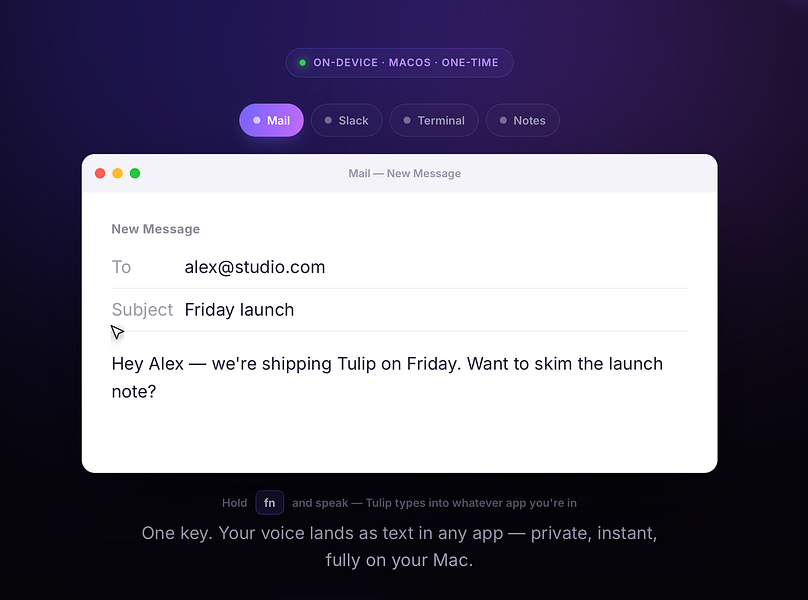
Hold a key and dictate into any Mac app; speech-to-text runs entirely on-device so nothing is sent to a server. One-time purchase, not a subscription.
Works offlinePay onceNo subscription
What to know▼
How it works
Hold the fn key on a Mac, speak, and release to drop clean, punctuated dictated text at your cursor in any app; speech-to-text runs entirely on-device on Apple Silicon and works offline.
What's different
Processes audio fully on-device and never sends it to a server, unlike cloud-based dictation tools.
Pricing
One-time purchase for a lifetime license usable on up to three Macs, with a 2-day free trial and a year of updates included.
Best for
Mac users who want fast, private dictation into any app without a subscription.
We check every product on this page once a day and record whether it still answers.
Voice dictation for Mac and iPhone that runs fully on-device so your voice never leaves your hardware, with multilingual support and a lifetime-purchase option instead of a subscription.
Works offlineData stays with youNo subscription
What to know▼
How it works
Hold a hotkey, speak, and structured text lands where your cursor is in any app on Mac and iPhone, using on-device models that fix punctuation and structure and support multilingual speech, a personal dictionary, snippets and workflows.
What's different
On-device processing means your voice never leaves your hardware.
Pricing
Free tier included, plus lifetime unlocks instead of a forced subscription.
Best for
Mac and iPhone users who want private, offline voice dictation across apps.
We check every product on this page once a day and record whether it still answers.
Generates and burns video captions entirely on your Mac using local AI, no cloud upload, no subscription, one-time purchase after a 30-day free trial.
No sign-upWorks offlinePay once
What to know▼
How it works
Generates, edits and burns video captions locally on a Mac using on-device AI, with Quick Mode for batch-processing multiple videos of mixed codecs/resolutions and Project mode for adjusting timing word by word. Supports karaoke, word-build and custom caption styles, exporting SRT, VTT, ASS, MKV or burned-in video.
What's different
Runs fully offline with no cloud upload, account or subscription, on any Apple Silicon Mac including 8GB models.
Pricing
Free 30-day trial, then a one-time purchase, no subscription.
Best for
Mac-based video creators who want captions generated and burned in without uploading footage to the cloud.
We check every product on this page once a day and record whether it still answers.
On-device AI dictation and meeting notetaker for Mac and iOS that works offline without an account.
Watch out · Windows and Android support are coming soon, not yet available.
FreeNo sign-upWorks offline
What to know▼
How it works
Runs 100% on-device using Gemma and Whisper for push-to-talk dictation into any app, live meeting transcripts, AI rewriting, and asking questions across notes.
What's different
No cloud, no account, no subscription.
Pricing
Free for macOS and iOS.
Watch out
Windows and Android support are coming soon, not yet available.
We check every product on this page once a day and record whether it still answers.
A one-time-purchase Mac app that records and transcribes video calls on-device without bots joining or data leaving the machine, for people who want to own a private, searchable meeting archive.
FreeWorks offlinePay once
What to know▼
How it works
Records meetings from Zoom, Meet, Teams or Webex on a Mac and transcribes them on-device, learning speaker names across meetings, without bots joining calls or data touching the cloud; saves transcripts as video, JSON and Markdown.
Pricing
One-time purchase, free to try.
Best for
People who want a private, searchable meeting record they own, without a subscription.