We check every product on this page once a day and record whether it still answers.
Offline Windows speech studio offering local text-to-speech, speech-to-text and system-wide dictation with a local API.
Watch out · Runs fully offline after models download; works on GPU or CPU.
Works offlineData stays with you
What to know▼
How it works
A Windows speech studio offering multi-engine local TTS with custom voices, speech-to-text with speaker labels, global hotkey dictation into any field, and a localhost HTTP API for scripts and AI agents.
Watch out
Runs fully offline after models download; works on GPU or CPU.
We check every product on this page once a day and record whether it still answers.
Generates bilingual subtitles for mixed-language (Japanese/Korean/Chinese-English) video without uploading the full video file, for creators who don't want their video leaving their device.
Data stays with youCan export my data
What to know▼
How it works
Audio extracted locally in-browser, only ~30MB audio sent to servers, deleted after processing
What's different
Handles code-switching and loanwords/technical terms accurately
We check every product on this page once a day and record whether it still answers.
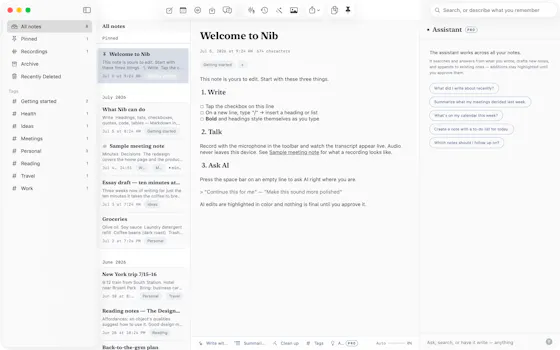
A notes app for iPhone, iPad, and Mac that records and transcribes on-device, then turns meeting audio and handwritten notes into structured minutes with decisions and to-dos you approve as diffs.
FreeWorks offlineData stays with you
What to know▼
How it works
On-device transcription keeps audio local; AI restructures transcripts into minutes with editable, diff-based approval.
Pricing
Recording, transcription, and search are free; cloud AI features require Pro.
We check every product on this page once a day and record whether it still answers.
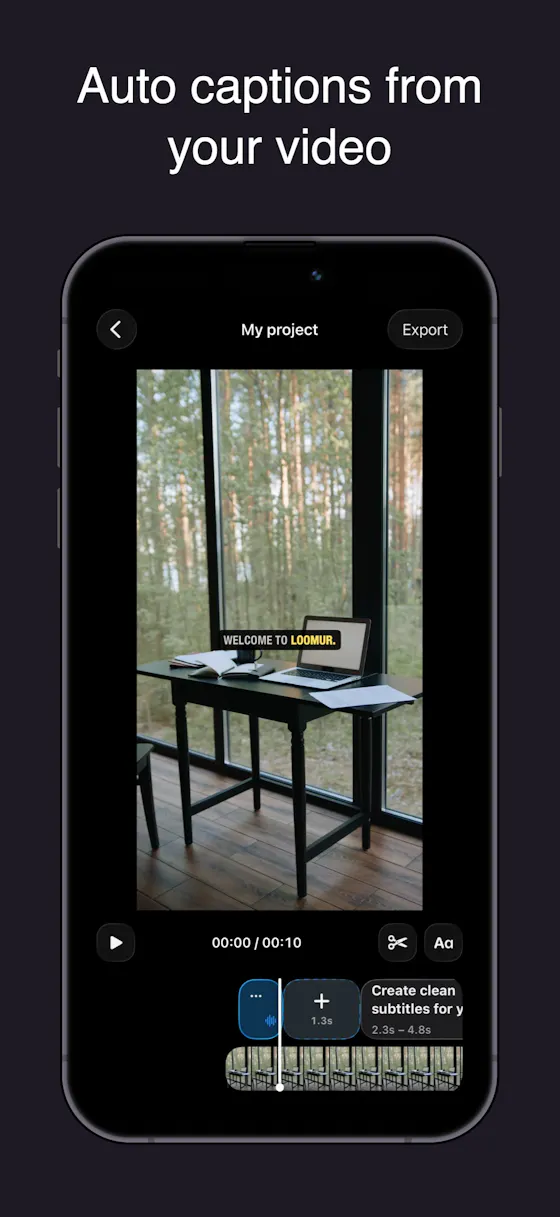
Auto-generates styled subtitles for short vertical videos directly on your iPhone using on-device AI — nothing is uploaded to a server.
Works offlineData stays with you
What to know▼
How it works
Generates stylish subtitles for short-form vertical videos directly on iPhone using on-device AI transcription; lets you edit text, highlight keywords, choose caption styles, and adjust placement before sharing.
What's different
Transcription happens entirely on-device, so no video is uploaded to a server.
Best for
Creators making stories, vlogs, or social content who want captions without uploading footage anywhere.
We check every product on this page once a day and record whether it still answers.
Push-to-talk dictation for Mac that types your speech into any app and can also trigger voice commands, for people who want hands-free input without cloud transcription.
Works offlineData stays with you
What to know▼
How it works
hold a hotkey to speak, transcribed on-device
What's different
voice never leaves the machine, can act on commands not just dictate
We check every product on this page once a day and record whether it still answers.
Converts speech to text entirely on your Windows PC — no cloud, no account required, works even with WiFi off. For users who want dictation without sending audio anywhere.
No sign-upWorks offlineData stays with you
What to know▼
How it works
Converts speech to text directly on a Windows PC using one shortcut: hold, speak, release, and the text lands wherever your cursor is, in any app.
What's different
Works entirely offline with no cloud processing, no account, and no subscription — it keeps working even with WiFi off.
Pricing
One-time payment, no subscription.
Best for
Windows users who want dictation in any app (email, chat, notes, code editors) without their voice data leaving the device.
We check every product on this page once a day and record whether it still answers.
Transcribes your own audiobooks on-device into word-by-word karaoke captions, with a dyslexia/ADHD-friendly reading mode — nothing ever leaves your phone.
Works offlineData stays with you
What to know▼
How it works
Transcribes your own audiobooks entirely on-device into word-by-word karaoke-style captions, with a dyslexia/ADHD reading mode (OpenDyslexic font, reading overlay, adjustable text size, night mode) and quote capture to save and share passages as highlight cards.
What's different
On-device AI transcription only — no upload, no cloud, nothing leaves your phone.
Best for
Audiobook listeners, including those with dyslexia or ADHD, who want to follow along with synchronized text.
We check every product on this page once a day and record whether it still answers.
Voice dictation for Mac and iPhone that runs fully on-device so your voice never leaves your hardware, with multilingual support and a lifetime-purchase option instead of a subscription.
Works offlineData stays with youNo subscription
What to know▼
How it works
Hold a hotkey, speak, and structured text lands where your cursor is in any app on Mac and iPhone, using on-device models that fix punctuation and structure and support multilingual speech, a personal dictionary, snippets and workflows.
What's different
On-device processing means your voice never leaves your hardware.
Pricing
Free tier included, plus lifetime unlocks instead of a forced subscription.
Best for
Mac and iPhone users who want private, offline voice dictation across apps.
We check every product on this page once a day and record whether it still answers.
A browser-based media editor (trim/merge/transcribe/convert/denoise) driven by typed natural-language commands, with processing done client-side.
Data stays with you
What to know▼
How it works
Trim, split, merge, transcribe, convert JPG/PNG/WebP, denoise, and add transitions to audio, video and images by typing natural-language commands, with processing done in the browser.
What's different
Editing is driven by typed commands rather than a traditional timeline/menu interface, and processing happens client-side.
Best for
Creators who want quick media edits (trimming, converting, denoising) without uploading files to a server.