We check every product on this page once a day and record whether it still answers.
A voice-to-text iOS keyboard that transcribes and AI-edits your dictation on-device (or self-hosted), for anyone who wants fast private dictation without cloud processing.
Works offlineSelf-hosted
What to know▼
How it works
Speech-to-text keyboard works in any app; AI Companion edits as you dictate on command (e.g. translate, make formal).
What's different
Runs fully on-device or self-hosted, zero analytics, zero tracking.
Best for
Users needing fast typing without sending audio to the cloud.
We check every product on this page once a day and record whether it still answers.
Real-time offline dictation and speech-to-text for meetings and notes on Mac that keeps everything private and processed locally instead of in the cloud.
Works offline
What to know▼
How it works
Provides realtime AI dictation and speech-to-text for meetings and notes, running privately and offline on Mac.
We check every product on this page once a day and record whether it still answers.
A local, privacy-first app that uses one on-device Gemma model to capture, transcribe, search, and automate your screen and audio history.
Watch out · Requires a 4GB GPU to run.
Works offlineOpen sourceNo tracking
What to know▼
How it works
Uses one local Gemma model on-device for screen vision, audio transcription, chat, and reasoning; captures only when content changes and lets you search or chat with your screen history in plain English.
What's different
Compared against Microsoft Recall (needs $1000+ hardware) and Screenpipe (needs separate OCR + Whisper + external LLM) — this runs one local model for everything.
We check every product on this page once a day and record whether it still answers.
A free, fully on-device meeting note-taker that transcribes and blends your typed notes without ever sending audio to the cloud or requiring an account, unlike most paid cloud notetakers.
FreeNo sign-upWorks offline
What to know▼
How it works
On-device transcription blended with your typed notes into a write-up; optional bring-your-own model key or fully offline.
What's different
Most competitors still upload audio to their cloud and cost $18+/mo; this doesn't and is free.
We check every product on this page once a day and record whether it still answers.
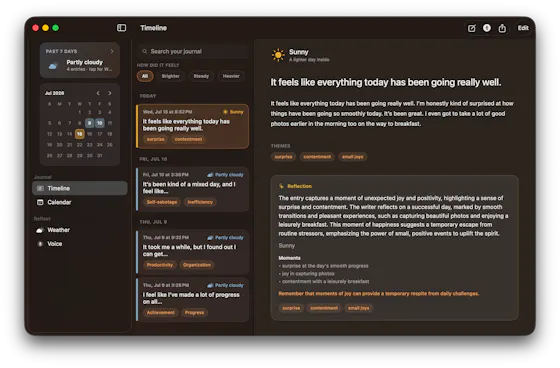
Transcribes short voice notes on-device into pattern dashboards, fully offline; data syncs end-to-end encrypted across devices, and you can plug in a local MCP server for your own AI agents.
Works offlineCan export my data
What to know▼
How it works
You speak a short voice note, it's transcribed on-device, and an offline dashboard surfaces patterns over time — repetition, distribution, spikes, changes, and correlations. Data syncs end-to-end encrypted across devices with keys you control, and can be exported/imported or connected to a local MCP server for your own agents to analyze.
What's different
Transcription and analysis happen entirely on-device with end-to-end encrypted sync, and data can be exported anytime to avoid lock-in.
Best for
People who want to track personal patterns from quick voice notes without their data leaving their control.
We check every product on this page once a day and record whether it still answers.
A free voice-to-structured-markdown notes app that runs entirely offline on Mac/iOS using a local LLM, for people who don't want their dictation sent to the cloud.
Watch out · Local LLM only — no cloud/API-key option mentioned, unlike some competitors.
FreeWorks offline
What to know▼
How it works
Global dictation shortcut, live markdown editor with on-the-fly LLM fixes, all local.
Pricing
Free.
Watch out
Local LLM only — no cloud/API-key option mentioned, unlike some competitors.
We check every product on this page once a day and record whether it still answers.
Turns on-site damp and timber survey inspections, captured via photos and voice dictation even offline, into finished reports with client portals and UK compliance tracking.
Works offline
What to know▼
How it works
Capture findings on-site with photo capture and voice dictation, even offline; AI analyzes the photos and generates branded reports with a client portal, job pipeline, and CRM.
Best for
UK surveyors doing damp and timber inspections who need Awaab's Law compliance built in.
We check every product on this page once a day and record whether it still answers.
A Mac dictation tool that turns speech into clean text anywhere via a hotkey, with recognition running locally, evolving into an on-device AI assistant you can hand tasks to. No cloud or account required.
FreeNo sign-upWorks offline
What to know▼
How it works
Hold a key, speak a sentence, and it appears as text in any Mac app; select existing text, press a key, and say what's wrong with it to have it rewritten in place. Speech recognition runs entirely on the Mac.
What's different
No audio ever leaves the device -- recognition and rewriting both run locally.
Pricing
Free trial.
Best for
Mac users who think faster than they type and want to dictate or fix text without leaving their current app.
We check every product on this page once a day and record whether it still answers.
Windows music-video editor that auto-cuts footage to the beat with lyric captions and stem separation, fully offline, $49 one-time.
Watch out · Runs on PC, offline.
Works offlineNo subscriptionCan export my data
What to know▼
How it works
Cuts footage to the beat automatically, generates word-by-word karaoke auto-lyrics, separates vocal and drum stems, and adds audio visualizers and lo-fi atmosphere effects.
Pricing
Free demo has a watermark and 60s export cap; $49 one-time unlocks clean exports with no subscription.
We check every product on this page once a day and record whether it still answers.
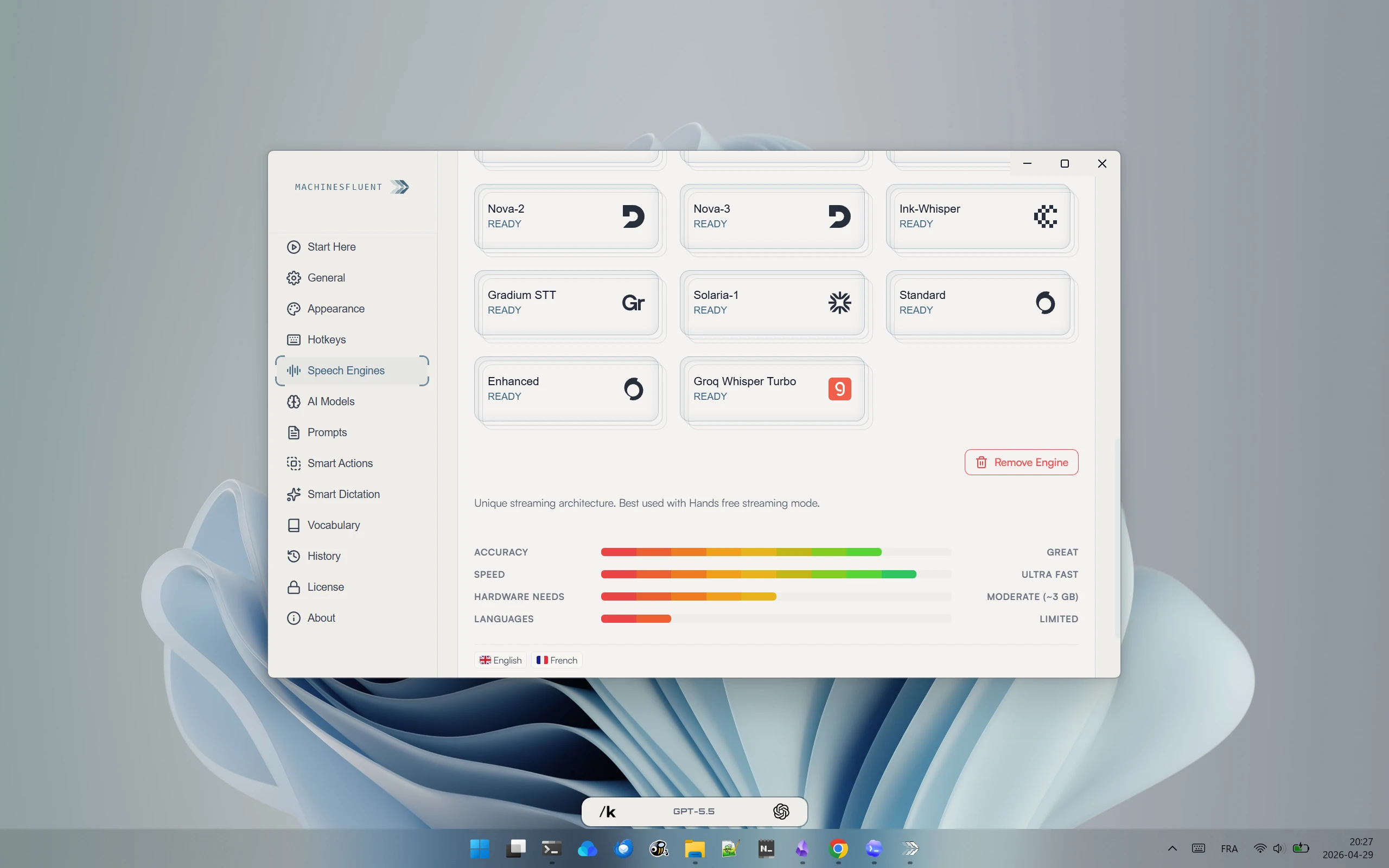
Offline Windows speech studio offering local text-to-speech, speech-to-text and system-wide dictation with a local API.
Watch out · Runs fully offline after models download; works on GPU or CPU.
Works offlineData stays with you
What to know▼
How it works
A Windows speech studio offering multi-engine local TTS with custom voices, speech-to-text with speaker labels, global hotkey dictation into any field, and a localhost HTTP API for scripts and AI agents.
Watch out
Runs fully offline after models download; works on GPU or CPU.
We check every product on this page once a day and record whether it still answers.
Transcribes meetings, interviews, and recordings on-device using local Whisper models, with speaker labels and a local AI summarizer.
FreeWorks offlineCan export my data
What to know▼
How it works
Records or imports audio/video and transcribes it on-device using local Whisper models, with speaker labels, editing, export, and a local AI assistant for summaries and action items.
Pricing
Free to download, with optional Pro access.
Best for
Sensitive, privacy-conscious meeting or interview transcription.
We check every product on this page once a day and record whether it still answers.
Records what you say and turns it into an organized project log automatically on your own device. Aimed at solo builders and founders who have no one else tracking their progress.
FreeWorks offlinePay once
What to know▼
How it works
Records spoken audio and turns it into an organized project history and devlog automatically, processed on your own device.
What's different
Runs fully on-device rather than relying on manual note-taking or a cloud service.
Pricing
Free to use with full functionality, no subscription; a paid Pro tier unlocks Labs and unlimited weekly processing.
Best for
Solo builders and founders who track their own progress by talking rather than writing, with no one else keeping a project record for them.
We check every product on this page once a day and record whether it still answers.
A Windows dictation tool for power users, running local models or your own API key to cloud AI, with voice search and 100+ language support.
Works offline
What to know▼
How it works
AI dictation for Windows that can run fully offline with local models (Ollama, LM Studio) or use cloud models via your own API key or OAuth sign-in, combining transcription and language models with custom prompts. Can process clipboard content including images, search the web by voice, and summarize long text into rich responses including diagrams, in 100+ languages.
What's different
Lets you switch between offline local models and cloud models, and bring your own key to access many different AI providers, rather than being locked to one.
Pricing
Free, no account required, open source, no subscription.
Best for
Windows power users who want flexible, privacy-conscious dictation across many apps and languages.
We check every product on this page once a day and record whether it still answers.
A local-first call transcription and note-taking app for Mac that transcribes and generates notes entirely on-device, instead of sending call audio to a cloud service.
Works offline
What to know▼
How it works
Runs transcription and intelligence generation on Apple Silicon; audio exists only in volatile memory and is destroyed once structured notes are produced.
What's different
No audio is ever recorded to disk or sent to the cloud, by design.
We check every product on this page once a day and record whether it still answers.
Transcribes audio and video entirely on your Apple Silicon Mac, no cloud upload and no minute limits — for anyone who needs private dictation or transcript editing without sending recordings off-device.
Works offline
What to know▼
How it works
Transcribes audio and video entirely on-device on Apple Silicon Macs, with synced playback for review, custom vocabulary, quick dictation anywhere, and merging/organizing transcripts.
What's different
No cloud uploads and no minute limits, unlike cloud transcription services.
Best for
Mac users who need private dictation or transcript editing without sending recordings off-device.
We check every product on this page once a day and record whether it still answers.
A notes app for iPhone, iPad, and Mac that records and transcribes on-device, then turns meeting audio and handwritten notes into structured minutes with decisions and to-dos you approve as diffs.
FreeWorks offlineData stays with you
What to know▼
How it works
On-device transcription keeps audio local; AI restructures transcripts into minutes with editable, diff-based approval.
Pricing
Recording, transcription, and search are free; cloud AI features require Pro.
We check every product on this page once a day and record whether it still answers.
A Mac dictation app that turns your voice, screenshots, and screen recordings into a clean AI-ready Markdown prompt for Claude Code, Cursor, or ChatGPT, running fully offline via local Whisper.
Works offline
What to know▼
How it works
Local Whisper and open models on a Mac turn voice, screenshots, and screen recordings into a clean Markdown prompt.
Best for
Developers using Claude Code, Cursor, or ChatGPT who want offline, private dictation without per-token billing.
We check every product on this page once a day and record whether it still answers.
A voice-to-text app that transcribes on-device and optionally cleans up grammar with a user-chosen AI, positioned as a free alternative to Wispr Flow.
FreeWorks offlineOpen source
What to know▼
How it works
Transcribes speech on-device (Parakeet/Whisper/Cohere), then optionally uses a chosen AI (Gemini, OpenAI, OpenRouter or local Ollama) to remove filler words and fix grammar; API keys stay in the Keychain.
What's different
Positioned as a free alternative to Wispr Flow, fully offline if you skip the AI cleanup step.
Pricing
Free, open-source.
Best for
People wanting private voice-to-text across any app.
We check every product on this page once a day and record whether it still answers.
A desktop companion app that generates real-time subtitles for VLC and MPV entirely offline using a local speech engine, with no internet connection or uploads required.
Works offline
What to know▼
How it works
Generates real-time subtitles for VLC and MPV entirely offline, using a local Vosk acoustic engine, with calibration sliders for syncing audio to captions.
What's different
No internet connection or uploads required — subtitle generation runs fully on-device.
Best for
People who want live captions for local video playback without sending audio to a cloud service.
We check every product on this page once a day and record whether it still answers.
Transcribes audio and video, including YouTube, to text locally using Whisper AI, with no cloud upload, no subscription, and a one-time payment. Good for unlimited, private transcription without ongoing fees.
Works offlinePay onceNo subscription
What to know▼
How it works
Transcribes audio and video, including YouTube videos, playlists and live microphone input, to text entirely on your computer using Whisper AI, in 100+ languages.
What's different
Runs fully offline with no cloud upload, unlimited usage and no subscription.
Pricing
One-time payment, no subscription.
Best for
People who want unlimited, private transcription without ongoing fees or uploading audio to a cloud service.
We check every product on this page once a day and record whether it still answers.
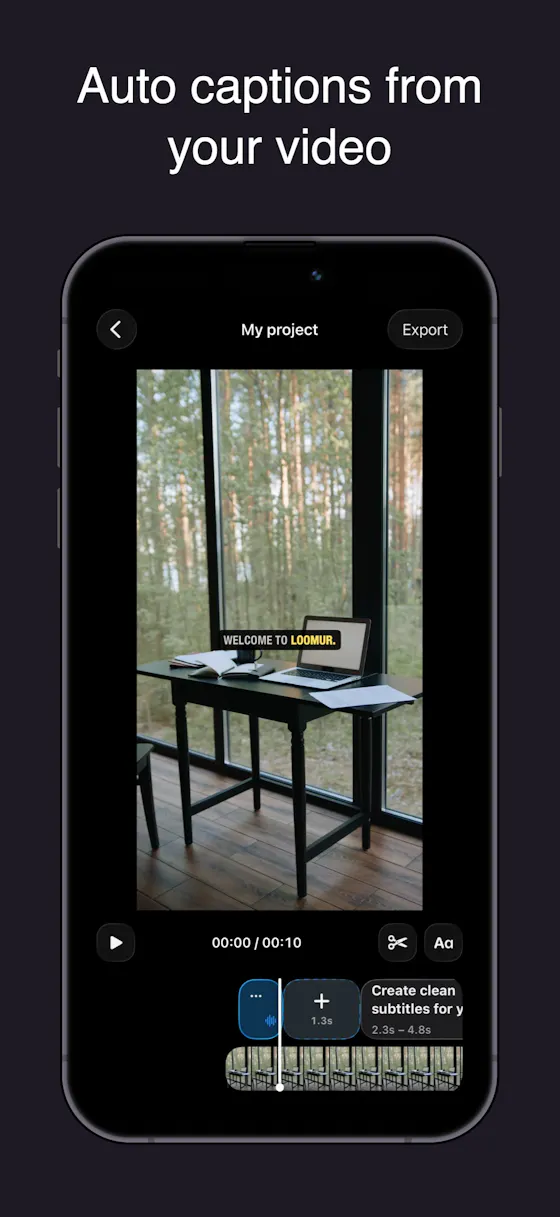
Auto-generates styled subtitles for short vertical videos directly on your iPhone using on-device AI — nothing is uploaded to a server.
Works offlineData stays with you
What to know▼
How it works
Generates stylish subtitles for short-form vertical videos directly on iPhone using on-device AI transcription; lets you edit text, highlight keywords, choose caption styles, and adjust placement before sharing.
What's different
Transcription happens entirely on-device, so no video is uploaded to a server.
Best for
Creators making stories, vlogs, or social content who want captions without uploading footage anywhere.
We check every product on this page once a day and record whether it still answers.
A podcast listening app that automatically detects and skips ads and sponsor reads, plus AI summaries, transcripts and offline downloads; free on iPhone, Android and web.
FreeWorks offline
What to know▼
How it works
Scans podcast episodes to find ads, sponsor reads, and commercial breaks and automatically skips them while you listen. Also provides AI summaries, searchable transcripts, and offline downloads.
What's different
Free automatic ad-skipping across podcasts, rather than a paid ad-free tier from individual podcast networks.
Pricing
100% free.
Best for
Podcast listeners on iPhone, Android, or web who want to skip ads without paying for ad-free subscriptions.
We check every product on this page once a day and record whether it still answers.
Push-to-talk dictation for Mac that types your speech into any app and can also trigger voice commands, for people who want hands-free input without cloud transcription.
Works offlineData stays with you
What to know▼
How it works
hold a hotkey to speak, transcribed on-device
What's different
voice never leaves the machine, can act on commands not just dictate
We check every product on this page once a day and record whether it still answers.
Records, transcribes and summarizes voice notes entirely on-device for iPhone, with speaker labels and live translation, for privacy-conscious note-takers.
Works offlineNo tracking
What to know▼
How it works
On-device AI transcription and summarization, no server upload
We check every product on this page once a day and record whether it still answers.
Records Google Meet calls locally on your computer, with no bot joining the call and nothing sent to a cloud server; the recording and transcript stay on your own PC and Drive.
Works offline
What to know▼
How it works
Records Google Meet calls entirely on your own machine, with no bot joining the call and nothing uploaded to a cloud server; video and transcript stay on your PC and your own Google Drive.
What's different
No bot in the call and no cloud upload, versus recorders that join as a participant and store recordings remotely.
Best for
People who want Google Meet recordings kept locally instead of sent to a third-party cloud.
We check every product on this page once a day and record whether it still answers.
A Mac hold-to-talk voice typing tool that transcribes on-device for privacy.
Watch out · Requires macOS 14.6 or later.
FreeWorks offlineNo subscription
What to know▼
How it works
Hold Option, speak, release, and text appears at the cursor; SenseVoice transcription runs on-device for free, offline, private use, or bring your own OpenAI Whisper or SiliconFlow key for cloud accuracy.
What's different
Strong on mixed Chinese-English transcription.
Pricing
Free to start; one-time Pro purchase plus optional AI Plus.
We check every product on this page once a day and record whether it still answers.
Records your Mac's mic and system audio directly with no bot joining the call, and transcribes on-device so recordings never leave your machine. Free to start, no account needed.
FreeNo sign-upWorks offline
What to know▼
How it works
Records your Mac's microphone and system audio as two separate tracks at the OS level, so nothing joins the call as a bot — works in Zoom, Meet, Teams, Discord or any browser tab. Transcription runs on-device.
What's different
No bot tile appears in the meeting, so it works even where bot-based recorders are blocked, and transcripts never leave your Mac.
Pricing
Free, no account needed to start.
Best for
People in companies that block meeting-recorder bots who still want private, local transcripts.
We check every product on this page once a day and record whether it still answers.
Converts speech to text entirely on your Windows PC — no cloud, no account required, works even with WiFi off. For users who want dictation without sending audio anywhere.
No sign-upWorks offlineData stays with you
What to know▼
How it works
Converts speech to text directly on a Windows PC using one shortcut: hold, speak, release, and the text lands wherever your cursor is, in any app.
What's different
Works entirely offline with no cloud processing, no account, and no subscription — it keeps working even with WiFi off.
Pricing
One-time payment, no subscription.
Best for
Windows users who want dictation in any app (email, chat, notes, code editors) without their voice data leaving the device.
We check every product on this page once a day and record whether it still answers.
An on-device dictation, rewriting, translation and local AI agent tool for Apple Silicon Macs - free and open-source (MIT), with no cloud, no accounts, and MCP support.
Watch out · Requires Apple Silicon and macOS 26; some listed models (Gemma 4, Qwen3.6, Ornith 1.0) are described as coming next, not yet available.
FreeWorks offlineOpen source
What to know▼
How it works
Runs on-device dictation, rewriting, and translation using multiple transcription models (Parakeet, CTC, Nemotron, Qwen3-ASR), plus a local agent that plans and calls tools like Apple Notes, clipboard, files, and MCP.
What's different
Fully local processing with no cloud and no accounts, and lets you swap or customize any underlying model or prompt.
Pricing
Free and open-source (MIT license).
Best for
Apple Silicon Mac users who want dictation and an AI agent without sending data to the cloud.
Watch out
Requires Apple Silicon and macOS 26; some listed models (Gemma 4, Qwen3.6, Ornith 1.0) are described as coming next, not yet available.
We check every product on this page once a day and record whether it still answers.
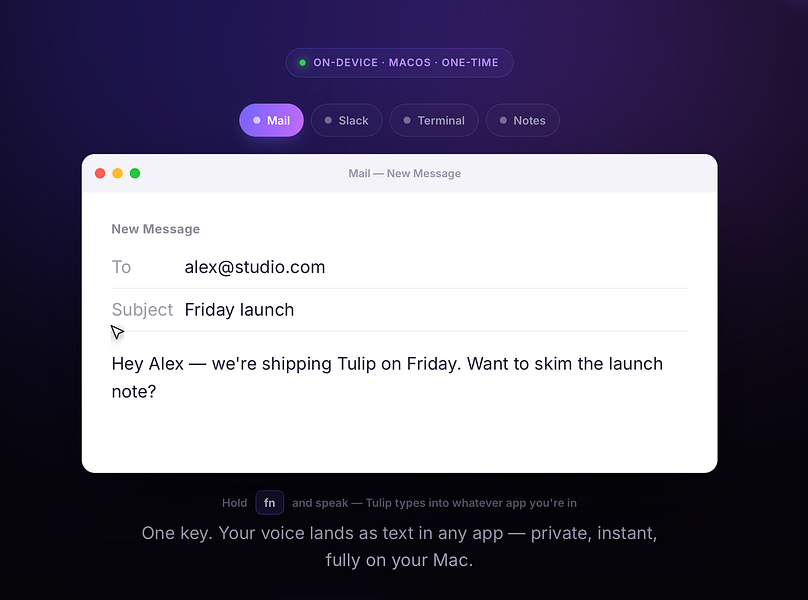
Hold a key and dictate into any Mac app; speech-to-text runs entirely on-device so nothing is sent to a server. One-time purchase, not a subscription.
Works offlinePay onceNo subscription
What to know▼
How it works
Hold the fn key on a Mac, speak, and release to drop clean, punctuated dictated text at your cursor in any app; speech-to-text runs entirely on-device on Apple Silicon and works offline.
What's different
Processes audio fully on-device and never sends it to a server, unlike cloud-based dictation tools.
Pricing
One-time purchase for a lifetime license usable on up to three Macs, with a 2-day free trial and a year of updates included.
Best for
Mac users who want fast, private dictation into any app without a subscription.
We check every product on this page once a day and record whether it still answers.
Transcribes your own audiobooks on-device into word-by-word karaoke captions, with a dyslexia/ADHD-friendly reading mode — nothing ever leaves your phone.
Works offlineData stays with you
What to know▼
How it works
Transcribes your own audiobooks entirely on-device into word-by-word karaoke-style captions, with a dyslexia/ADHD reading mode (OpenDyslexic font, reading overlay, adjustable text size, night mode) and quote capture to save and share passages as highlight cards.
What's different
On-device AI transcription only — no upload, no cloud, nothing leaves your phone.
Best for
Audiobook listeners, including those with dyslexia or ADHD, who want to follow along with synchronized text.
We check every product on this page once a day and record whether it still answers.
Voice dictation for Mac and iPhone that runs fully on-device so your voice never leaves your hardware, with multilingual support and a lifetime-purchase option instead of a subscription.
Works offlineData stays with youNo subscription
What to know▼
How it works
Hold a hotkey, speak, and structured text lands where your cursor is in any app on Mac and iPhone, using on-device models that fix punctuation and structure and support multilingual speech, a personal dictionary, snippets and workflows.
What's different
On-device processing means your voice never leaves your hardware.
Pricing
Free tier included, plus lifetime unlocks instead of a forced subscription.
Best for
Mac and iPhone users who want private, offline voice dictation across apps.
We check every product on this page once a day and record whether it still answers.
Generates and burns video captions entirely on your Mac using local AI, no cloud upload, no subscription, one-time purchase after a 30-day free trial.
No sign-upWorks offlinePay once
What to know▼
How it works
Generates, edits and burns video captions locally on a Mac using on-device AI, with Quick Mode for batch-processing multiple videos of mixed codecs/resolutions and Project mode for adjusting timing word by word. Supports karaoke, word-build and custom caption styles, exporting SRT, VTT, ASS, MKV or burned-in video.
What's different
Runs fully offline with no cloud upload, account or subscription, on any Apple Silicon Mac including 8GB models.
Pricing
Free 30-day trial, then a one-time purchase, no subscription.
Best for
Mac-based video creators who want captions generated and burned in without uploading footage to the cloud.
We check every product on this page once a day and record whether it still answers.
A fully local voice-to-text keyboard for macOS that types into any app — audio and text never leave your device, free for personal use.
FreeWorks offline
What to know▼
How it works
Hold a shortcut key and speak to type text into any macOS app via local speech recognition; audio and transcribed text stay on the device and are never sent to an external server.
Pricing
Free for personal use.
Best for
macOS users who want voice typing without their audio leaving their device.
We check every product on this page once a day and record whether it still answers.
On-device AI dictation and meeting notetaker for Mac and iOS that works offline without an account.
Watch out · Windows and Android support are coming soon, not yet available.
FreeNo sign-upWorks offline
What to know▼
How it works
Runs 100% on-device using Gemma and Whisper for push-to-talk dictation into any app, live meeting transcripts, AI rewriting, and asking questions across notes.
What's different
No cloud, no account, no subscription.
Pricing
Free for macOS and iOS.
Watch out
Windows and Android support are coming soon, not yet available.
We check every product on this page once a day and record whether it still answers.
A one-time-purchase Mac app that records and transcribes video calls on-device without bots joining or data leaving the machine, for people who want to own a private, searchable meeting archive.
FreeWorks offlinePay once
What to know▼
How it works
Records meetings from Zoom, Meet, Teams or Webex on a Mac and transcribes them on-device, learning speaker names across meetings, without bots joining calls or data touching the cloud; saves transcripts as video, JSON and Markdown.
Pricing
One-time purchase, free to try.
Best for
People who want a private, searchable meeting record they own, without a subscription.
We check every product on this page once a day and record whether it still answers.
A free local VS Code/Cursor extension that turns your Claude Code session files into a browsable dashboard with full transcripts, tool calls, sub-agents and per-response token and cost tracking.
FreeWorks offline
What to know▼
How it works
A VS Code/Cursor/VSCodium extension that turns local Claude Code session files into a browsable workspace with full transcripts, tool calls, sub-agents, per-response token and cost tracking, an analytics dashboard, and a CLAUDE.md memory view.
What's different
100% local-first — nothing leaves your machine.
Pricing
Free.
Best for
Developers using Claude Code who want to review sessions, costs and tool calls without a CLI-only cost counter.
We check every product on this page once a day and record whether it still answers.
Native macOS voice dictation for any text field — runs locally and works fully offline after downloading a speech model, keeping your voice on-device. Free, no subscription, no word limits.