We check every product on this page once a day and record whether it still answers.
Two-way sync extension keeping Zoho CRM and Mailchimp data automatically up to date, replacing manual CSV exports or per-task Zapier billing.
What to know▼
How it works
Two-way sync between Zoho CRM and Mailchimp, per module, every 1-10 minutes, including custom modules; Mailchimp opens, clicks, and unsubscribe status sync back onto CRM records.
What's different
Replaces manual CSV exports or per-task Zapier billing, keeping data only between Zoho and Mailchimp with no third-party storage.
Pricing
Flat pricing, no developer needed.
Best for
Teams running both Zoho CRM and Mailchimp who need their contact and engagement data kept in sync.
We check every product on this page once a day and record whether it still answers.
Web-to-print software specifically for commercial print shops — order intake, job specs, proofing, variable pricing, reorders.
What to know▼
How it works
Web-to-print software handling order processing, workflow automation, print management and B2B eCommerce for commercial printers, built around job specs, proofing, variable pricing and reorders.
What's different
Works only with printing companies across the US, Canada and Australia, so the workflow is built specifically around how print shops run jobs rather than being a generic eCommerce tool.
Best for
Commercial print shops in the US, Canada or Australia needing order intake, proofing and reorder workflows.
We check every product on this page once a day and record whether it still answers.
Bulk-schedules Pinterest pins and auto-assigns publish dates from your upload order, instead of manually picking a date for every pin. Built for creators, bloggers, agencies and marketers running Pinterest at scale.
What to know▼
How it works
Auto-assigns publish dates to Pinterest pins based on your upload order and posting frequency, instead of manually picking a date for every pin.
What's different
Removes the manual date-picking step other Pinterest schedulers require.
Best for
Creators, bloggers, agencies and eCommerce brands running Pinterest at scale.
We check every product on this page once a day and record whether it still answers.
Simple invoicing with automatic, escalating payment reminders for small service businesses like cleaners and freelancers, stopping once the client marks it paid.
Free
What to know▼
How it works
Create an invoice in four fields; reminders fire before/on due date then at 3/7/14/30 days overdue, stopping when marked paid
What's different
Never processes customer payments itself, no processing fees
Pricing
Free for 30 days or 30 invoices, then $9/mo intro, then $19/mo
We check every product on this page once a day and record whether it still answers.
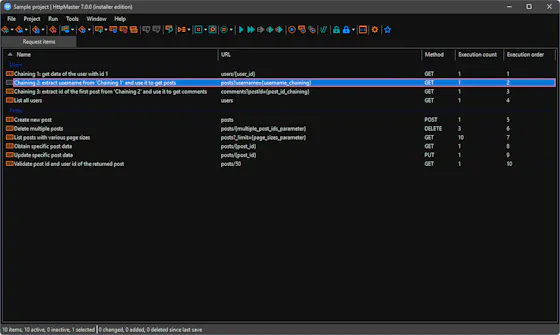
A desktop HTTP testing and automation tool for developers, with request chaining, OpenAPI support and cURL generation. Runs fully offline, free, with no ads or subscription.
FreeWorks offlineNo subscription
What to know▼
How it works
A desktop HTTP testing environment for creating, automating and validating HTTP workflows, with OpenAPI support, request chaining, dynamic parameters, advanced response validation, and cURL generation.
What's different
Completely free and offline, with no ads, subscriptions, or feature restrictions, plus native ARM support.
Pricing
Free, with no ads, subscriptions, or feature restrictions.
Best for
Developers building and validating HTTP request workflows and APIs.
We check every product on this page once a day and record whether it still answers.
A Chrome extension for automating repetitive browser tasks — clicking, form-filling, conditional macro workflows — entirely within the browser.
What to know▼
How it works
A Chrome extension that automates repetitive browser tasks — simple macro clicking, form filling, or multi-step workflows with conditional logic — entirely within the browser.
Best for
Users who need to repeat the same clicking or form-filling actions in Chrome and want conditional automation without leaving the browser.
We check every product on this page once a day and record whether it still answers.
Rapid application development tool for building customized workflow apps quickly, for business teams doing enterprise digitalization, instead of a traditional software development cycle.
What to know▼
Best for
Citizen developers building internal workflow apps.
We check every product on this page once a day and record whether it still answers.
Five Python scripts for repetitive office tasks — CSV cleanup, bulk email, file organizing, PDF merging, web scraping. The code is free; the paid bundle adds support, and you'll need enough Python comfort to run scripts yourself.
Free
What to know▼
How it works
Five Python scripts that automate repetitive office tasks: CSV cleaning, bulk emails, file organizing, PDF merging, and web scraping.
Pricing
The code is free on GitHub; the $29 bundle adds support.
Best for
Developers or makers comfortable running Python scripts who want to automate recurring office tasks.
We check every product on this page once a day and record whether it still answers.
A free cross-platform automation tool combining an auto-clicker, macro recorder and a no-code, screen-aware sequence builder that adapts when buttons or popups move. No account, no ads, no tracking.
FreeNo sign-upNo tracking
What to know▼
How it works
Combines a high-speed auto clicker, a mouse/keyboard macro recorder, on-screen image detection, and a no-code multi-step automation sequence builder that can branch and loop.
What's different
Uses on-screen image detection so clicks adapt when buttons or popups move, unlike clickers that just repeat fixed coordinates.
Pricing
Free core version.
Best for
Users automating repetitive on-screen tasks across Windows, Mac or Linux.