Tools you can use without making an accountRuns on Linux

16 match your filters — 16 of them answered our check today.

Watching this group for 19 days · how we check

This week6 new arrivals

A free, no-account desktop markdown and text editor with live WYSIWYG formatting and clean markdown export, available now for Windows with macOS and Linux planned. A general writing tool, not developer-specific.

FreeNo sign-upWorks offlineCan export my data
What to know
How it works
A desktop markdown and text editor with WYSIWYG live formatting; edit inline or switch to raw source/preview, then export clean markdown.
Pricing
Free to download and use, including commercial use, no account required.
Best for
General writers who want a simple local markdown editor rather than developers specifically.
Watch out
Windows is available now; macOS and Linux builds are listed as coming soon, not yet available.

Watched for 18 days · last checked today

Details →

A local-first trading journal with an offline AI coach that reviews your trades and notes to flag costly habits, for traders who don't want their data on someone else's server.

No sign-upWorks offlineNo tracking
What to know
How it works
stores trades and notes in a single local file; AI coach runs against a local model (Ollama, LM Studio)
What's different
open source so the no-cloud claim is verifiable, plus a 'Leak Finder' that prices out bad habits
Best for
prop-firm traders needing drawdown and payout tracking

Watched for 4 days · last checked 4d ago

Details →

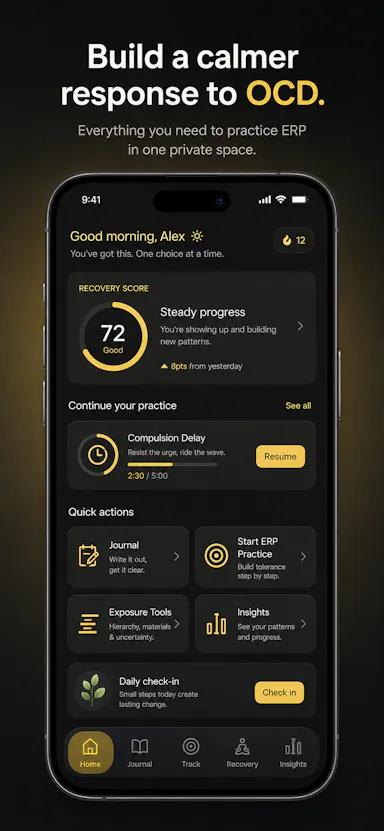
Private OCD/ERP tracker across desktop and mobile that logs obsessions, compulsions, triggers and exposure practice with no cloud sync.

Domain registered 19 days ago

No sign-upWorks offlineData stays with youNo ads
What to know
How it works
Tracks obsessions, compulsions, mood and exposure exercises across iOS/Android/desktop
What's different
No accounts, no cloud sync — data stays on-device
Best for
People doing ERP therapy who want a private tracking journal

Watched for 5 days · last checked today
Details →

A desktop entity-resolution tool that matches and deduplicates records in a CSV locally on your machine, free up to 100k records, with an MCP server for AI coding assistants.

FreeNo sign-upWorks offline
What to know
How it works
Loads a CSV and resolves duplicate records live using the same real-time matching engine as Tilores' cloud product, running entirely on your machine; a local MCP server also lets Claude Code, Codex and other AI assistants search, import and steer it against your data.
What's different
Skips the usual enterprise entity-resolution sales process (demo, contract) — nothing leaves your laptop, and it's free up to 100k records.
Pricing
Free up to 100,000 records.
Best for
Teams who want to deduplicate and match records locally, including via AI coding assistants, without a cloud enterprise contract.

Watched for 9 days · last checked 3d ago

Details →

Notvex

Live

Fully local, zero-knowledge encrypted notes app for people who want their notes to never touch a server or sync account.

No sign-up
What to know
How it works
A fully-local, zero-knowledge encrypted notes app for Windows, macOS, and Linux with no account, no server, and no sync.
What's different
Notes are encrypted and stay entirely on-device instead of syncing through a server.
Best for
People who want their notes to never touch a server or a sync account.

Watched for 8 days · last checked 2d ago

Details →

An open-source, template-based design tool for building App Store and Play Store screenshots, feature graphics, and preview videos entirely in your browser or desktop app, with no account or upload required.

Domain registered 13 days ago

FreeNo sign-upData stays with youOpen source
What to know
How it works
pick a template, drop in your app screens, and export every required store size, including MP4 previews
What's different
an optional AI agent can build the whole listing from raw screenshots
Best for
app developers and designers preparing store listings

Watched for 6 days · last checked 5d ago

Details →

A free screen recording app for Windows, macOS, Linux, and web that automatically zooms the cursor on clicks, processing everything on-device without upload.

FreeNo sign-upWorks offlineData stays with you
What to know
How it works
Highlights the cursor and auto-zooms on clicks during recording, with no upload or account required to start.
Pricing
Free.
Best for
People who want a directed-looking screen recording without manual editing or cloud upload.

Watched for 11 days · last checked 5d ago

Details →

Ortu

Live

A cross-platform clipboard manager with full history, search and secret masking for anyone who copy-pastes constantly - handy for developers managing API keys, but useful for any heavy copy-paste workflow.

No sign-upWorks offlineOpen source
What to know
How it works
Remembers everything you copy - text, images, files - across macOS, Windows and Linux, with full-text search, a paste stack, secret masking with encryption, and smart auto-grouping.
What's different
Runs 100% locally with no account, and is open source.
Pricing
Not stated beyond being open source.
Best for
Developers and anyone who copy-pastes constantly, including people managing API keys via clipboard.

Watched for 15 days · last checked 9d ago

Details →

A local-first AI platform bundling chat, a coding agent, a terminal and uncensored open models, with no cloud or accounts. For technical users, not really a mobile app despite the Android companion.

No sign-upWorks offlineOpen sourceNo subscription
What to know
How it works
A local-first AI platform bundling end-to-end encrypted P2P chat, a bare-metal terminal with real PTY shell access, autonomous coding agents, hybrid RAG, and bundled uncensored Qwen/Gemma models, with a native Android companion app for LAN discovery.
What's different
Runs fully offline with no cloud, accounts, or subscriptions, and ships uncensored model variants with no filters.
Pricing
Open-source (AGPL-3.0).
Best for
Technical users on Linux or Windows who want a self-hosted AI toolkit with no cloud dependency.
Watch out
Ships uncensored models with zero filters — outputs are not moderated.

Watched for 18 days · last checked 1d ago

Details →

Opens Apple iWork files (.pages, .numbers, .key) directly in the browser on any device without owning Apple software.

FreeNo sign-upNothing to installCan export my data
What to know
How it works
browser-based viewer/converter for iWork files
Pricing
free, no signup
Best for
non-Apple users needing to open iWork files

Watched for 5 days · last checked 3d ago

Details →

A free cross-platform automation tool combining an auto-clicker, macro recorder and a no-code, screen-aware sequence builder that adapts when buttons or popups move. No account, no ads, no tracking.

Domain registered 1 month ago

FreeNo sign-upNo tracking
What to know
How it works
Combines a high-speed auto clicker, a mouse/keyboard macro recorder, on-screen image detection, and a no-code multi-step automation sequence builder that can branch and loop.
What's different
Uses on-screen image detection so clicks adapt when buttons or popups move, unlike clickers that just repeat fixed coordinates.
Pricing
Free core version.
Best for
Users automating repetitive on-screen tasks across Windows, Mac or Linux.

Watched for 13 days · last checked 2d ago

Details →

Sends files and folders directly between your own devices with end-to-end encryption, paired by QR code or a 6-digit code — no account, no cloud storage. Works across Android, iOS, desktop and web.

No sign-up
What to know
How it works
Sends files and folders directly between your own devices with end-to-end encryption, pairing devices via a QR code or a 6-digit code; uses local network discovery on the same Wi-Fi and falls back to an encrypted relay when direct connections are blocked.
What's different
No account and no cloud storage — files move device-to-device instead of sitting on someone else's server.
Best for
People moving files between their own Android, iOS, macOS, Windows or Linux devices without signing up for cloud storage.

Watched for 16 days · last checked 8d ago

Details →

whetū

Live

Fast, zero-config cross-shell terminal prompt written in Zig, with no network or telemetry.

No sign-upNo tracking
What to know
How it works
Zero-config cross-shell prompt (fish, bash, zsh) written in Zig, showing git branch/state/status, toolchain versions for 39 languages, and a syntax-highlighted history picker on the up arrow.
What's different
Single compiled binary with no config file, no network or telemetry, rendering in about 2ms.
Watch out
macOS and Linux only.

Watched for 2 days · last checked 2d ago

Details →

Pluks

Live

A clipboard manager for macOS and Windows that copies text the instant you select it, no Ctrl+C needed, plus a searchable history of your last 200 clips.

FreeNo sign-upWorks offline
What to know
How it works
A clipboard manager for macOS and Windows (beta) that copies text the instant you select it — no Ctrl+C/Cmd+C needed — then long-press to paste, or press Cmd/Ctrl+Shift+V to open a searchable history of your last 200 clips.
What's different
Brings the select-to-copy behavior Linux users know from PRIMARY selection to Mac and Windows; traditional clipboard managers only store history after you explicitly press copy.
Pricing
Free.
Best for
macOS and Windows users who want copy-paste without the extra keystroke.
Watch out
The Windows version is in beta.

Watched for 18 days · last checked 1d ago

Details →

A desktop PDF toolkit with 27 tools — merge, compress, sign, encrypt, OCR, redact — that all run locally without uploading files.

FreeNo sign-upWorks offline
What to know
How it works
Runs 27 PDF tools — merge, compress, convert, sign, encrypt, OCR, redact — 100% locally on your machine with no file uploads.
What's different
Aimed at confidential work like legal contracts, medical records, financial statements, and ID documents; available on macOS, Windows, and Linux.
Pricing
The Merge tool is free forever with no account; Pro unlocks the other 26 tools.

Watched for 9 days · last checked 3d ago

Details →

Free runtime CVE scanner that matches installed software or scan results against known vulnerabilities and suggests patches.

FreeNo sign-up
What to know
How it works
Scans installed software, nmap XML output, or a public site, matches products to CPEs and CVEs against the NVD, and helps you find official patches.
Pricing
Free.
Best for
Security-conscious users on Mac, Linux, or Windows checking for known vulnerabilities.

Watched for 2 days · last checked today

Details →