Tools that don't upload your dataI'm wasting money

10 match your filters — 10 of them answered our check today.

Watching this group for 18 days · how we check

This week1 new arrival

SubKit

Live

An iOS/Apple Watch app that tracks subscriptions and recurring bills with local, private data and reminders to avoid surprise charges.

No sign-upWorks offlineData stays with you
What to know
How it works
Tracks subscriptions, recurring bills, and automatic payments in one dashboard with smart reminders, widgets, and Apple Watch support, storing data privately on-device.
Watch out
iOS and Apple Watch.

Watched for 8 days · last checked 8d ago

Details →

A free Chrome extension that lists every subscription you pay for and warns you before renewals, with no bank linking, no sign-up, and no data leaving your browser.

FreeNo sign-upData stays with you
What to know
How it works
A Chrome extension that lists every subscription you pay for, shows total monthly and yearly spend on a dashboard, and sends renewal reminders before a subscription renews.
What's different
Works without linking your bank account or signing up, with no data leaving your browser.
Pricing
Free.
Best for
People who want to track subscription spending and avoid surprise renewals without connecting their bank.

Watched for 13 days · last checked 2d ago

Details →

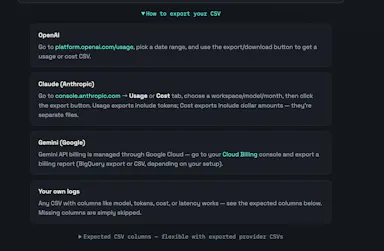
Upload your OpenAI, Claude, or Gemini usage export and it flags token waste, model overkill and failed-request costs right in your browser — no API key required, nothing uploaded to a server.

Data stays with you
What to know
How it works
Upload your OpenAI, Claude, or Gemini usage export and it finds token waste, model overkill, and failed-request cost directly in the browser.
What's different
No API key needed and nothing is uploaded to a server.
Best for
Developers and teams trying to cut down their AI API spend.

Watched for 13 days · last checked 7d ago

Details →

Compares your contracts and invoices CSVs locally in the browser to flag possibly missing or underbilled invoices before month-end close, with no upload and no AI.

Data stays with you
What to know
How it works
Compares a contracts.csv file with an invoices.csv file locally in the browser and flags potential missing invoices and underbilling for human review, with every flagged candidate linking back to its source rows.
What's different
Runs entirely locally in the browser with no data upload and no AI guessing — comparisons are rule-based against source rows.
Best for
Accountants and finance teams checking for missing invoices before month-end close.
Watch out
The public demo uses synthetic data; flagged items are opportunities to investigate, not confirmed recovered revenue.

Watched for 13 days · last checked 7d ago

Details →

PXINK

Live

A free browser tool that shrinks big text/code pastes into dense PNGs so AI vision billing costs less than text billing.

FreeData stays with you
What to know
How it works
Wraps text blocks into dense 1928px PNGs the model reads via OCR
What's different
Exploits vision-token vs text-token pricing gap for ~60% savings
Pricing
Free, client-side, no account
Best for
Developers pasting large text/code logs into Claude or Gemini

Watched for 6 days · last checked 5d ago

Details →

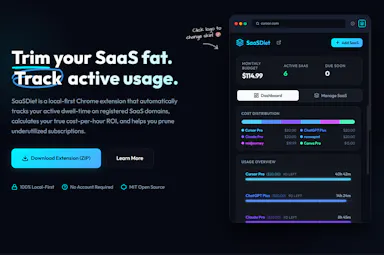
A privacy-first Chrome extension that tracks which SaaS subscriptions you actually use and their cost-per-hour ROI, so you can cancel the ones wasting money, all processed locally.

Works offlineData stays with you
What to know
How it works
A Chrome extension that runs silently in the background to monitor when you're active on SaaS tabs, then shows real-time usage stats, cost-per-hour ROI, and quick cancellation links for underused subscriptions.
What's different
100% local-first processing rather than sending browsing data to a server.
Best for
People who suspect they're paying for SaaS subscriptions they barely use and want data to decide what to cancel.

Watched for 15 days · last checked 2d ago

Details →

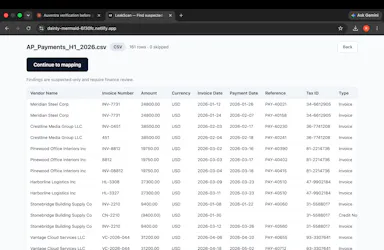
Scans your accounts-payable export in the browser for duplicate vendor payments, and the file never leaves the tab. Built for finance teams doing AP audits, not general spreadsheet work.

Data stays with youCan export my data
What to know
How it works
Scans an AP export (CSV/Excel) in the browser for suspected duplicate vendor payments — same invoice paid twice, invoice number variants, duplicate payment references, unapplied credits — and produces a CFO-ready HTML report plus Excel export.
What's different
Runs entirely in the browser under CSP that blocks outbound requests, so the file never leaves the tab.
Best for
Finance teams running accounts-payable audits.
Watch out
The reported result (found $38,125 of planted duplicates, 5/5, with zero false alarms) comes from a blind test the vendor ran itself, not an independent audit.

Watched for 18 days · last checked 2d ago

Details →

76 separate browser-based, offline, pay-once workspaces built for specific roles like real estate agents, fitness coaches and developers, pitched as an escape from stacked SaaS subscriptions.

Nothing to installWorks offlineData stays with youPay once
What to know
How it works
76 self-contained, browser-based workspaces, each with 8-10 purpose-built modules for a specific role or niche (real estate, fitness coaching, cybersecurity, development, etc.), running 100% offline and locally.
What's different
Data never touches a server (local-first architecture) and it's a one-time purchase instead of a stack of monthly SaaS subscriptions.
Pricing
Pay once, own forever (one-time payment, no subscription).
Best for
Professionals in specific niches who want purpose-built tools without recurring SaaS fees or sending business data to the cloud.

Watched for 14 days · last checked 8d ago

Details →

A password manager built on the open, KeePass-compatible KDBX format, storing logins, passkeys, cards and TOTP codes in one encrypted vault with Face ID autofill.

Domain registered 3 months ago

Data stays with youNo adsNo tracking
What to know
How it works
Stores logins, passkeys, credit cards, secure notes and TOTP codes in an encrypted vault, built on the open KDBX format compatible with KeePass and KeePassXC, with one-tap AutoFill and Face ID across iPhone, iPad, Mac, Windows and Linux.
What's different
Uses the open KDBX format instead of a proprietary vault, so you're not locked into one vendor, with zero-knowledge on-device encryption before sync.
Best for
People wanting a KeePass-compatible password vault across Apple, Windows and Linux devices without vendor lock-in.

Watched for 13 days · last checked 2d ago

Details →

Instantly compares DIY truck rental, moving container, and professional mover costs without asking for your email, so you avoid being spammed by mover sales calls.

FreeNo sign-upData stays with you
What to know
How it works
Instantly compares costs for a DIY truck rental, a moving container, and a professional mover for a move.
What's different
No sign-up or email required to see estimates, unlike most moving-quote sites that require your email to sell to mover sales teams.
Pricing
Free.
Best for
People planning a move who want to compare costs without being called by movers afterward.

Watched for 15 days · last checked 2d ago

Details →