Tools that don't upload your dataEmail

13 match your filters — 13 of them answered our check today.

Watching this group for 18 days · how we check

This week3 new arrivals

A 15-module course that teaches non-coders to build their own private AI operator, running on their own computer, that drafts email and messages on WhatsApp instead of a commercial AI assistant subscription.

Data stays with you
What to know
How it works
An AI coding assistant helps you build the operator tier by tier, across 15 modules plus 6 bonuses.
Pricing
Runs for a few dollars a month to operate; course has a 30-day guarantee.
Best for
Non-coders who want to own a private AI assistant instead of subscribing to one.

Watched for 7 days · last checked 1d ago

Details →

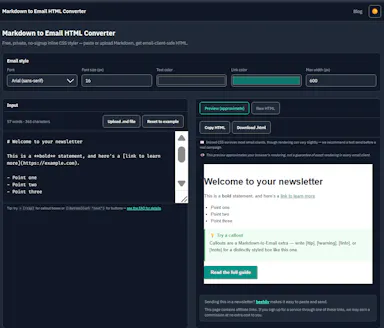
Converts Markdown into inlined, Outlook-safe HTML you can paste into ConvertKit, beehiiv, or Mailchimp, entirely in your browser — built for newsletter writers and marketers who draft in Markdown.

FreeNo sign-upData stays with you
What to know
How it works
Converts Markdown into fully inlined, Outlook-safe HTML entirely in the browser, ready to paste into ConvertKit, beehiiv, Mailchimp or other email service providers, with built-in email-safe callout boxes and CTA button syntax.
What's different
Runs 100% client-side with no signup, account or paywall, so content never leaves the browser.
Pricing
Free, no signup, no paywall.
Best for
Newsletter writers, marketers and indie developers who draft in Markdown and need Outlook-safe HTML for their email platform.

Watched for 10 days · last checked 4d ago

Details →

Melia

Live

A native Linux desktop email client that connects straight to your IMAP/SMTP mail servers with no cloud relay, middleman account or telemetry, as an alternative to Thunderbird or Evolution.

FreeWorks offlineData stays with youPay once
What to know
How it works
A native Linux desktop email client that connects directly to your mail servers over IMAP and SMTP, storing everything locally in a SQLite database and syncing credentials through the OS keyring so it works fully offline.
What's different
No cloud relay, middleman account, or telemetry — mail stays on your own machine, unlike hosted alternatives.
Pricing
Free for one account with full functionality; a one-time $10 unlock removes the account cap.
Best for
Linux desktop users looking for a native alternative to Thunderbird, Evolution, Geary or Mailspring.

Watched for 18 days · last checked today

Details →

A local MCP server that gives AI assistants like Claude, Cursor and ChatGPT tools to act on your Mac — iMessage, Teams, WhatsApp, Mail, files — with nothing sent to the cloud.

FreeWorks offlineData stays with you
What to know
How it works
A local Model Context Protocol server running on a Mac that gives AI assistants like Claude, Cursor and ChatGPT 143 tools to act on iMessage, local Microsoft Teams chats, WhatsApp, Apple Mail, Calendar, Contacts, Notes, Reminders, Finder files, OneDrive, Outlook and Office documents.
What's different
Runs 100% locally with no cloud connection, reaching apps like iMessage and local Teams chats that cloud-based connectors can't access.
Pricing
Free.
Best for
Mac users who want their AI assistant to act across native apps like iMessage and Mail without sending data to the cloud.

Watched for 18 days · last checked 2d ago

Details →

Deduplicates and sorts a messy Google Takeout export into organized folders, processed entirely on your own device.

FreeData stays with youPay onceNo subscription
What to know
How it works
Uses content fingerprinting (not filenames) to find true duplicates, sorts into categories, repackages as a zip
Pricing
Free up to 3GB, one-time payment beyond that
Best for
People exporting their Google data and wanting it organized

Watched for 6 days · last checked 5d ago

Details →

A browser-based Gmail extension that summarizes email threads and organizes trade clients into folders without sending data to a server.

Data stays with youNo subscriptionCan export my data
What to know
How it works
Runs inside Gmail, uses your own AI key, stores data only in your browser
What's different
Zero-server, encrypted export files for handoff
Pricing
Free 14-day trial, then 5 free ops/day, or $199 one-time lifetime plan
Best for
Cross-border trade professionals managing client emails in Gmail

Watched for 6 days · last checked 4d ago

Details →

Replaces your browser's new-tab page with a private local dashboard for tasks, a kanban board, quick links and a calendar, works offline and exports your data anytime.

No sign-upWorks offlineData stays with youNo tracking
What to know
How it works
Replaces your browser's new-tab page with a dashboard for tasks, a kanban board, a job tracker, content planners, a screenshot inbox, quick links and a calendar; searchable with Cmd/Ctrl+K and exportable to Markdown, CSV, JSON, or a full backup.
What's different
100% local-first — no account, no cloud, no tracking, works offline, with everything stored on your device.
Best for
People who want a private productivity dashboard on every new tab without creating an account or sending data anywhere.

Watched for 18 days · last checked 2d ago

Details →

A dead-simple iPhone scanner app that works entirely offline with no account or cloud, and nothing leaving your device. Free with ads; one-time purchase removes them.

FreeNo sign-upWorks offlineData stays with you
What to know
How it works
Scans documents on iPhone by snapping a photo or importing one, then produces a clean PDF that can be sent by email, WhatsApp or printed. Runs entirely offline with no account and no cloud upload.
What's different
Designed with big buttons and plain language for people who don't live on their phone, and everything stays on-device.
Pricing
Free with ads; a one-time purchase removes ads, no subscription.
Best for
iPhone users who want a simple, private document scanner without setting up an account.

Watched for 17 days · last checked 8d ago

Details →

A GTD task manager that keeps every task on your device only, no account, no cloud sync — for people who want the full method without their data leaving their control.

No sign-upWorks offlineData stays with you
What to know
How it works
Implements the full Getting Things Done method while keeping all tasks entirely on the user's local device, with no account and no cloud storage.
What's different
Full GTD method implementation with no account, no cloud sync and no upload — data never leaves the device.
Best for
GTD practitioners who want the full method but don't want their task data stored in the cloud.

Watched for 18 days · last checked 11d ago

Details →

Prizmi

Live

An AI assistant that drafts messages, organizes files, and fills out forms and flight check-ins on its own, installed on your computer for everyday tasks.

Works offlineData stays with you
What to know
How it works
You message Prizmi in plain language and it acts on your phone or computer — drafting texts and emails, organizing files, filling out web forms and flight check-ins, and running scheduled tasks — while proactively reaching out when it notices something matters.
What's different
Takes action directly on your connected devices rather than just answering questions, but never clicks Submit or Pay itself, keeping the user in control of final actions.
Best for
Anyone wanting a proactive assistant that runs tasks on their own Mac, Windows or Linux machine, described as built for grandparents through developers.

Watched for 18 days · last checked today

Details →

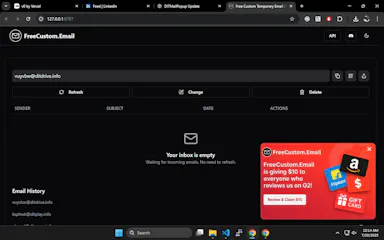
Instant, no-signup temporary email aliases with rotating domains to dodge blacklists, plus a public API for developers who want to build it into their own workflows.

FreeNo sign-upData stays with youOpen source
What to know
How it works
Creates custom, instant temporary email aliases (any inbox name) without sign-up, receiving emails in real-time from multiple rotating domains to avoid blacklists; also offers a public API and open-source frontend.
What's different
Rotating domains to avoid blacklists, plus no popups, timers, or tracking, unlike traditional temp mail tools.
Pricing
Free.
Best for
People needing disposable email for sign-up verifications or testing, and developers who want to build disposable email into their own workflows via the API.

Watched for 14 days · last checked 8d ago

Details →

A browser tool that rewrites text in place across Gmail, LinkedIn, Slack, and other fields in your chosen tone.

FreeNo sign-upData stays with you
What to know
How it works
Adds a click-to-rewrite AI button inside text fields you already use — Gmail, LinkedIn, Slack, job applications — letting you pick from 10 tones and get polished text in place.
Pricing
Free for 10 rewrites a day, no signup required.
Watch out
Supports 30+ languages; privacy-first processing.

Watched for 8 days · last checked 6d ago

Details →

Offline on-device speech to text for Mac and Windows

No sign-upWorks offlineData stays with you

First seen today · last checked today

Details →