We check every product on this page once a day and record whether it still answers.
A macOS app that copies camera cards to multiple drives after a shoot and verifies every byte, then produces a DIT report producers accept. Built for working filmmakers on paid jobs, not general students.
Works offlinePay onceNo subscription
What to know▼
How it works
A macOS app for offloading camera cards after a shoot: copies cards to several drives at once and verifies every byte by reading back from disk rather than RAM, then produces a DIT report (ASC MHL 2.0, PDF or CSV) that producers accept.
What's different
One-time price in a niche where the market leader charges a subscription, with real byte-for-byte verification rather than a plain copy.
Pricing
One-time purchase, no subscription; works fully offline; requires macOS 12+; 14-day trial.
Best for
Filmmakers, videographers, photographers and DITs offloading camera cards on paid jobs.
We check every product on this page once a day and record whether it still answers.
Converts AI chat conversations into properly formatted PDF/Word/Markdown documents — preserving code blocks and tables — entirely in-browser without uploading the conversation anywhere.
Watch out · Client-side only, so it depends on the browser handling large exports.
Works offlineCan export my data
What to know▼
How it works
Parses conversation structure and rebuilds as a real document; covers 13 AI platforms; PDF output is vector/selectable text.
What's different
Rebuilds structure (code blocks, tables) instead of dumping raw text or a screenshot; runs fully locally in-browser.
Watch out
Client-side only, so it depends on the browser handling large exports.
We check every product on this page once a day and record whether it still answers.
An offline mobile app to view, edit and convert PDF, Word, Excel and PowerPoint files in 17 languages — a general document viewer, not a spreadsheet replacement.
No sign-upWorks offline
What to know▼
How it works
An offline Android app for opening and viewing PDF, DOCX, XLSX, PPT, TXT, and RTF files, with no sign-up or uploads required.
Best for
Android users who want a fast, private, offline reader for documents they receive in various formats.
We check every product on this page once a day and record whether it still answers.
An iPhone document scanner with on-device OCR and clean PDF export, free of ads, accounts and cloud upload, built by an indie developer tired of paywalled scanner apps.
FreeWorks offlineNo ads
What to know▼
How it works
Scans documents with automatic edge detection, runs on-device text recognition (OCR) in English, Russian and Romanian so you can search by content, lets you copy text from any page, and exports clean, watermark-free PDFs.
What's different
Everything runs on-device on iPhone with no ads, accounts, analytics, or cloud upload, built by an indie developer as a reaction to paywalled scanner apps.
Pricing
Free, with no subscription and no watermarks or limits.
Best for
iPhone users who want a private document scanner without a subscription.
We check every product on this page once a day and record whether it still answers.
100+ free offline browser tools spanning PDF, image, developer, finance and niche calculators, no ads or signup.
FreeNo sign-upWorks offline
What to know▼
How it works
100+ free offline tools spanning PDF, image, developer, finance, and niche categories, including a Zakat calculator, Pakistani electricity bill calculator, CNIC validator, cricket run rate calculator, and QR clipboard sync.
We check every product on this page once a day and record whether it still answers.
On-device OCR that extracts text from screenshots or images in 16 languages without uploading anything to the cloud, for people wary of sending images to online OCR services.
No sign-upWorks offlineNo tracking
What to know▼
How it works
Extracts text from screenshots, photos, screen areas, or any web image entirely on-device; right-click or select an area for editable text, supporting 16 languages, QR codes, read-aloud, and TXT/Markdown export.
What's different
Private and offline; no account, uploads, or tracking.
We check every product on this page once a day and record whether it still answers.
Redact PDFs locally, verify the redaction actually worked
No sign-upWorks offlineData stays with you
What to know▼
How it works
Regex/checksum doğrulayıcıları ve isteğe bağlı yerel AI modeliyle tespit eder, OCR ile tarama okur, her dışa aktarım hash tabanlı sertifikayla dört yönden yeniden doğrulanır.
We check every product on this page once a day and record whether it still answers.
A local-first markdown editor that a developer's AI agent can read and co-edit live in the same file, for people who don't want their notes leaving their disk.
No sign-upWorks offlineNo tracking
What to know▼
How it works
A fast, local-first markdown editor that opens any .md file instantly, and lets an AI agent read, write, and co-edit the same file alongside you via a CLI, agent plugin, and MCP.
What's different
No account or telemetry — files never leave your disk.
Best for
People who want their AI agent editing notes alongside them without the files leaving their machine.
We check every product on this page once a day and record whether it still answers.
A local-first app combining document scanning, PDF tools, notes, expense tracking, and reminders that mostly works offline without an account.
Works offlineData stays with you
What to know▼
How it works
Combines document scanning, PDF tools, multi-format document reading, notes, expense tracking, reminders, weather, QR generation, and photo compression, with most features working offline and no account required.
What's different
Built to replace multiple everyday apps with one experience.
We check every product on this page once a day and record whether it still answers.
A free browser-based meme generator with no sign-up, watermarks or file uploads — everything is edited locally and images never leave your device.
FreeNo sign-upWorks offline
What to know▼
How it works
A browser-based meme generator: upload an image or paste a URL, add top and bottom text, apply one of 12 filters, and download as PNG or copy to clipboard.
What's different
No uploads to any server — everything is edited locally in the browser.
Pricing
Free, no sign-up, no watermarks, unlimited use.
Best for
Anyone who wants to make memes quickly without creating an account.
We check every product on this page once a day and record whether it still answers.
A mobile app that converts video to GIF entirely on-device, with no upload, watermark, or account required, and can share the result to WhatsApp, Telegram, Instagram, Reddit, or X.
No sign-upWorks offlineData stays with you
What to know▼
How it works
Encodes video to GIF on-device with a trim/scrubber editor and FPS/resolution/speed controls.
Pricing
One-time $2.99 premium removes ads and unlocks longer clips and higher quality; no subscription.
Best for
People converting short video clips to GIFs privately without uploading footage.
We check every product on this page once a day and record whether it still answers.
A free, in-browser suite of over 250 file tools — image, video, audio, SVG, developer, SEO, QR, document and PDF — that processes everything locally so files never leave the device.
FreeWorks offline
What to know▼
How it works
Runs client-side in the browser (e.g. ffmpeg.wasm for video, an on-device AI model for background removal, native Web Audio for audio editing); no accounts or daily limits.
Pricing
Free.
Best for
Developers and anyone needing quick file conversion/editing tools without uploading files to a server.
We check every product on this page once a day and record whether it still answers.
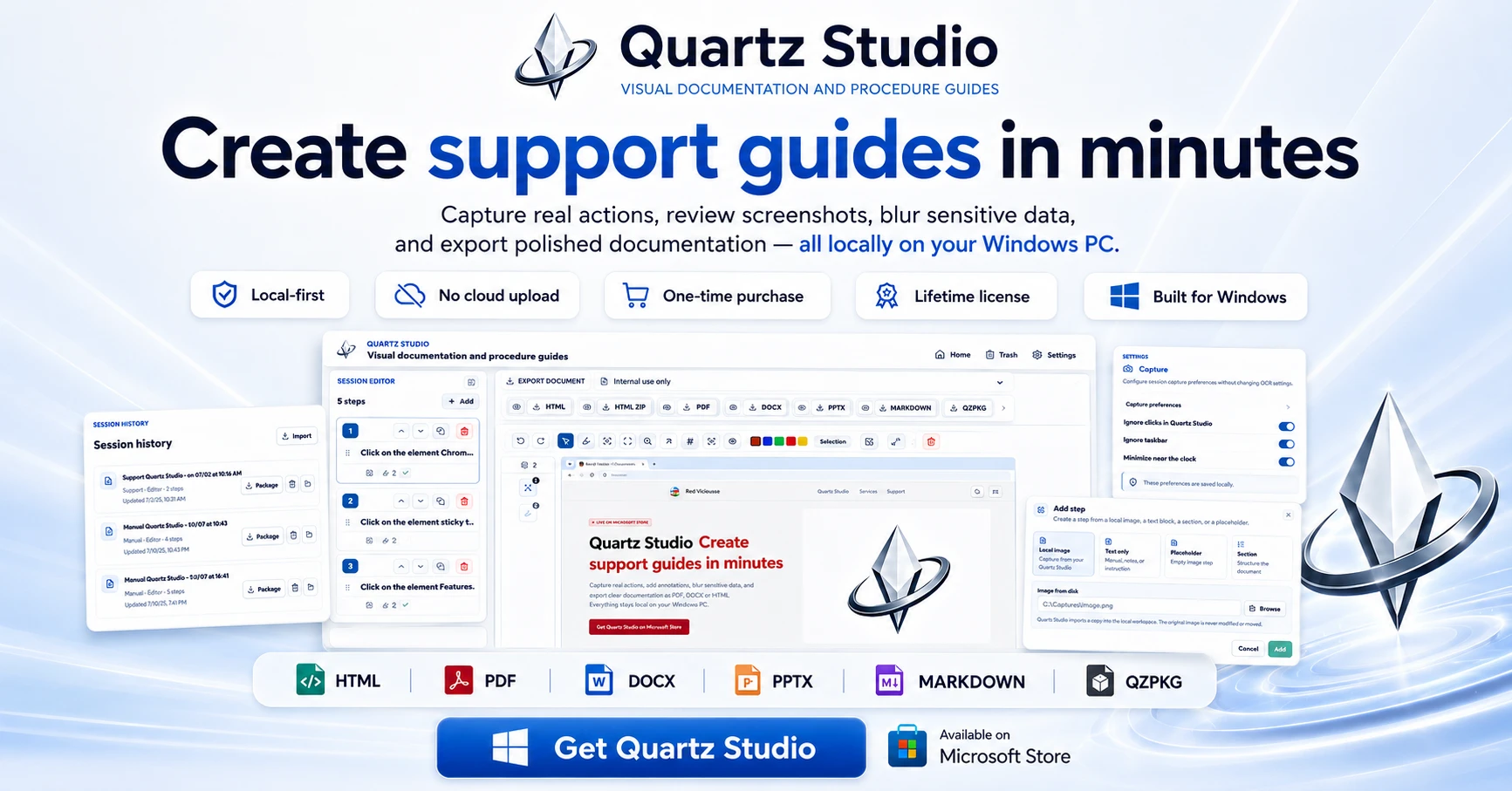
A Windows app that turns real screen actions into annotated step-by-step guides with local OCR and no cloud upload, aimed at IT support, helpdesk and training teams.
Works offlineNo subscriptionCan export my data
What to know▼
How it works
A local-first Windows app for turning real desktop actions into professional visual guides: it captures clicks and active windows with consent, offers a structured editor, annotations, blur, and local OCR, and exports to PDF, DOCX, HTML, PowerPoint, or Markdown.
What's different
Keeps screenshots, OCR, and documents entirely local on the user's PC, with no SaaS account and no keystroke logging, unlike cloud-based alternatives.
Pricing
Available on Microsoft Store with a one-time lifetime license.
Best for
IT support, helpdesk, QA, operations, and training teams that need step-by-step documentation from real desktop actions.
We check every product on this page once a day and record whether it still answers.
A free browser-based OCR tool that makes scanned PDFs searchable and can translate the extracted text, with all processing done client-side so nothing is uploaded.
FreeWorks offlineData stays with you
What to know▼
How it works
Makes scanned PDFs searchable using OCR and can translate the extracted text, with all processing done client-side in the browser.
What's different
No upload required — files never leave the browser, with no size limit.
Pricing
Free.
Best for
Anyone needing to make scanned documents searchable or translated without uploading them to a server.
We check every product on this page once a day and record whether it still answers.
A fast, local-first Markdown editor that runs in-browser or as an offline desktop app, for writers who want quick note-taking without cloud lock-in.
FreeWorks offline
What to know▼
How it works
A lightweight Markdown editor that starts as a free web editor for writing, previewing, importing and downloading Markdown, and grows into a local-first Tauri desktop app with native file access, offline work and local history snapshots.
Pricing
Free web editor.
Best for
Writers who want fast Markdown editing without cloud lock-in.
We check every product on this page once a day and record whether it still answers.
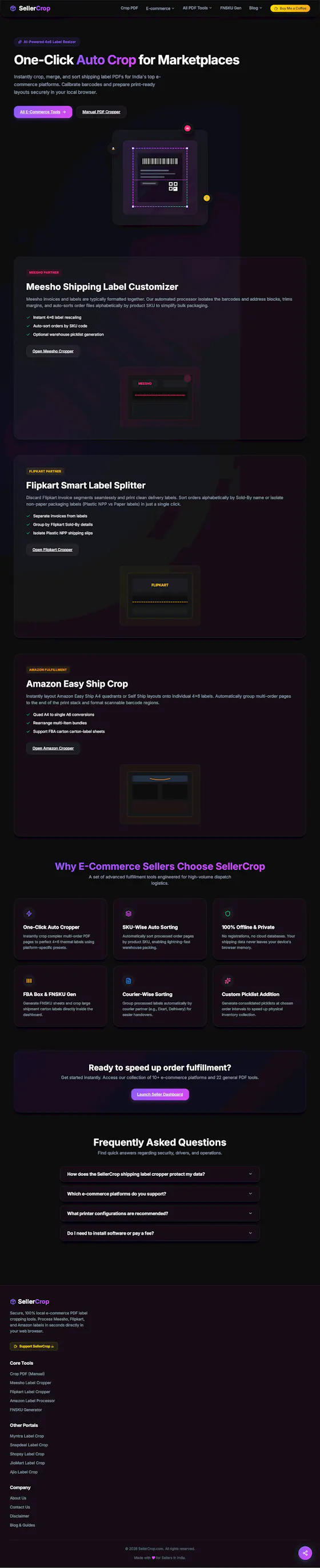
Runs PDF tools like merge, split, and convert directly in your browser via WebAssembly instead of uploading files to a server. For anyone who doesn't want documents leaving their device.
Watch out · Described as launching soon, and one of the 23 tools does not run fully on-device.
FreeNo sign-upWorks offline
What to know▼
How it works
Runs PDF tools — merge, split, compress, and more — directly in the browser using WebAssembly instead of uploading files to a server.
What's different
22 of 23 tools run fully on-device, and the maker publishes exactly which tool is the exception rather than a blanket privacy claim.
Pricing
Free, no account required.
Best for
People who don't want their documents leaving their device.
Watch out
Described as launching soon, and one of the 23 tools does not run fully on-device.
We check every product on this page once a day and record whether it still answers.
A native Windows/Mac desktop PDF editor (edit, sign, annotate, organize) that keeps files fully offline on your device and is sold as a one-time purchase, not a subscription.
Works offlinePay onceNo subscription
What to know▼
How it works
A native desktop app for Windows 11 and macOS to edit, sign, annotate and organize PDFs, with all editing happening offline on the device.
What's different
Local-first: files never leave your device, and it's sold as a one-time purchase rather than a subscription.
Pricing
Free trial, then one-time payment (positioned as an Adobe Acrobat subscription alternative).
Best for
Windows/Mac users who want a privacy-respecting PDF editor without a recurring subscription.
We check every product on this page once a day and record whether it still answers.
A free, open-source browser tool that compresses and converts images, video, audio and PDFs entirely on your device with no uploads or ads — a general utility, not developer-specific.
FreeWorks offlineData stays with you
What to know▼
How it works
An open-source app with 47 tools for compressing and converting images, video, audio and PDFs, with all processing happening on-device so files never leave your computer, including offline use.
What's different
No upload step at all — compression runs entirely locally, works offline, with no ads, accounts or size limits.
Pricing
Free forever.
Best for
Anyone who wants to compress or convert media files without uploading them to a server.
We check every product on this page once a day and record whether it still answers.
Compresses images and video (JPG, PNG, TIFF, MP4, GIF) entirely on your device with no upload to a server — for Mac, Windows and Linux, privacy-focused.
Works offlineData stays with you
What to know▼
How it works
Compresses JPG, PNG, TIFF, MP4 and GIF files, processing them locally on-device rather than uploading them to a server, via web tools or a dedicated offline desktop app for Mac, Windows and Linux.
What's different
Local, privacy-focused processing rather than server-side upload-based compression.
Best for
Anyone who wants to compress images or video without sending files to a third-party server.
We check every product on this page once a day and record whether it still answers.
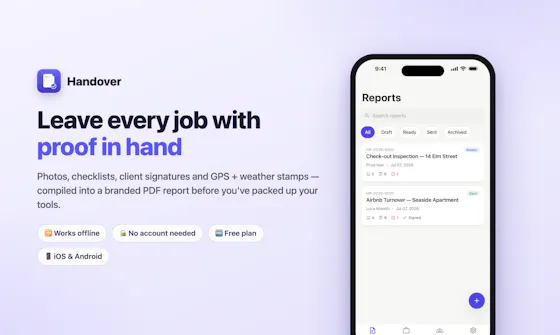
Lets field-service workers (cleaners, handymen, landscapers, painters, inspectors) fill in a job template with before/after photos and a signature, then send a branded PDF proof-of-work report with GPS and weather stamped in. Works offline, no account needed.
No sign-upWorks offline
What to know▼
How it works
Field-service workers fill in a job template with before/after photos and a signature, then send a branded PDF proof-of-work report with GPS and weather stamped in before leaving the job.
What's different
Works offline and needs no account.
Best for
Cleaners, handymen, detailers, landscapers, pet sitters, inspectors and painters who need proof-of-work for every job.
We check every product on this page once a day and record whether it still answers.
Converts images to PDF and edits them entirely in your browser via WebAssembly, so files never touch a server — worth it if privacy matters more than cloud convenience.
No sign-upWorks offlineData stays with you
What to know▼
How it works
Converts JPG, PNG, WEBP, HEIC, and BMP images to PDF and edits PDFs entirely in the browser using WebAssembly and local JS, including a suite of 36 tools to merge, split, compress, sign, protect, and decrypt.
What's different
Files never touch a server, work offline, and have no file size or page limits.
Best for
People handling sensitive documents who don't want to upload them to a cloud service.
We check every product on this page once a day and record whether it still answers.
A native Mac app for viewing and editing local Markdown files — READMEs, docs, notes — entirely offline, no GitHub connection required.
Works offline
What to know▼
How it works
A native macOS app that opens local Markdown and plain-text files (.md, .markdown, .mdown, .mkd, .txt), lets you browse folders of related documents, renders them in a dedicated viewer, and provides source editing, search, task-list updates and typography controls.
What's different
Documents are processed entirely locally on the Mac — no account and no upload of Markdown content.
Best for
People working with local Markdown notes, READMEs, technical documentation or project specs on macOS.
We check every product on this page once a day and record whether it still answers.
Android app that converts PDFs, EPUBs, and text into offline narrated audiobooks with playback and export options.
Watch out · Android only; narration is offline-first so documents and audio stay on-device.
Works offlineCan export my data
What to know▼
How it works
Converts PDFs, EPUBs, and pasted text into narrated audiobooks with saved playback progress, exportable as M4B, MP3, WAV, or ZIP; also plays local video/music and includes a PIN/biometric vault.
What's different
Combines reading, listening, playback, export, and private storage in one Android app instead of separate single-purpose apps.
Watch out
Android only; narration is offline-first so documents and audio stay on-device.
We check every product on this page once a day and record whether it still answers.
Edits, merges, splits and OCRs PDFs entirely in your browser via WebAssembly, so files never touch a server. Free, no account needed.
FreeNo sign-upWorks offline
What to know▼
How it works
Edits, merges, splits, compresses and OCRs PDFs, plus AI document chat, running entirely inside your browser via WebAssembly so files never touch a server.
What's different
Zero server uploads — every operation, including the AI summary, runs on-device.
Pricing
Completely free, no account, no size limits, no paywalls.
Best for
People handling sensitive PDFs who don't want files leaving their device.
We check every product on this page once a day and record whether it still answers.
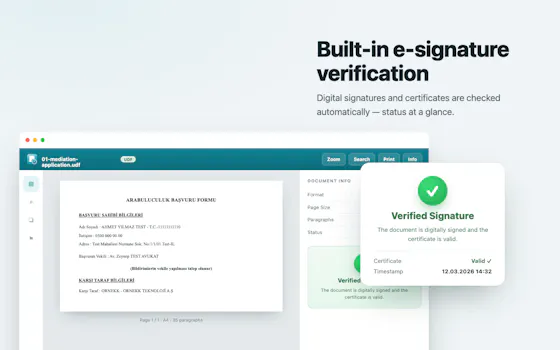
Verifies digital signatures on PDF files and scans QR codes entirely offline, for people who want to check PDF authenticity without an internet connection.
Watch out · Works offline, no cloud dependency.
Works offline
What to know▼
How it works
Verifies digital signatures on PDF files and scans QR codes entirely offline.
Best for
People who want to check PDF authenticity without an internet connection.
We check every product on this page once a day and record whether it still answers.
Eleven free image converters, such as HEIC to JPG, WebP to PNG, and AVIF, that run entirely in the browser so photos never get uploaded, and work offline.
FreeNo sign-upWorks offline
What to know▼
How it works
Converts formats client-side, with no sign-up, watermarks, or limits.
We check every product on this page once a day and record whether it still answers.
A small Chrome extension that saves highlighted text from ChatGPT or Claude chats to a local Markdown file — a capture companion for those chats, not a replacement for them.
Works offline
What to know▼
How it works
A Chrome extension: highlight text in a Claude or ChatGPT chat, hit Save, and it's written to a local Markdown file.
What's different
No cloud, no accounts, no dialogs — saves directly to a local file rather than a hosted archive.
Best for
People who want to keep highlighted snippets from AI chats without leaving the chat interface.
We check every product on this page once a day and record whether it still answers.
A free, browser-based collection of file utilities, image compression, video trimming, PDF manipulation, that runs entirely in the browser via WebAssembly so files never leave the device, instead of uploading to cloud tools.
FreeNothing to installWorks offline
What to know▼
How it works
Uses WebAssembly and multi-threaded Web Workers, including ffmpeg.wasm, to process images, video, and PDFs locally inside the browser tab.
We check every product on this page once a day and record whether it still answers.
A free macOS app that captures, annotates and merges multiple screenshots into a single PDF, or exports PNG and JPEG, working fully offline with no account required.
Watch out · Works fully offline with no account, so nothing is uploaded to a server.
FreeNo sign-upWorks offline
What to know▼
How it works
A free macOS app that captures a screen area, lets you annotate it, and merges multiple screenshots into a single PDF, also exporting as PNG or JPEG.
Pricing
Free.
Best for
Mac users who want to turn screenshots into a shareable PDF without an account or internet connection.
Watch out
Works fully offline with no account, so nothing is uploaded to a server.
We check every product on this page once a day and record whether it still answers.
A free browser-based tool that resizes photos and signatures and compresses PDFs to exact specs for Indian exam portals.
Watch out · Nothing is uploaded — processing runs locally in the browser.
FreeNothing to installWorks offline
What to know▼
How it works
Resizes photos and signatures and compresses PDFs to UPSC, SSC, IBPS, NEET, and other Indian exam portal specs using built-in presets, entirely in the browser.
Pricing
Free.
Best for
Indian exam applicants preparing documents to spec.
Watch out
Nothing is uploaded — processing runs locally in the browser.
We check every product on this page once a day and record whether it still answers.
A free, offline-first PDF suite with standard annotation tools plus offline TXT/Word/Excel conversion, smart form/table filling, photo albums with perspective correction, and embedded interactive MP4 video.
FreeWorks offlineNo ads
What to know▼
How it works
Handles standard PDF annotation alongside offline document conversion, form/table filling, photo albums, and interactive video embeds (SerVideoPlayer).
We check every product on this page once a day and record whether it still answers.
An offline OCR app that extracts text from images on-device across dozens of languages, with no internet connection required and nothing sent to the cloud.
Works offline
What to know▼
How it works
An offline OCR app that extracts text from images entirely on-device, supporting dozens of languages including English, French, Spanish, German, Chinese, Japanese, Korean, Hindi, Arabic, Russian, Turkish, and more.
What's different
Works fully offline with no internet connection required, so nothing leaves the device.
Best for
People who need to extract text from images in many languages without sending images to the cloud.
We check every product on this page once a day and record whether it still answers.
A dead-simple iPhone scanner app that works entirely offline with no account or cloud, and nothing leaving your device. Free with ads; one-time purchase removes them.
FreeNo sign-upWorks offline
What to know▼
How it works
Scans documents on iPhone by snapping a photo or importing one, then produces a clean PDF that can be sent by email, WhatsApp or printed. Runs entirely offline with no account and no cloud upload.
What's different
Designed with big buttons and plain language for people who don't live on their phone, and everything stays on-device.
Pricing
Free with ads; a one-time purchase removes ads, no subscription.
Best for
iPhone users who want a simple, private document scanner without setting up an account.
We check every product on this page once a day and record whether it still answers.
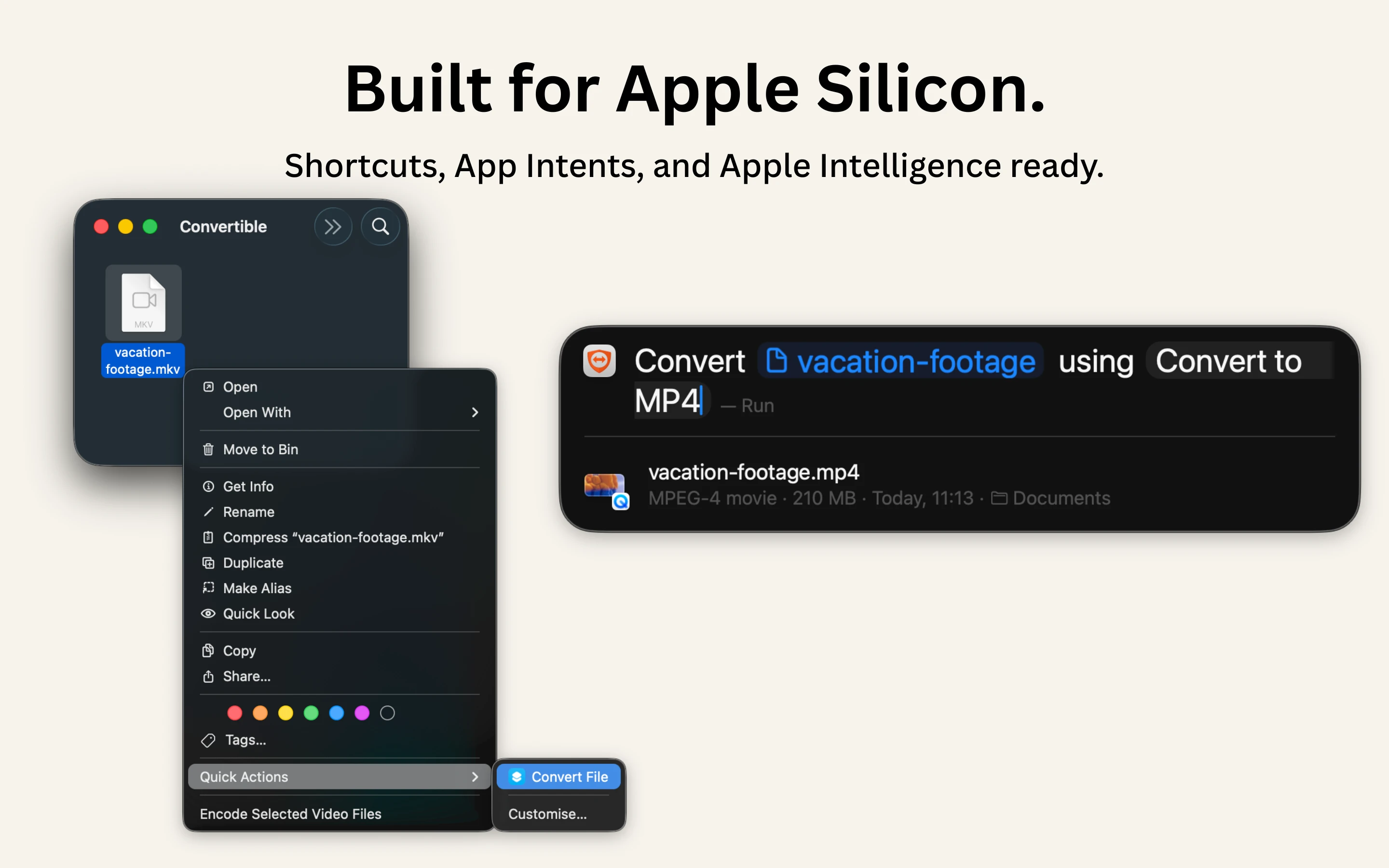
A native Mac file converter that compresses images, video, audio and PDFs entirely on-device with Shortcuts and Finder integration, for people who don't want files touching the cloud.
Works offlineData stays with youPay once
What to know▼
How it works
Converts and compresses images, video, audio and PDFs entirely on-device on Mac, including hard-to-open formats like MKV, WebM and HEIC, and can shrink files to a target size limit in one click.
What's different
Runs 100% locally with no cloud upload or telemetry, and integrates with Shortcuts, Finder's right-click menu, Spotlight and scheduled automations.
Pricing
One-time purchase, no subscription.
Best for
Mac users who want to convert or compress files without sending them to the cloud.
We check every product on this page once a day and record whether it still answers.
A free set of 17 browser-based PDF tools to merge, split, compress, convert and sign PDFs and images, for people who don't want to upload their files to a server.
FreeNo sign-upWorks offline
What to know▼
How it works
Runs entirely in the browser so files never leave the device; works offline, has no sign-up and no watermarks.
Best for
quick PDF and image edits without creating an account or uploading files.
We check every product on this page once a day and record whether it still answers.
Turns your Markdown files into a visual workspace with outlines and mind maps while keeping the underlying files as plain Markdown — for developers, writers and creators.
Works offlineOpen source
What to know▼
How it works
Adds a visual layer, outlines, mind maps, multiple views, on top of Markdown files while keeping the underlying files as plain Markdown, combined with AI-assisted writing and Git-based version history.
What's different
Open-source, local-first, and runs in the browser, keeping files as native Markdown rather than locking content into a proprietary format.
Best for
Developers, writers, and creators who want to navigate long Markdown documents visually without leaving the Markdown format.